The short version
To stop living paycheck to paycheck, plan each paycheck before it lands, pay bills on their due dates, find what leaks, and move a small amount to savings the day you are paid. The Federal Reserve found in 2025 that 63% of adults would cover a $400 emergency expense with cash, so more than a third do not.[1] Below are the steps, then seven apps and which step each helps with. Wonderful, which we make, is one of them and is not free after a week.
- 1
Wonderful: A plan for each paycheck, with bills due before the next one
- 2
YNAB (You Need A Budget): Giving every dollar a job before the next paycheck
- 3
PocketGuard: One 'safe to spend' number after bills
- 4
Quicken Simplifi: A daily spending number and a cash-flow forecast
- 5
Goodbudget: Free envelopes if you will type in spending
- 6
EveryDollar: A free zero-based plan if you will type in spending
- 7
Rocket Money: Finding subscriptions you forgot you pay for
How to stop living paycheck to paycheck, in 7 steps
You do not need a bigger income to start. You need to know where each check goes before it arrives. These steps go in order, and each one makes the next easier.
Step 1: Plan the check before it lands
Write down what this paycheck is, when the next one comes, and every bill due in between. That is the whole plan: money in, bills before the next check, and what is left. Living paycheck to paycheck usually means the check is spent in your head before it arrives, with no list of what it has to cover. Our paycheck budget planner lays out each check against its bills, and the biweekly pay guide shows the two months a year with a third check.
Step 2: Put every bill on its due date
Bills are the biggest part of where pay goes. For all US households, the Bureau of Labor Statistics found that housing took $27,790 a year, 33.9% of spending, in 2025. Transportation took 16.5% and food 13.0%.[3] Those three are about 63% of the average household's spending, so they are where a plan is won or lost. List your own fixed bills with the day each leaves your account; our fixed expenses examples help you find ones you forgot. If a due date lands right before payday, ask the biller whether it can move.
Step 3: Find the money that leaks
Look at the last 60 days of statements for charges you did not mean to keep: subscriptions, free trials that turned paid, fees. This is the fastest money you will find, because you are not giving up anything you use. An app that lists recurring charges does this in minutes; a statement and a highlighter does it in an evening.
Step 4: Start a buffer the day you are paid
The Federal Reserve's 2025 survey found that 63% of adults would cover a $400 emergency expense with cash or its equivalent, and 55% had set aside three months of expenses.[1] If you are in the other group, start small and make it automatic. The CFPB says saving automatically is one of the easiest ways to be consistent, and that you may be able to split your paycheck between checking and savings accounts if your employer allows it.[4] Move the money on payday, before you can spend it. Our emergency fund guide says how big the buffer should get, and the savings calculator turns a pay amount into a number.
Step 5: Smooth out the bills that come once a year
Car registration, insurance premiums, holiday gifts and a vet bill do not arrive monthly, so they feel like emergencies. Divide each by 12 and set that amount aside every month in its own pot. That is a sinking fund, and it turns a surprise into a line in the plan.
Step 6: Pay debt in an order, not at random
Pay the minimum on everything, then send every spare dollar to one debt. Smallest balance first gives quick wins; highest interest rate first costs less overall. Our debt payoff calculator compares the two with your numbers. If the minimums themselves do not fit, see the section on help below before you borrow anything.
Step 7: Widen the gap
Once the first six hold for two or three months, you have a gap between what comes in and what is committed. Widen it from either side. On the cost side, go after the biggest line first, which is usually housing or a car; our guide on how much of your income should go to each thing shows ranges to compare. On the income side, put every raise, tax refund or bonus through the same plan before it reaches your spending.
See budget examples for four worked monthly budgets if you want to see the steps with numbers in them.
At a glance
| App | Helps with | Free option | Works on |
|---|---|---|---|
| Wonderful | Steps 1, 2 and 5 | A free week, then paid | Web |
| YNAB (You Need A Budget) | Steps 1, 2, 4 and 5 | A 34-day trial, then paid | iPhone, Android, Web |
| PocketGuard | Steps 1 and 3 | A 7-day trial, then paid | iPhone, Android, Web |
| Quicken Simplifi | Steps 1 and 2 | No free plan or trial; 30-day refund | iPhone, Android, Web |
| Goodbudget | Steps 2 and 5 | A free plan with limits | iPhone, Android, Web |
| EveryDollar | Steps 1 and 2 | A free version, typed in by hand | iPhone, Android, Web |
| Rocket Money | Step 3 | A free plan, mobile only | iPhone, Android, Web |
How we compared
An app does not make you stop living paycheck to paycheck; the habit does. So we asked which step each app actually helps with, and four practical things:
- Does it work from your paycheck. Apps built around a calendar month fit badly when you are paid every two weeks.
- Does it show what is due before the next check. This is the number that stops the end-of-cycle squeeze.
- What it costs. A tool that costs $100 a year has to save you more than $100 to help. Free options are marked.
- Typing or connecting. Connecting a bank saves work; typing keeps your logins out of an app. Both are fine.
Every fact comes from the app's own pricing and help pages and its App Store and Google Play listings, numbered to the sources at the end. We have not used these apps ourselves, and where a page does not say, we say so. We left out apps that sell advances on your pay or loans as their main feature, because that is not a way out of the cycle. For apps without the paycheck angle, see best simple budgeting apps and best free budgeting apps.
The apps, by step
1. A plan for each paycheck, with bills due before the next one
Wonderful
$14.99/mo or $99/yr· Web
What it is
A budgeting app for couples who keep their own money, and for one person: each of you connects your own bank, chooses what the other sees, and every paycheck gets a plan.
Why it's on this list
We make Wonderful, and it is not free. There is a free week, plus more days for finishing parts of setup. A card is added to start it and nothing is charged until it ends. After that it is $14.99 a month or $99 a year, with no free plan.
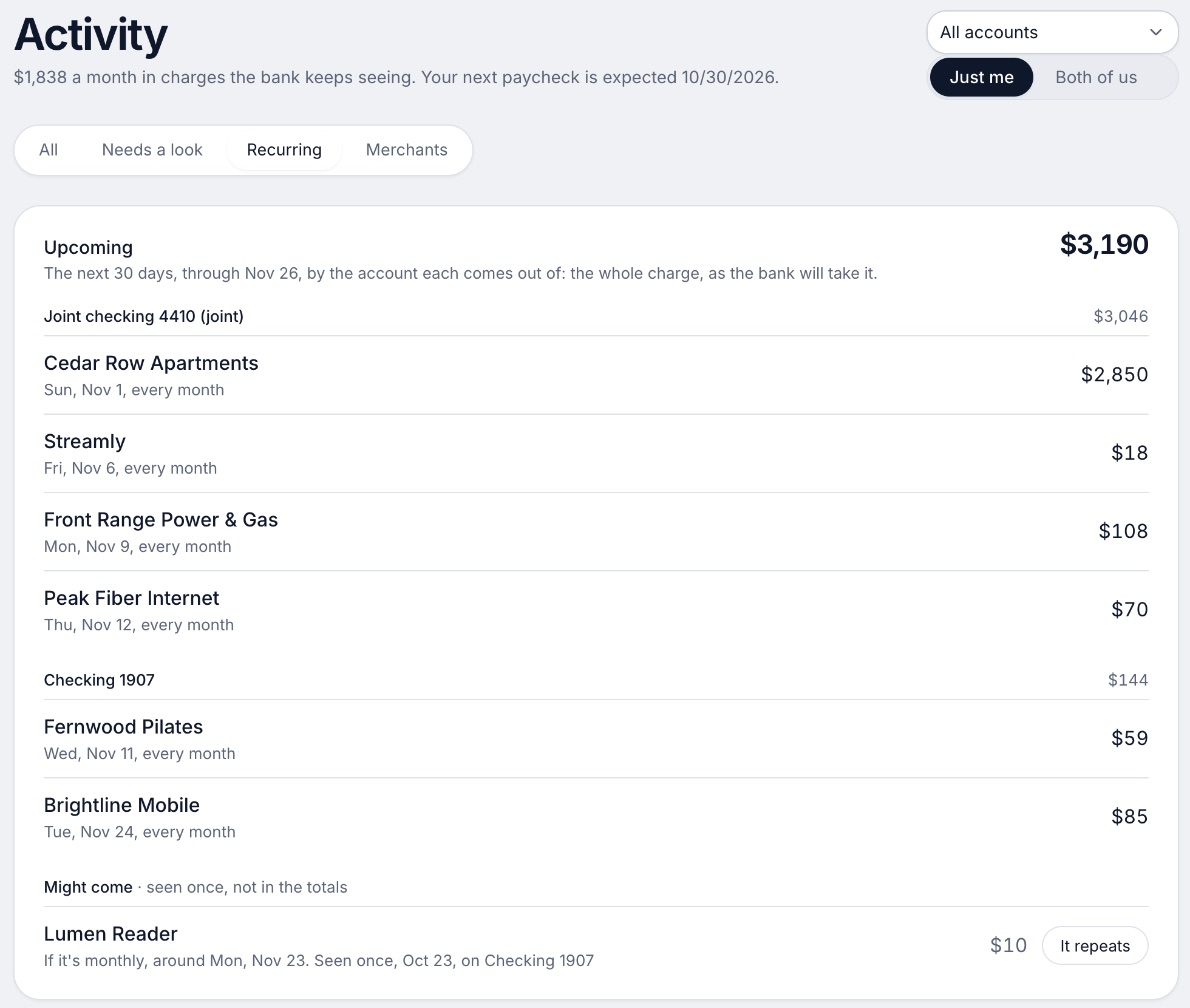
It is here for steps 1, 2 and 5. Every paycheck gets a plan for bills, spending and saving before it lands. It finds recurring charges and subscriptions, lists what is due before your next paycheck, and flags a bill that comes in higher than usual. It does not cancel subscriptions for you. Banks connect through Plaid and every charge is sorted into a category.[9][8]
Ideal for: Someone who wants each paycheck planned against the bills due before the next one, and will pay $99 a year for it after a free week.
What it does
- Every paycheck gets a plan for bills, spending and saving before it lands.[9]
- Banks connect through Plaid and every charge is sorted into a category.[8][9]
- Mine, yours and ours: each charge counts for the person or the pair it belongs to.[9]
- Finds recurring charges and subscriptions, lists what's due before your next paycheck, and flags a bill that comes in higher than usual. It doesn't cancel them for you.[9]
- Texts you by iMessage when a bill is charged twice, a price goes up or a refund lands, and you can text it questions.[9]
- Savings goals show the month you'll reach them.[9]
- Net worth for each of you and for both, from the balances your banks send, with its line over time.[9]
- Life events like getting married come step by step, with the deadlines.[9]
Good
2. YNAB: give every dollar a job before you spend it
YNAB's method asks what each dollar is for. It splits that into now, meaning before the next paycheck, later, meaning bills like car repairs that do not come monthly, and ease, meaning getting a month ahead. That maps onto steps 1, 4 and 5 almost one to one.[12] It has targets for each category and a Loan Planner that shows the interest and time saved by each extra dollar on a debt.
It costs $14.99 a month or $109 a year, after a 34-day trial with no card needed when you sign up on its site. There is no free plan.[10][13] The catch is effort: it is a method to learn, not just charts to look at.
3. PocketGuard: one safe-to-spend number
PocketGuard's main number is what it calls "Leftover": what you can still spend after bills, goals and essentials.[18][22] It finds recurring charges and subscriptions (step 3) and has a debt payoff planner (step 6). It costs $12.99 a month, $74.99 a year or $149.99 once for life, after a 7-day trial, and has no free plan.
App Store reviewers in 2025 and 2026 report being charged at the start of the trial and banks that stopped syncing.[23] Set a reminder for the day before the trial ends and check your card statement.
4. Simplifi by Quicken: a spending number per day
Simplifi builds a spending plan that shows what you can spend per day, tracks upcoming bills and subscriptions, and projects cash flow with what-if scenarios.[25] That makes it useful for steps 1 and 2 when you want to see next month before it happens.
There is no free plan or free trial. Simplifi requires an active annual subscription, and Quicken gives a 30-day money-back guarantee for purchases made directly on Quicken.com.[29] Only annual plans are offered, and renewals are charged at the full standard price, so look at that price before you pay.[29]
5. Goodbudget: free envelopes if you will type
Goodbudget divides income into virtual envelopes, one per bill or goal, which suits steps 2 and 5. Its free plan has 10 regular envelopes, 10 more annual or goal envelopes, 1 account and 2 devices. Premium is $10 a month or $80 a year and adds unlimited envelopes and accounts, 5 devices and automatic bank sync for US banks.[32][33] On the free plan you enter transactions yourself. That is a small chore, and for many people it is the point: you see each purchase leave the envelope.
6. EveryDollar: a free zero-based plan
EveryDollar asks you to give every dollar of the month a place before it starts. Its free version has no end date and includes a monthly budget, unlimited categories, sinking funds, split transactions and bill due dates, but no bank import.[41][42] Premium imports transactions from your bank and costs $79.99 billed yearly or $17.99 a month, after a 14-day trial for new users. EveryDollar is built by Ramsey Solutions.
7. Rocket Money: find subscriptions you forgot
Rocket Money earns its place on step 3. It finds recurring subscriptions in one place, and its free plan links accounts, lists your subscriptions and shows spending breakdowns, on mobile only.[46][47] On Premium, a team cancels subscriptions for you. The free plan leaves cancelling to you.
One cost to know about: bill negotiation takes 35% to 60% of the first year's savings as a fee, within a range you choose, and nothing if nothing is saved.[46][47][48] Its pages disagree about whether the free plan includes budgets, so check before you count on one.
How to choose
Pick by the habit you are missing. If you never know what is due before the next check, you need step 1 and 2 tools. If money just disappears, you need step 3. If nothing is left to save, step 4 has to be automatic.
Choose YNAB (You Need A Budget) if you:
- Want a method, and will put in the effort to learn it
- Want to plan for bills that come once a year
- Can share one subscription with up to six people
Choose Goodbudget if you:
- Want to pay nothing
- Like seeing money leave an envelope
- Will enter spending by hand
Choose EveryDollar if you:
- Want a free monthly plan on web and phone
- Are fine typing transactions
- Might pay $79.99 a year later for bank import
Choose PocketGuard if you:
- Want one number: what is safe to spend
- Would pay once, $149.99, rather than every year
- Will watch your card after the trial starts
Choose Quicken Simplifi if you:
- Want a daily spending number
- Want to see cash flow for the coming months
- Accept an annual plan with a 30-day refund
Choose Rocket Money if you:
- Suspect subscriptions are the leak
- Want a free look first, on your phone
- Know the negotiation fee is 35% to 60% of savings
Choose Wonderful if you:
- Are paid on a schedule and want each check planned
- Want to see what is due before the next paycheck
- Are fine paying $99 a year, on the web only
If you are short right now
An app will not fix a shortfall this week. Call the biller or landlord first and ask for a later date or a payment plan; it costs nothing to ask, and it is best done before a bill is late.
Do not use a payday loan to bridge the gap. The CFPB says a typical two-week loan with a $15 fee per $100 works out to an APR of almost 400 percent, and payday lenders do not generally verify that you can repay while meeting your other obligations.[5] Treat advances on your pay and costly credit the same way: check the total cost first, and prefer a conversation with the biller.
For debt you cannot keep up with, talk to a nonprofit. The National Foundation for Credit Counseling offers counseling by phone (877-360-6322), video chat or an agency finder, and says consent is not required as a condition of using its services and you are under no obligation to purchase anything.[6] Ask any agency what it charges before you agree to a plan. The CFPB's free guides on saving and emergency funds are a good first read. This page is general information, not financial advice.
Where Wonderful fits, and where it doesn't
Wonderful fits steps 1, 2 and 5: a plan for each paycheck, the bills due before the next one, and a flag when a bill comes in higher than usual. It also splits shared costs and keeps a running total of who owes whom, for two people.
It is the wrong pick if you need free: it is a free week, then $14.99 a month or $99 a year for the household, and Goodbudget, EveryDollar or a spreadsheet will serve you. It runs in the browser only, with no iPhone or Android app yet, it does not cancel subscriptions, and it gives no investment advice. See budgeting apps for couples if there are two of you, or the budgeting for couples guide.
Fed figures: 2025 executive summary.
Questions people ask
How do I stop living paycheck to paycheck?
Plan each paycheck before it lands, pay bills on their due dates, find the money that leaks out, and move a small amount to savings the day you are paid. Then smooth out the bills that come once or twice a year and pay down debt in a set order. The steps above go in that order, and each one works with a pen and paper if you prefer.
How many people live paycheck to paycheck?
The Federal Reserve does not ask that exact question. Its 2025 survey found that 63% of adults would cover a $400 emergency expense with cash or its equivalent, and 55% had set aside money for three months of expenses. The rest are the people for whom one bad month is hard to absorb.
How much should I save if I live paycheck to paycheck?
Start with an amount you will not miss and make it automatic. The CFPB suggests recurring transfers from checking to savings, or splitting your direct deposit between two accounts if your employer allows it. Raise the amount when a bill ends or a raise lands. Our emergency fund guide covers how big the pile should get.
What is the best app to stop living paycheck to paycheck?
It depends on the habit you are missing. YNAB teaches giving every dollar a job before the next paycheck. PocketGuard gives one safe-to-spend number. Goodbudget and EveryDollar are free if you will type in spending. Wonderful plans each paycheck against the bills due before the next one, but it is not free after a week.
Are there free apps for this?
Yes. Goodbudget has a free plan with 10 regular envelopes, 10 more envelopes, 1 account and 2 devices, and EveryDollar has a free version with no end date. Both mean typing in transactions, because bank connection is paid on each. A spreadsheet or paper page is free too.
Should I use a payday loan or cash advance to get through the month?
Not as a plan. The CFPB says a typical two-week payday loan with a $15 fee per $100 works out to an APR of almost 400 percent, and lenders generally do not check that you can repay it. If you are short now, call your biller or landlord first and ask for a later date, and talk to a nonprofit credit counselor.
Where can I get free help with debt and bills?
The National Foundation for Credit Counseling is a network of nonprofit agencies that offers counseling by phone, video chat or an agency finder, and says you are under no obligation to buy anything. Ask any agency what it charges before you agree to a plan. The CFPB also publishes free guides on saving and debt.
How much of my pay should go to bills?
Across all US households, the BLS found housing took 33.9% of spending in 2025, transportation 16.5% and food 13.0%. Those three add up to about 63%. Our guide on how much of your income should go to each thing shows ranges and examples you can compare to your own.
Does a budgeting app help if my income varies?
It can, if it lets you plan from what has landed rather than what you hope will. Plan the bills first, then spend what is left, and keep a buffer for the thin weeks. YNAB's method of working with money you already have fits this, and our paycheck budget planner lays out each check against its bills.
- How much should you have in an emergency fund? →
- How much of your income should go to each thing? →
- Budget examples: 4 monthly budgets for real situations →
- How to budget your paycheck: plan every check against your bills →
- What is a sinking fund? →
- Best simple budgeting apps →
- Best free budgeting apps in 2026 →
- Debt payoff calculator: snowball vs avalanche →
Sources
52 sources · read November 2, 2026
Every number on this page comes from federalreserve.gov, bls.gov, consumerfinance.gov and 16 more. If a source has changed since, the source is right.
- 1Federal Reserve, Economic Well-Being of U.S. Households in 2025: savings and investments (May 2026)federalreserve.gov
- 2Federal Reserve, Economic Well-Being of U.S. Households in 2025: executive summary (May 2026)federalreserve.gov
- 3Bureau of Labor Statistics, Consumer Expenditures 2025 (released October 29, 2026)bls.gov
- 4CFPB, An essential guide to building an emergency fundconsumerfinance.gov
- 5CFPB, What is a payday loan?consumerfinance.gov
- 6National Foundation for Credit Counselingnfcc.org
- 7Wonderful terms of servicewonderful.money
- 8Wonderful privacy policywonderful.money
- 9Wonderfulwonderful.money
- 10YNAB pricingynab.com
- 11YNAB featuresynab.com
- 12The YNAB methodynab.com
- 13YNAB on the App Storeapps.apple.com
- 14YNAB on Google Playplay.google.com
- 15Apple public review feed for YNABitunes.apple.com
- 16YNAB: Using YNAB as Partnerssupport.ynab.com
- 17Trustpilot, ynab.comtrustpilot.com
- 18PocketGuard home pagepocketguard.com
- 19PocketGuard pricingpocketguard.com
- 20PocketGuard help: Plus overviewpocketguard.com
- 21PocketGuard help: all featurespocketguard.com
- 22App Store listing, PocketGuardapps.apple.com
- 23App Store reviews, PocketGuardapps.apple.com
- 24Trustpilot, pocketguard.comtrustpilot.com
- 25Quicken Simplifi product pagequicken.com
- 26Quicken blog: personal finance software with the best customer supportquicken.com
- 27Simplifi help: How to use Spaces sharingsupport.simplifi.quicken.com
- 28Simplifi help: How to cancel and get a refundsupport.simplifi.quicken.com
- 29Simplifi help: Subscription questionssupport.simplifi.quicken.com
- 30App Store listing, Quicken: Budget & Track Moneyapps.apple.com
- 31App Store reviews, Quicken: Budget & Track Moneyapps.apple.com
- 32Goodbudget pricing (signup page)goodbudget.com
- 33Goodbudget help: Subscribe to Goodbudgetgoodbudget.com
- 34Goodbudget refunds and cancellationsgoodbudget.com
- 35Goodbudget home pagegoodbudget.com
- 36Goodbudget help indexgoodbudget.com
- 37App Store listing, Goodbudgetapps.apple.com
- 38App Store reviews, Goodbudgetapps.apple.com
- 39Goodbudget envelope budgeting pagegoodbudget.com
- 40Goodbudget changeloggoodbudget.com
- 41EveryDollar plans (Ramsey Solutions)ramseysolutions.com
- 42EveryDollar budget page (Ramsey Solutions)ramseysolutions.com
- 43EveryDollar on the App Storeapps.apple.com
- 44EveryDollar on Google Playplay.google.com
- 45Apple public review feed for EveryDollaritunes.apple.com
- 46Rocket Money: How much does Rocket Money costrocketmoney.com
- 47Rocket Money help center: How much does Rocket Money costhelp.rocketmoney.com
- 48Rocket Money FAQframer.rocketmoney.com
- 49Rocket Money on the App Storeapps.apple.com
- 50Rocket Money on Google Playplay.google.com
- 51Apple public review feed for Rocket Moneyitunes.apple.com
- 52Trustpilot, rocketmoney.comtrustpilot.com
App names are trademarks of their owners; Wonderful isn't connected with them. Wonderful gives general information. It isn't a financial or tax advisor.