The short version
The simplest budgeting apps link your accounts, sort the charges and give you one number to watch. For a first budget, try Wonderful, which makes a plan for each paycheck, or PocketGuard, which shows what is safe to spend. Rocket Money and Honeydue have free versions. EveryDollar is free if you will type transactions in. YNAB is on the list as the opposite: thorough, with a method to learn.
- 1
Wonderful: A plan made for each paycheck, with charges sorted for you
- 2
PocketGuard: One safe-to-spend number and little else
- 3
Rocket Money: Starting free and finding forgotten subscriptions
- 4
Copilot Money: A clean, adaptive budget on Apple devices
- 5
Honeydue: Two people who want a free app on their phones
- 6
EveryDollar: A free zero-based plan if you will type transactions in
- 7
Goodbudget: Envelopes, for people who like to see a limit
- 8
YNAB (You Need A Budget): The opposite: a full method you have to learn
At a glance
| App | Setting it up | Each week | Price | Works on |
|---|---|---|---|---|
| Wonderful | Banks connect through Plaid and every charge is sorted into a category.[2][3] | Every paycheck gets a plan for bills, spending and saving before it lands.[3] | $14.99/mo or $99/yr | Web |
| PocketGuard | Connects to more than 20,000 institutions in the US, Canada and the UK through Plaid, Finicity and Salt Edge, with read-only access.[4] | "Leftover": what you can still spend after bills, goals and essentials.[4][8] | $6.25/mo or $74.99/yr | iPhone, Android, Web |
| Rocket Money | A free plan exists. It links accounts (not in real time), tracks subscriptions but you cancel them yourself, tracks upcoming bills, and shows spending breakdowns.[11] | Tracks upcoming bills, net income and spending, with automatic categories.[11] | Free, or $15/mo | iPhone, Android, Web |
| Copilot Money | Connects to 16,000+ US institutions through read-only integrations, with direct links for Venmo, Apple Card and Coinbase.[20][21] | Adaptive budgets that adjust to your spending.[21] | $13/mo or $95/yr | iPhone, Web, Mac |
| Honeydue | Shared view of linked bank account balances, loans and investments. The site says it connects "over 20,000 financial institutions across 5 countries."[24][28] | Monthly household spending limits for each category, with alerts as you and your partner get close.[28] | Free | iPhone, Android |
| EveryDollar | Zero-based budgeting: plan every dollar before the month starts so income minus expenses equals zero.[33] | No bank import on the free version. You type every transaction.[32] | Free, or $17.99/mo or $79.99/yr | iPhone, Android, Web |
| Goodbudget | Envelope budgeting: you divide income into category envelopes, spend from the matching envelope and stop when it is empty, with no physical cash.[44] | Automatic bank sync is a Premium feature and works with US banks only. The free plan is manual entry.[37][38] | Free, or $10/mo or $80/yr | iPhone, Android, Web |
| YNAB (You Need A Budget) | The method: for every dollar, ask "What's it for?" Plan for now (before the next paycheck), for later (non-monthly bills like car repairs), and for ease (get a month ahead).[48] | The method asks you to plan each dollar before you spend it, which the company's method page presents as the whole point of the app.[48] | $14.99/mo or $109/yr | iPhone, Android, Web |
How we compared
"Simple" is a feeling more than a feature, so we broke it into the two kinds of work a budgeting app asks of you:
- Setup. What you do before the app is useful. Linking a bank is a few taps. Building categories, envelopes or a full plan is an evening.
- The weekly ask. What you do to keep it right. An app that sorts charges for you asks for a look. An app where you type each transaction asks for a habit.
- Cost to try. A free plan or a trial, so a bad fit doesn't cost you a year.
- What breaks. A budget that needs fixing every time a bank link drops isn't simple, so we read the complaints too.
Every fact comes from the app's own pricing and help pages and its App Store and Google Play listings, read on October 27, 2026. None of the pages gives a setup time in minutes, so we don't, and "least work to most" in the order below is our reading of what each one describes. Each fact is numbered to its source at the end. Our best budgeting apps page compares the same kind of app on methods and bank sync; this page compares them on effort.
How much setup, and how much each week
The table above has the short version. Here are both kinds of work in full, from each profile, so you can see what you are signing up for before you pick.
What setup asks of you
- Wonderful: Banks connect through Plaid and every charge is sorted into a category.[2][3]
- PocketGuard: Connects to more than 20,000 institutions in the US, Canada and the UK through Plaid, Finicity and Salt Edge, with read-only access.[4]
- Rocket Money: A free plan exists. It links accounts (not in real time), tracks subscriptions but you cancel them yourself, tracks upcoming bills, and shows spending breakdowns.[11]
- Copilot Money: Connects to 16,000+ US institutions through read-only integrations, with direct links for Venmo, Apple Card and Coinbase.[20][21]
- Honeydue: Shared view of linked bank account balances, loans and investments. The site says it connects "over 20,000 financial institutions across 5 countries."[24][28]
- EveryDollar: Zero-based budgeting: plan every dollar before the month starts so income minus expenses equals zero.[33]
- Goodbudget: Envelope budgeting: you divide income into category envelopes, spend from the matching envelope and stop when it is empty, with no physical cash.[44]
- YNAB (You Need A Budget): The method: for every dollar, ask "What's it for?" Plan for now (before the next paycheck), for later (non-monthly bills like car repairs), and for ease (get a month ahead).[48]
What each week asks of you
- Wonderful: Every paycheck gets a plan for bills, spending and saving before it lands.[3]
- PocketGuard: "Leftover": what you can still spend after bills, goals and essentials.[4][8]
- Rocket Money: Tracks upcoming bills, net income and spending, with automatic categories.[11]
- Copilot Money: Adaptive budgets that adjust to your spending.[21]
- Honeydue: Monthly household spending limits for each category, with alerts as you and your partner get close.[28]
- EveryDollar: No bank import on the free version. You type every transaction.[32]
- Goodbudget: Automatic bank sync is a Premium feature and works with US banks only. The free plan is manual entry.[37][38]
- YNAB (You Need A Budget): The method asks you to plan each dollar before you spend it, which the company's method page presents as the whole point of the app.[48]
The pattern is clear. The apps that link to your bank and sort charges ask for a glance. The ones that don't, or that are built around a method, ask for time. Neither is wrong. A method can be the thing that makes a budget stick, but beginners usually quit from effort, not from a missing feature.
What a year costs
- PocketGuard$74.99
- EveryDollar$79.99
- Goodbudget$80
- Copilot Money$95
- Wonderful$99
- YNAB (You Need A Budget)$109
- Rocket Money$180
No paid plan with a listed price: Honeydue.
The cheapest way to pay for a year on each app's own pricing page. Bars show the cheapest paid plan on each page. Copilot's is the App Store price; its website shows $109. Rocket Money's is Premium+ at $15 a month; Premium is a price you choose, typically $7 to $14 a month. Honeydue is free.
Free is a real option here. EveryDollar, Goodbudget, Rocket Money and Honeydue each have a free version, and the difference is what you give up. PocketGuard's yearly plan is $74.99, its monthly plan $12.99 and its lifetime plan a one-time $149.99. A beginner who isn't sure should start on a free plan or a trial: PocketGuard gives 7 days, YNAB 34, and Copilot one month on the App Store and in its FAQ.[4][5][46][49][19][20][21]
1. A plan made for each paycheck, with charges sorted for you
Wonderful
$14.99/mo or $99/yr· Web
What it is
A budgeting app for couples who keep their own money, and for one person: each of you connects your own bank, chooses what the other sees, and every paycheck gets a plan.
Why it's on this list
Wonderful makes a plan for each paycheck before it lands, so the plan is tied to your pay. Banks connect through Plaid and every charge is sorted into a category, so you aren't typing transactions in. It finds recurring charges and shows what is due next. Its pages don't give a setup time, and it has no free plan after the free week. It runs in the browser, with no iPhone or Android app yet.
Ideal for: Someone who wants a budget they don't have to build from scratch each month, and is fine with a web app.
What it does
- Every paycheck gets a plan for bills, spending and saving before it lands.[3]
- Banks connect through Plaid and every charge is sorted into a category.[2][3]
- Mine, yours and ours: each charge counts for the person or the pair it belongs to.[3]
- Finds recurring charges and subscriptions, lists what's due before your next paycheck, and flags a bill that comes in higher than usual. It doesn't cancel them for you.[3]
- Texts you by iMessage when a bill is charged twice, a price goes up or a refund lands, and you can text it questions.[3]
- Savings goals show the month you'll reach them.[3]
- Net worth for each of you and for both, from the balances your banks send, with its line over time.[3]
- Life events like getting married come step by step, with the deadlines.[3]
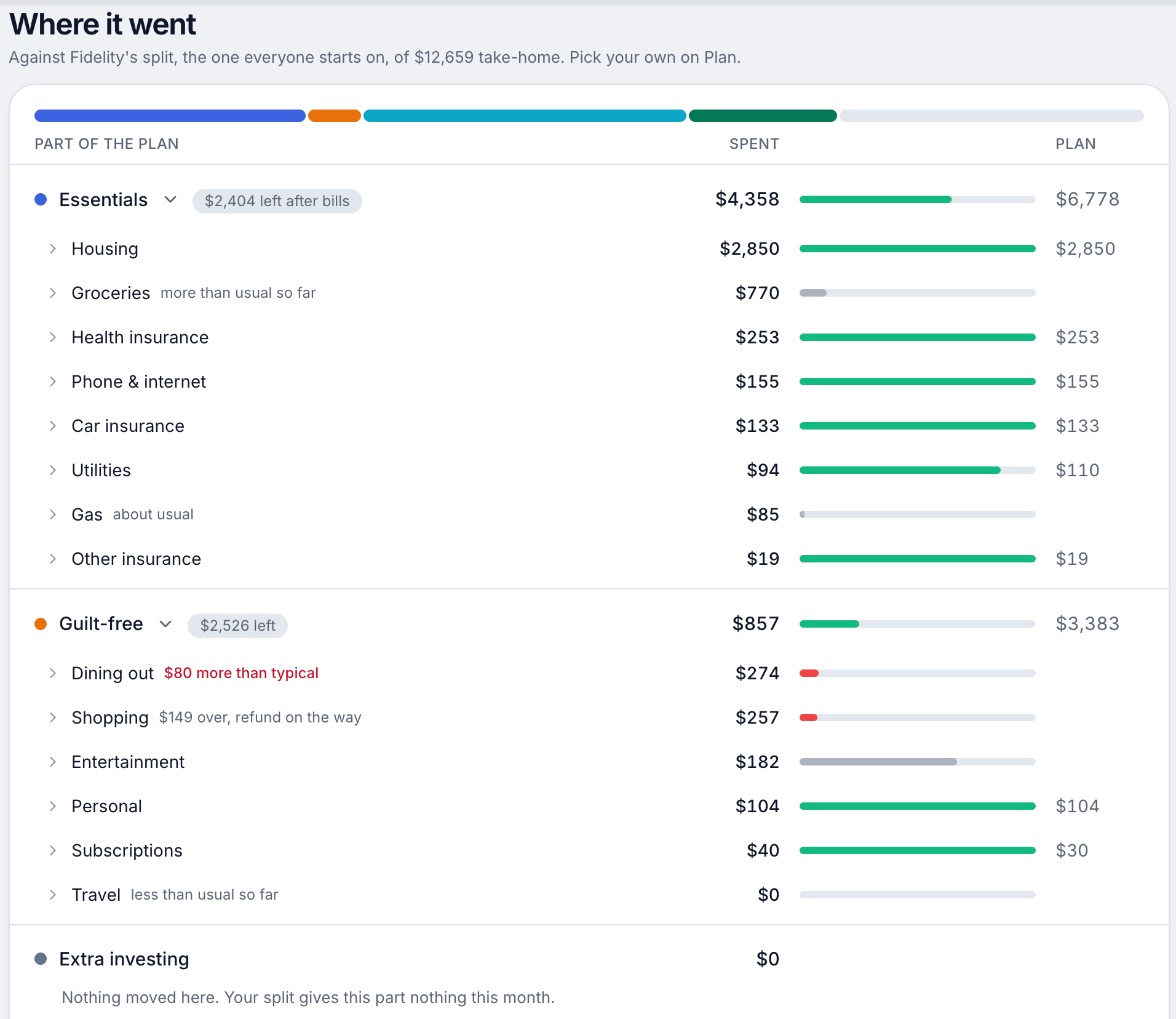
Good
2. One safe-to-spend number and little else
What it is
A paid budgeting app for iPhone, Android and web that links bank accounts and shows how much is safe to spend after bills, goals and essentials.
Why it's on this list
PocketGuard's main screen is one number, Leftover: what you can still spend after bills, goals and essentials. It finds recurring charges on its own and predicts where you will end the month. Reviewers describe a redesign that made it more analytical, and many say they could not use it without paying.
Ideal for: A single person who wants to open an app and see what is safe to spend.
What it does
- "Leftover": what you can still spend after bills, goals and essentials.[4][8]
- Budget with zero-based, envelope or category methods, with rollovers for unspent or overspent money.[4][6]
- Pace: predicts how much you will have left at month's end from your spending habits.[4][8]
- Finds recurring charges and subscriptions automatically, and the listing mentions a built-in bill negotiation service.[4][8]
- Transaction rules that match merchant names, keywords, amounts, categories or accounts.[8]
Good
Not so good
- No free plan; the app requires the trial or a paid plan.[5]
- Monthly billing is $12.99, about double the yearly rate per month.[5]
- No partner or shared login is described on the pages opened.[4][5][6][7]
- App Store reviewers in 2025 and 2026 report being charged at the start of the trial, and a trial that does not appear in App Store subscription settings.[9]
Pricing
“I’ve been using this app for about 6 years now and it helps me stay on budget and know when to stop spending money. Also, whenever I have an issue with the app, the developers fix it fast.”Read it where it was said ↗
3. Starting free and finding forgotten subscriptions
What it is
An app that finds your subscriptions, can cancel them and negotiate bills for you, and tracks spending and budgets, with a free plan and two paid ones.
Why it's on this list
Rocket Money asks little at the start: link accounts, and the free plan shows subscriptions, upcoming bills and spending breakdowns. A full budget is the catch. The free plan allows two custom category budgets, and unlimited ones are Premium, whose price you choose within a range. Many reviewers say they were charged more than they expected.
Ideal for: Someone who wants to start free, see what they are paying for each month and add a budget later.
What it does
- Finds recurring subscriptions in one place. On Premium, a team cancels them for you; its cost article says this usually takes 2 to 10 days. On Free you cancel them yourself.[11]
- Negotiates cable, phone and insurance bills for a success fee of 35% to 60% of the first year's savings.[11][12][13]
- Tracks upcoming bills, net income and spending, with automatic categories.[11]
- Custom budgets: two custom category budgets on Free, unlimited custom budgets and categories on Premium.[11]
- Premium adds transaction rules, splits, notes, tags, manual transactions and CSV export.[11]
Good
- A free plan exists and covers subscription tracking, bills and basic budgets.[11]
- Cancels subscriptions for you on Premium and negotiates bills.[11]
- Large installed base: 403K ratings on the App Store at 4.5 stars and 141K on Google Play at 4.5.[14][15]
- Premium is a sliding scale you pick yourself, with a 7-day trial.[11][12]
Not so good
- The price is not fixed: the learn article says $7 to $14 a month, the help center gives no numbers, and the App Store lists purchases from $2.99 to $9.99.[11][12][14]
- Bill negotiation costs 35% to 60% of the first year's savings for Free and Premium members.[11][12]
- On Free you cancel subscriptions yourself. Hands-off cancelling is Premium.[11][13]
- The free plan allows two custom category budgets, so a full budget needs Premium.[11]
Pricing
- Free[11]FreeMobile only. Tracks subscriptions and upcoming bills, with two custom category budgets.
- Premium[11][12][14]Pay what you think is fair, "typically $7 to $14 per month, subject to change," per the learn article. The help center says the price varies by platform and gives no numbers. The App Store lists Premium purchases from $2.99 to $9.99 without billing periods.
- Premium+[11][12][14]$15 a monthA fixed $15 a month plus tax. Adds Rowan, an AI assistant that works through text messages, and no fee on bill negotiation.
- The help center says new Premium members get a 7-day free trial, then the subscription continues at the price chosen at sign-up. The learn article states no trial.[11][12]
- A free plan exists. It links accounts (not in real time), tracks subscriptions but you cancel them yourself, tracks upcoming bills, and shows spending breakdowns.[11]
“I selected 7 dollars per month and it still charged me for 15”Read it where it was said ↗
4. A clean, adaptive budget on Apple devices
Copilot Money
$13/mo or $95/yr· iPhone, Web, Mac· App Store 4.8 (31K)[21]
What it is
A paid budgeting and net worth app for Apple devices and the web, with an AI money assistant and one plan that does everything.
Why it's on this list
Copilot sorts transactions for you and uses adaptive budgets that adjust to your spending, so there is less to set up by hand. It is one paid plan with a one-month trial on the App Store. It has no Android app, and the website and App Store show different prices.
Ideal for: Someone on an iPhone who wants a clean app that adjusts its budgets as they spend.
What it does
- Money Assistant: an AI you can ask about your money. The page says it "always asks before acting." It can fix transactions, run instructions in the background and flag spending trends with budget suggestions. The App Store says it is available only on iPhone.[18][21]
- Connects to 16,000+ US institutions through read-only integrations, with direct links for Venmo, Apple Card and Coinbase.[20][21]
- Sorts transactions automatically, and the assistant can change a category or match a refund to its purchase. You can set your own categories with colors and emojis.[18][21]
- Adaptive budgets that adjust to your spending.[21]
- Tracks spending, investments, net worth and subscriptions.[18][21]
Good
Not so good
- No Android app. The pages list iPhone, iPad, Mac and web only.[18][19][20]
- Sharing with a partner is not live. Households are marked "Coming soon."[18][19][20]
- No free plan after the trial.[20]
- The website and the App Store show different prices: $18 a month or $109 a year (shown as $9 a month) on the site, $13.00 and $95.00 on the App Store.[19][21]
Pricing
- Website, monthly[19]$18 a monthBilled monthly. The pricing page calls it "One simple plan" (checked in a browser 10/27).
- Website, yearly[19]$109 a yearShown as $9 a month, billed yearly, "instead of $119", and labeled a limited time offer.
- App Store, monthly[21]$13 a monthListed as $13.00 on the App Store, which is not what the pricing page shows.
- App Store, yearly[21]$95 a yearListed as $95.00 on the App Store.
“I switched to Copilot when Mint shut down. This app is much better than Mint ever was. The annual fee is a small price to pay to manage my budget and transactions.”Read it where it was said ↗
5. Two people who want a free app on their phones
What it is
A free phone app for couples that shows both people's linked accounts, bills and budgets, with a choice of how much each person shares.
Why it's on this list
Honeydue is the free option made for two. Each of you links your accounts, and the app sets monthly limits per category with alerts as you get close, plus reminders when a bill is due. Its catch is reliability: reviewers from 2024 to October 2026 say sync worked for a while and then stopped.
Ideal for: Two people who want a free app, monthly limits by category and reminders for bills.
What it does
- Shared view of linked bank account balances, loans and investments. The site says it connects "over 20,000 financial institutions across 5 countries."[24][28]
- Choose what your partner sees per account: balances and transactions, balances only, or nothing.[26]
- Monthly household spending limits for each category, with alerts as you and your partner get close.[28]
- Bill reminders that notify you or your partner when a payment is due.[24][28]
- Chat built into the app: send a quick reaction or ask your partner about a specific transaction.[24]
Good
Pricing
- Free[25]FreeHoneydue's help center says, "Honeydue is 100% free for everybody, and we don't block any features with a paywall."
- Monthly tip (optional)[25][28]Any amount from $1 to $10 a month through the App Store or Google Play. The help center says tips fund new features. The App Store lists $0.99 to $9.99.
- The whole app is free. The only paid thing is the optional tip, which can be changed or cancelled in the App Store or Google Play.[25]
“My husband and I have used this for years and genuinely love using it.”Read it where it was said ↗
6. A free zero-based plan if you will type transactions in
What it is
Ramsey Solutions' zero-based budgeting app: a free version where you type in transactions, and a paid version that imports them from your bank.
Why it's on this list
EveryDollar's free version is a full zero-based budget that you can use as long as you want. You pay for the one thing that makes it easier: bank import is Premium. The free version asks for a habit, because you enter each transaction yourself. Ramsey also describes a Household option for two people on one budget.
Ideal for: Someone who will sit down once a month, plan every dollar, and doesn't mind typing in transactions.
What it does
- Zero-based budgeting: plan every dollar before the month starts so income minus expenses equals zero.[33]
- Free: monthly budget, unlimited categories and line items, split transactions, due dates for bills, and savings goals for big purchases.[32][34]
- Sinking funds for future expenses, in the free version.[32][33]
- Premium imports transactions automatically from connected accounts. Ramsey says it uses Mastercard Connect and Plaid.[32]
- Premium plans spending around payday and bill due dates.[32][33]
Good
Not so good
- No bank import on the free version. You type every transaction.[32]
- Premium is $17.99 billed monthly, which is $215.88 over twelve months, against $79.99 billed yearly.[32]
- Rated 4.3 on Google Play, lower than the App Store's 4.7.[34][35]
- The plans page and the App Store show different Premium plans and prices.[32][34]
Pricing
- Free[32]FreeUsable as long as you want. Manual transaction entry, no bank import.
- Premium, monthly[32][34]$17.99 a monthBank import and the rest of Premium.
- Premium, yearly[32][34]$79.99 a yearShown by Ramsey as about $6.67 a month.
- Ramsey+, yearly[34]$129.99 a yearListed only as an in-app purchase on the App Store, along with Ramsey+ at $59.99 for three months. The plans page does not describe it.
- Premium includes a 14-day free trial, for new users only.[32]
- A free version you can use as long as you want. It has a monthly budget, unlimited categories, manual transactions, sinking funds, split transactions, bill due dates and live-person support. It does not import transactions from a bank.[32][33]
“My wife and I’ve been using this app for eight years. Can’t live without it.”Read it where it was said ↗
7. Envelopes, for people who like to see a limit
Goodbudget
Free, or $10/mo or $80/yr· iPhone, Android, Web· App Store 4.6 (13,516)[42]
What it is
An envelope budgeting app for the web, iPhone and Android where you divide income into virtual envelopes and share the budget across devices.
Why it's on this list
Goodbudget divides income into envelopes and you stop spending when one is empty, which is simple to understand and takes upkeep. The free plan is manual entry with caps on envelopes, accounts and devices, and automatic bank sync is Premium. Reviewers in 2026 call it complicated to set up.
Ideal for: Someone who likes envelopes, wants a free plan and is fine entering transactions by hand.
What it does
- Envelope budgeting: you divide income into category envelopes, spend from the matching envelope and stop when it is empty, with no physical cash.[44]
- The free plan has 10 regular envelopes and 10 annual or goal envelopes; Premium removes the cap.[37][38]
- Syncs and shares a budget across iPhone, Android and the web, with data backed up to Goodbudget's website.[40][42]
- Automatic bank sync is a Premium feature and works with US banks only. The free plan is manual entry.[37][38]
- Reports in the app: spending by envelope (a pie chart), income versus spending, and debt progress; more reports on the web.[42]
Good
Pricing
- Free[37][38]FreeCalled "Free Forever" on the page. 10 regular envelopes, 10 annual or goal envelopes, 1 account, 2 devices, 1 year of history, debt tracking, community support.
- Premium[37][38]$10 a month · $80 a yearAdds automatic bank sync (US banks only), unlimited envelopes and accounts, 5 devices, 7 years of history and email support.
“We’ve been using Goodbudget for several years now, after trying multiple budgeting apps. It’s the best solution we’ve found to budget with an envelope system, while utilizing credit cards and online payments.”Read it where it was said ↗
8. The opposite: a full method you have to learn
What it is
A paid budgeting app built on a method: give every dollar a job before you spend it.
Why it's on this list
YNAB is here as the opposite of the rest. It links to your bank, but the app is built around a method: for every dollar, ask "What's it for?" and plan before you spend. That is what makes it work for people who stick with it, and what makes it a lot to learn. It is $14.99 monthly or $109 billed annually, with a 34-day trial.
Ideal for: Someone who wants the most control and will learn a method to get it.
What it does
- The method: for every dollar, ask "What's it for?" Plan for now (before the next paycheck), for later (non-monthly bills like car repairs), and for ease (get a month ahead).[48]
- Bank import links accounts and brings in transactions automatically. Apple Card import is also listed.[47]
- Targets: set spending and savings goals per category and track progress at a glance.[47]
- Loan Planner: shows how much interest and time you save for each extra dollar paid toward debt.[47][49]
- Reports on spending, such as average grocery spend, and on net worth over time.[47][49]
Good
- A written method, not just a tracker: the app is built around planning before spending.[48]
- One subscription covers up to six people at no extra cost.[46]
- A 34-day trial with no card when you sign up on the site, and a free 365-day trial for college students.[46]
- Rated 4.8 on the App Store (62K ratings) and 4.6 on Google Play (25.4K).[49][50]
Not so good
- No free plan after the trial.[46]
- Paid monthly it is $14.99, which is $179.88 over twelve months, against $109 billed annually.[46]
- The website says a 34-day trial and the App Store says 30 days.[46][49]
- The method asks you to plan each dollar before you spend it, which the company's method page presents as the whole point of the app.[48]
Pricing
“I’ve been without account info for two weeks and they can’t fix it because they are too dependent on third parties for bank connections. Upped fees are also an issue”Read it where it was said ↗
What free gets you, and what it leaves out
Four of these apps have a free version. They are free in different ways, and the missing piece is what decides how simple they feel.
- EveryDollar: A free version you can use as long as you want. It has a monthly budget, unlimited categories, manual transactions, sinking funds, split transactions, bill due dates and live-person support. It does not import transactions from a bank.[32][33]
- Goodbudget: A free plan exists. It has no bank sync, one account, 20 envelopes in all (10 regular and 10 annual or goal), two devices and a year of history. The App Store listing calls it ad-free.[37][38][42]
- Rocket Money: A free plan exists. It links accounts (not in real time), tracks subscriptions but you cancel them yourself, tracks upcoming bills, and shows spending breakdowns.[11]
- Honeydue: The whole app is free. The only paid thing is the optional tip, which can be changed or cancelled in the App Store or Google Play.[25]
The pattern: the free versions of the two budgeting methods, EveryDollar and Goodbudget, leave out the bank link. The free versions of Rocket Money and Honeydue keep the bank link but are narrower (Rocket Money in budgets, Honeydue in being a phone app for couples). For every free budgeting option, see our free budgeting apps page.
What trips beginners up
The first budget fails for ordinary reasons. These are what reviewers and the apps' own pages point to.
- Typing everything. Reviewers of Goodbudget say that without paying you are "manually inputting every transaction".[37][43]
- Bank links that stop. Accounts that stop syncing. Many App Store reviews from 2024 to October 2026 say sync worked for a week to a few months and then stopped.[30]
- Surprise charges. Being charged more than expected. Many October 2026 App Store reviews say they picked a lower price and were charged $15, or could not find where to cancel.[16]
- No free way to try. No free tier: many 2025 and 2026 reviewers say they could not use the app without starting a trial or paying.[5][9]
- A learning curve. The method asks you to plan each dollar before you spend it, which the company's method page presents as the whole point of the app.[48]
The fix for most of these is to start with a free plan or a trial, and to check how to cancel before you add a card.
Pick the method first
Beginners often choose an app and then find the method doesn't suit them. It goes better the other way around. Three methods come up on this list:
- Safe to spend. One number: what is left after bills and goals. The least work. PocketGuard is built on it.
- Envelopes. Each category has a limit and you stop when it is empty. Goodbudget is built on it.
- Zero-based. Every dollar of income gets a job before the month starts, so income minus plans equals zero. EveryDollar is built on it, and YNAB's give-every-dollar-a-job method is the same idea. See zero-based budget apps for the comparison.
There is a fourth that Wonderful uses: a plan for each paycheck, made before it lands. If your pay doesn't line up with the first of the month, our pay schedule tool shows when your paychecks fall.
Which kind of beginner are you?
Simple means different things depending on why you are starting. Three kinds of beginner come up most.
You have never kept a budget
You want the least work and the fastest answer to "can I afford this?" Start at the top of the list. PocketGuard's one number, Wonderful's plan for each paycheck and Rocket Money's free view of bills all answer that without asking you to set up categories first. Avoid the apps where you type every transaction until you know you will keep a habit.
You have tried and quit
Look at why. If it was typing, move to an app that links your bank. If it was a plan that fell apart in week two, a looser app with a single number will last longer than a stricter one. If it was price, use a free plan: EveryDollar, Goodbudget, Rocket Money or Honeydue. Don't pay for a year until you have used one for a month.
You want control, and don't mind effort
Then simple isn't the goal and YNAB is the honest answer. Its pages describe a method that asks you to plan each dollar before you spend it, and a 34-day trial with no card when you sign up on its site lets you find out whether you will do that.[46][49] Our YNAB vs EveryDollar page compares it with the free zero-based option.
The numbers to know before you start
Whichever app you pick, it works better if you start with four numbers. Take-home pay for the month, after tax and anything taken out at work. Fixed bills, the ones that are the same every month. What you usually spend on food and getting around. And one thing you want to save for. If you're paid every two weeks, remember that two months a year have three paychecks; our three-paycheck months guide shows which. You don't need to be exact. A budget with rough numbers that you open is better than a perfect one you don't.
Common first-budget mistakes
- Too many categories. Start with eight or ten. You can split them later. Our budget categories guide has a starting list.
- Forgetting the bills that aren't monthly. Car repairs, annual fees and gifts arrive without warning. A sinking fund sets money aside for them. EveryDollar's free version includes sinking funds.[32][33]
- Setting limits from a guess. Look at what you spent first, then set the limit.
- Paying before you know it fits. Use the free plan or trial first. Several apps here have reviewers who say they were billed after cancelling, so know how to cancel before you add a card.
- Budgeting to zero fun. A budget with no room for dinner out is a budget you drop in March. Leave a line for it.
Phone or web
Where an app runs changes how simple it feels. Honeydue is for iPhone and Android and has no web app.[28][29] Copilot is on iPhone, iPad, Mac and the web, not Android.[18][19][20] PocketGuard, Rocket Money, EveryDollar, Goodbudget and YNAB have iPhone, Android and web. Wonderful runs in the browser only, on any phone or computer. If you check money on your phone in a store line, an app in the App Store will feel easier than a website.
When to move to something bigger
A simple app is the right place to start, and you may never need to leave. Signs you have outgrown it: you want to see investments and net worth beside the budget, you share money with a partner and need more than a shared login, or you want rules for how charges are sorted. At that point look at our personal finance apps, or the longer budgeting apps list, which includes Monarch, Simplifi and Origin.
Your first week
A simple way to start, whichever app you pick:
- Link one account, the one you spend from most. Check the last few charges match your bank.
- Write down your fixed bills: rent, utilities, phone, insurance. Our budget categories guide lists the usual ones.
- Look at last month's spending before you set any limits. A limit you set from a guess is the first one you will break.
- Open the app at the same time each week. Five minutes, the same day.
- After a month, change what didn't fit. A first budget is a draft.
How to choose
Choose by the work you will actually do, not the work you intend to do.
Choose Wonderful if you:
- Want a plan for each paycheck, not each calendar month
- Don't want to type transactions in
- Are fine with a web app and no free plan after a week
Choose PocketGuard if you:
- Want one safe-to-spend number
- Are on your own, not sharing the budget
- Might want to pay once for life
Choose Rocket Money if you:
- Want to start free
- Mostly want to see subscriptions and bills
- Will check the price before you choose Premium
Choose Copilot Money if you:
- Use an iPhone
- Want a clean app that adjusts as you spend
Choose Honeydue if you:
- Are budgeting as a couple
- Want it free
- Can live with sync that sometimes stops
Choose EveryDollar if you:
- Want a zero-based plan at no cost
- Will enter transactions by hand
Choose Goodbudget if you:
- Like envelopes and a visible limit
- Want a free plan and don't mind manual entry
Choose YNAB (You Need A Budget) if you:
- Want a method and will learn it
- Are willing to plan every dollar first
Where Wonderful fits, and where it doesn't
We make Wonderful, so here is its place plainly. It fits someone who wants every paycheck planned and doesn't want to type transactions in. It doesn't fit someone who wants it free: there is no free plan after the free week, and it is $14.99 a month or $99 a year for the household. It runs in the browser, so if you want an app from the App Store today, pick another. It finds subscriptions but doesn't cancel them, and it gives no investment advice. For a wider look at money apps beyond budgeting, see best personal finance apps.
Questions people ask
What is the easiest budgeting app to use?
The apps that ask least of you link your accounts, sort charges for you and show one number. PocketGuard shows what is safe to spend after bills and goals. Wonderful makes a plan for each paycheck. Rocket Money has a free plan that tracks subscriptions and upcoming bills. The ones that ask most are the ones where you type in every transaction or plan every dollar yourself.
What is the best budgeting app for beginners?
For a first budget, start with an app that sorts transactions for you so you only decide what the numbers mean. Wonderful, PocketGuard and Rocket Money fit that. If you want a method to follow and don't mind learning it, EveryDollar's zero-based plan is free if you type transactions in.
Is there a free simple budgeting app?
Yes, four. EveryDollar's free version has no time limit but you type in every transaction. Goodbudget's free plan has 10 regular envelopes, 10 annual or goal envelopes and 1 account. Rocket Money's free plan tracks subscriptions and upcoming bills with two custom category budgets. Honeydue is free for couples. Wonderful has no free plan after its free week.
How long does it take to set up a budgeting app?
None of the apps' own pages gives a setup time, so we don't give one either. What the pages describe is the work: linking accounts takes the least, and building a plan from scratch takes more. Goodbudget's reviewers call it complicated to set up, with weekly and monthly schedules to manage.
Do I have to enter transactions by hand?
Not in most of them. PocketGuard, Rocket Money, Copilot, Wonderful and YNAB link to your bank. EveryDollar's free version and Goodbudget's free plan do not, so you type each transaction. Both sell bank sync: EveryDollar Premium is $79.99 a year and Goodbudget Premium is $80 a year.
What is the simplest budgeting method?
A safe-to-spend number is the least work: subtract bills and goals from what came in and watch what is left. PocketGuard works this way. Envelopes (Goodbudget) give each category a limit you can see. A zero-based plan (EveryDollar) gives every dollar a job before the month starts. Our best budgeting apps page covers the methods in more detail.
Is YNAB good for beginners?
It can be, if you want to learn the method. YNAB asks you to give every dollar a job before you spend it, and its own pages present that as the whole point of the app. It has a 34-day free trial with no card when you sign up on its site. If you want something lighter, start with one of the apps above it on this list.
What is the easiest budgeting app for a couple?
Honeydue is free and made for two: each person links their own accounts and chooses what the other sees. Wonderful covers both partners under one subscription, $14.99 a month or $99 a year. Our couples roundup compares what each partner sees.
How much does a simple budgeting app cost?
From nothing to about $110 a year. EveryDollar, Goodbudget, Rocket Money and Honeydue have free versions. PocketGuard is $74.99 a year or a one-time $149.99. Wonderful is $99 a year. YNAB is $109 billed annually. Copilot is $109 a year on its website and $95 on the App Store.
Is a spreadsheet simpler than a budgeting app?
For some people, yes: you see every number and nothing is connected to your bank. The cost is that you type everything. A free monthly budget template is on our site if you want to try that first.
Sources
53 sources · read October 27, 2026
Every number on this page comes from wonderful.money, pocketguard.com, apps.apple.com and 13 more. If a source has changed since, the source is right.
- 1Wonderful terms of servicewonderful.money
- 2Wonderful privacy policywonderful.money
- 3Wonderfulwonderful.money
- 4PocketGuard home pagepocketguard.com
- 5PocketGuard pricingpocketguard.com
- 6PocketGuard help: Plus overviewpocketguard.com
- 7PocketGuard help: all featurespocketguard.com
- 8App Store listing, PocketGuardapps.apple.com
- 9App Store reviews, PocketGuardapps.apple.com
- 10Trustpilot, pocketguard.comtrustpilot.com
- 11Rocket Money: How much does Rocket Money costrocketmoney.com
- 12Rocket Money help center: How much does Rocket Money costhelp.rocketmoney.com
- 13Rocket Money FAQframer.rocketmoney.com
- 14Rocket Money on the App Storeapps.apple.com
- 15Rocket Money on Google Playplay.google.com
- 16Apple public review feed for Rocket Moneyitunes.apple.com
- 17Trustpilot, rocketmoney.comtrustpilot.com
- 18Copilot Money homecopilot.money
- 19Copilot Money pricingcopilot.money
- 20Copilot Money FAQcopilot.money
- 21Copilot on the App Storeapps.apple.com
- 22Apple public review feed for Copilotitunes.apple.com
- 23Honeydue home pagehoneydue.com
- 24Honeydue: How it workshoneydue.com
- 25Honeydue help: How does Honeydue earn moneysupport.honeydue.com
- 26Honeydue help: Will my partner see my accountssupport.honeydue.com
- 27Honeydue Joint Cashhoneydue.com
- 28Honeydue on the App Storeapps.apple.com
- 29Honeydue on Google Playplay.google.com
- 30Apple public review feed for Honeydueitunes.apple.com
- 31Honeydue help: Account issues and inviting a partnersupport.honeydue.com
- 32EveryDollar plans (Ramsey Solutions)ramseysolutions.com
- 33EveryDollar budget page (Ramsey Solutions)ramseysolutions.com
- 34EveryDollar on the App Storeapps.apple.com
- 35EveryDollar on Google Playplay.google.com
- 36Apple public review feed for EveryDollaritunes.apple.com
- 37Goodbudget pricing (signup page)goodbudget.com
- 38Goodbudget help: Subscribe to Goodbudgetgoodbudget.com
- 39Goodbudget refunds and cancellationsgoodbudget.com
- 40Goodbudget home pagegoodbudget.com
- 41Goodbudget help indexgoodbudget.com
- 42App Store listing, Goodbudgetapps.apple.com
- 43App Store reviews, Goodbudgetapps.apple.com
- 44Goodbudget envelope budgeting pagegoodbudget.com
- 45Goodbudget changeloggoodbudget.com
- 46YNAB pricingynab.com
- 47YNAB featuresynab.com
- 48The YNAB methodynab.com
- 49YNAB on the App Storeapps.apple.com
- 50YNAB on Google Playplay.google.com
- 51Apple public review feed for YNABitunes.apple.com
- 52YNAB: Using YNAB as Partnerssupport.ynab.com
- 53Trustpilot, ynab.comtrustpilot.com
App names are trademarks of their owners; Wonderful isn't connected with them. Wonderful gives general information. It isn't a financial or tax advisor.