The short version
The free budget spreadsheet you want probably already exists. Microsoft lists 30 free Excel budget templates, Google Sheets has a template gallery with budgets in it, Notion's gallery has free expense and cash flow templates, and Tiller publishes 18 free sheets. All of them start blank. When typing every charge stops happening, the choices below fill the sheet from your bank or replace it.
- 1
Tiller: The sheet that fills itself, if you like sheets
- 2
Lunch Money: A web app that replaces the sheet, with rules
- 3
YNAB (You Need A Budget): A method plus a bank feed, after a 34-day trial
- 4
Wonderful: For the sheet two people keep arguing over
Where each template lives
Search results for "budget spreadsheet" are full of sites that sell you a file or ask for an email. These four first-party sources don't. Each link goes to the company's own page, and each template listed there is free to use.
| Source | Budget templates | Opens in | Link |
|---|---|---|---|
| Microsoft Create | 30 listed, including household, family, annual and personal | Excel (.xlsx files) | Free budget templates[1] |
| Google Sheets | Budgets are in the Template Gallery; names change | Google Sheets, in a browser | How to open the gallery[2] |
| Notion | Free finance and expense tracker templates from creators | Notion | Finance category[4] |
| Tiller | 18 free sheets, including Monthly Budget and Yearly Budget | Google Sheets or Excel | Tiller templates[6] |
Looking for a page to print and fill in by hand instead? That is our free printable monthly budget template. It is one sheet with planned, actual and difference columns and a yours, mine, ours version for two. This page doesn't repeat it. It is about the spreadsheet files and what to do when one stops working.
Microsoft Excel: 30 free budget templates
Microsoft's Create site lists 30 free, customizable budget templates, and each one opens as an Excel file.[1] Several are for a household, and the rest are for a college student, a business, an event or a construction project, so skip those. The ones a person budgeting at home would look at:
- Household monthly budget and Family monthly budget: the closest to a household list of income and bills.
- Simple annual budget: one sheet for the year, for people who want the whole picture before the month starts.
- Personal monthly budget, Basic personal budget, Simple personal budget and Easy monthly budget: single-person versions. They are all on the Create page.
The catch is where they run. They are Excel files, and the page doesn't say how they behave when you open them in another program. If you live in Google Sheets, check that the totals still add up before you trust one.
Google Sheets: the template gallery
Google Sheets is free with a Google Account: its page says anyone with one can create in Sheets.[3] To start from a budget, open Sheets on a computer, click Template Gallery at the top right, and click a template. A copy opens for you to edit.[2]
Google's help page says the gallery includes budgets among its templates, and it doesn't list their names. The gallery needs you to be signed in, and the templates in it change, so we won't tell you the title of one that may be gone next month. Search the gallery for budget, open two or three, and pick the one whose categories look like your life. A shared copy is easy: use Share and give your partner edit access.
If the gallery's choices are not what you want, Tiller's free sheets (below) are also made for Google Sheets, and our budget categories list gives you the rows to type in.
Notion: free templates, made by outsiders
Notion's gallery has a finance category, and its page showed 472 expense tracker and 138 cash flow management templates.[4] The cards we read from the expense tracker category were each marked Free, and the gallery has a Free filter next to Paid and Free + Paid.[5] Nearly all are made by creators, not by Notion. The cards don't show their titles in the page we read, so we can't name one. Open the category and read the preview before you duplicate it.
Notion suits someone who already keeps their life in Notion and wants a budget page next to their notes. It is a database of rows more than a calculator, so ask whether the template totals things for you or only lists them.
Tiller's free sheets
Tiller sells a service that sends your bank transactions into a Google Sheets or Excel file, and it publishes free sheets that sit on top of that data. Its templates page calls them free, prebuilt sheets and lists 18: Monthly Budget, Yearly Budget, Category Tracker, Monthly Analysis, Bill Payment Tracker, Debt Payoff Planner, Savings Goals, Net Worth, Cash Flow Forecast, Spending Trends and others.[6]Tiller says they work with the transactions, categories and account history in your Tiller spreadsheet.
That last part matters. The templates page doesn't say whether you need a subscription to use one, and the Foundation Template, the main budget, is listed as included with Tiller.[8] A separate gallery of free community templates exists, with examples such as a Bill Payment Tracker, a Debt Snowball Spreadsheet and a Net Worth template for Excel.[7] Treat Tiller's sheets as free to look at and best with the $99-a-year feed.
How we compared
We opened each company's template page, listed what it says is on it, and followed the links. We looked at five things:
- Who made it. Google, Microsoft, Notion or Tiller, not a blog that wants your email.
- What it costs. The template, and whatever you need to make it useful.
- Where it runs. Excel, Google Sheets in a browser, or Notion.
- What it tracks. A plan, or only what you typed.
- How the numbers get in. Typing, a bank file, or a bank feed.
For the apps in the last half of the page, every fact is from the app's own pricing page, its App Store listing and what its users say in public, each numbered at the end. We haven't built a sheet in each of these ourselves, so what follows is what their pages say.
What a free budget sheet tracks
Almost every template does the same three things: lists income, lists spending by category with a planned and an actual column, and subtracts one from the other. Our printable template does exactly that. Tiller's list goes further: category totals over a period, a bill tracker, a debt payoff plan, savings goals tied to account balances, a net worth tab and a cash flow forecast.[6]
What none of the free files do on their own is get your transactions in. You type them, or you export a CSV from your bank and paste it. That is the single thing to weigh.
Set one up in an evening
Pick the template, then make it yours before you trust it. This is the order that keeps a first sheet from being abandoned.
- Pick one and delete rows. Open the Excel household template or a Google Sheets one from the gallery. Delete every category you never spend in. A sheet with 12 lines gets filled in; a sheet with 40 doesn't.
- Fill the planned column from your bank statement. Use last month's real numbers, not what you wish they were. Our budget categories list gives you the names so you aren't inventing them.
- Put your paychecks at the top. If you are paid every two weeks, two months a year have three paychecks. Our paycheck budget planner lays a paycheck out against your bills.
- Set a day to fill in the actual column. Weekly beats monthly. Put it in your calendar, or the sheet will be a month old before you open it.
- Review after two months. If you are still filling it in, keep going. If you have stopped, you have your answer on the next step.
Two people sharing a sheet should also agree on one thing first: which costs are shared and how they split. Our fair split calculator and budgeting for couples guide cover it.
When a sheet stops being enough
A spreadsheet is a good first budget. These are the signs it is time to let something else do the work.
- You skip a week, then a month. The sheet only knows what you typed. When the actual column goes stale, the plan stops meaning anything.
- You find out after the money is gone. A sheet shows last month. A bank feed lets you see a bill that came in higher, or a charge made twice, while you can still do something. Our guide to being charged twice shows what that looks like.
- Two people edit one file. You can share a sheet easily. What it can't do is tell a charge that is yours from one that is shared, so who owes whom is a second tab someone has to maintain.
- Categories are your job. Sorting every charge by hand is the part people quit.
- You want it to say what is safe to spend. A sheet shows totals. It won't plan a paycheck for you.
- You want to keep the sheet. That is allowed. Tiller, below, is built for it.
If it is only the typing that bothers you, a bank feed into the same sheet is the smallest change. If it is the sheet itself, a budgeting app replaces it.
What to move to
These four are what the profiles on this site show for a person leaving a sheet, from least change to most. Prices are before tax and change, so check the pricing page before you pay.
- Tiller$99
- Wonderful$99
- Lunch Money$100
- YNAB (You Need A Budget)$109
The cheapest way to pay for a year on each app's own pages. The Google, Microsoft and Notion templates themselves are free; the cost here is the feed or app that fills them. Wonderful's $99 covers both partners in a household.
1. The sheet that fills itself, if you like sheets
Tiller
$99/yr· Web
What it is
A service that sends your bank transactions into Google Sheets or Excel spreadsheets you own, with budget templates on top.
Why it's on this list
Tiller is the one option here that keeps your sheet. It sends bank transactions into a Google Sheets or Excel file you own and sorts them with AutoCat. The price is one number: $99 a year after 30 days free, with 30 more days backed by a full refund. The pages we read describe no mobile app and no way to give a partner their own login, so sharing the sheet is up to you. If a sheet is where you think best, this is the least change.
Ideal for: Someone who likes working in a sheet and wants the bank feed and the data to stay theirs.
What it does
- Syncs bank accounts into private spreadsheets you own, with daily automation.[9]
- All transactions flow into one Transactions Sheet.[9]
- Works with both Google Sheets and Microsoft Excel.[11]
- AutoCat sorts transactions into categories, and you can set your own category rules.[9][11]
- The Foundation Template is an automated spreadsheet budget; other templates cover expenses, debt, net worth and savings.[9][11]
Good
Pricing
- Tiller[10]$99 a year"After 30 days, Tiller is just $99/year." The only plan listed; no monthly option shown.
“...I use Tiller Money to automate my various bank and credit card transactions directly into Google Sheets”Read it where it was said ↗
2. A web app that replaces the sheet, with rules
Lunch Money
$10/mo or $100/yr· iPhone, Web· App Store 4.8 (58)[18]
What it is
A web budgeting app that pulls in bank transactions, with rules, recurring items, multi-currency support and unlimited contributors to a budget.
Why it's on this list
Lunch Money is a web budgeting app that pulls in bank transactions, with rules that sort them, recurring items, over 160 currencies and budget periods that can follow your pay cycle instead of the calendar month. Each budget has unlimited collaborators with their own logins, which makes sharing easier than a sheet. It has a 30-day trial. A commenter on Hacker News says it is not envelope budgeting, so it suits spreadsheet people more than YNAB people.
Ideal for: People who want to leave the spreadsheet but keep the control: rules, tags and their own budget periods.
What it does
- Connects to bank and credit card accounts through Plaid so transactions pull in automatically.[15][16]
- Also takes manual entry and CSV imports, and manual accounts for cash, assets, gift cards and crypto.[15]
- Custom budget periods that match your pay cycle.[16]
- A rules engine that categorizes transactions based on conditions you set.[16]
- Recurring items that match imported transactions automatically.[16]
Good
Not so good
- Current prices could not be confirmed: the pricing page returned HTTP 403 when we tried it.[14]
- The pages opened show no iOS or Android app.[15]
- Bank syncing goes through Plaid, and the guide says to open bank syncing tickets from the in-app support menu when something breaks.[15]
- Not envelope budgeting: a Hacker News commenter says its philosophy is "fundamentally different from YNAB".[17]
Pricing
“...I'm a big fan of lunchmoney, and I'm rooting for the success of the app.”Read it where it was said ↗
3. A method plus a bank feed, after a 34-day trial
What it is
A paid budgeting app built on a method: give every dollar a job before you spend it.
Why it's on this list
YNAB has no free plan. Its trial is 34 days, with no card needed if you sign up on its site, then $14.99 a month or $109 a year. One subscription can be shared with up to 5 more people. It is the choice for a spreadsheet user who built a zero-based sheet and wants the bank feed to fill it. Its method asks you to give every dollar a job, which a plain sheet doesn't enforce.
Ideal for: Someone who wants a method, not only a tracker, and will spend a month learning it.
What it does
- The method: for every dollar, ask "What's it for?" Plan for now (before the next paycheck), for later (non-monthly bills like car repairs), and for ease (get a month ahead).[22]
- Bank import links accounts and brings in transactions automatically. Apple Card import is also listed.[21]
- Targets: set spending and savings goals per category and track progress at a glance.[21]
Good
- A written method, not just a tracker: the app is built around planning before spending.[22]
- One subscription covers up to six people at no extra cost.[20]
- A 34-day trial with no card when you sign up on the site, and a free 365-day trial for college students.[20]
- Rated 4.8 on the App Store (62K ratings) and 4.6 on Google Play (25.4K).[23][24]
Not so good
- No free plan after the trial.[20]
- Paid monthly it is $14.99, which is $179.88 over twelve months, against $109 billed annually.[20]
- The website says a 34-day trial and the App Store says 30 days.[20][23]
- The method asks you to plan each dollar before you spend it, which the company's method page presents as the whole point of the app.[22]
Pricing
“I really like YNAB but I think it’s too expensive.”Read it where it was said ↗
4. For the sheet two people keep arguing over
Wonderful
$14.99/mo or $99/yr· Web
What it is
A budgeting app for couples who keep their own money, and for one person: each of you connects your own bank, chooses what the other sees, and every paycheck gets a plan.
Why it's on this list
We make Wonderful, and it is not free: a free week, then $14.99 a month or $99 a year for the household. There is no free plan after the trial. It is here because it answers the signs above that a sheet can't: banks connect through Plaid and every charge is sorted into a category, every paycheck gets a plan, and mine, yours and ours are tracked per charge so a running total of who owes whom is kept for you.
For a person budgeting alone it still plans each paycheck and finds recurring charges. It runs in the browser, with no iPhone or Android app yet, and it gives no investment advice.
Ideal for: Two people whose shared sheet has become a second job, who are fine with a web app and willing to pay $99 a year after a free week.
What it does
- Every paycheck gets a plan for bills, spending and saving before it lands.[30]
- Banks connect through Plaid and every charge is sorted into a category.[29][30]
- Mine, yours and ours: each charge counts for the person or the pair it belongs to.[30]
- Finds recurring charges and subscriptions, lists what's due before your next paycheck, and flags a bill that comes in higher than usual. It doesn't cancel them for you.[30]
- Texts you by iMessage when a bill is charged twice, a price goes up or a refund lands, and you can text it questions.[30]
- Savings goals show the month you'll reach them.[30]
- Net worth for each of you and for both, from the balances your banks send, with its line over time.[30]
- Life events like getting married come step by step, with the deadlines.[30]
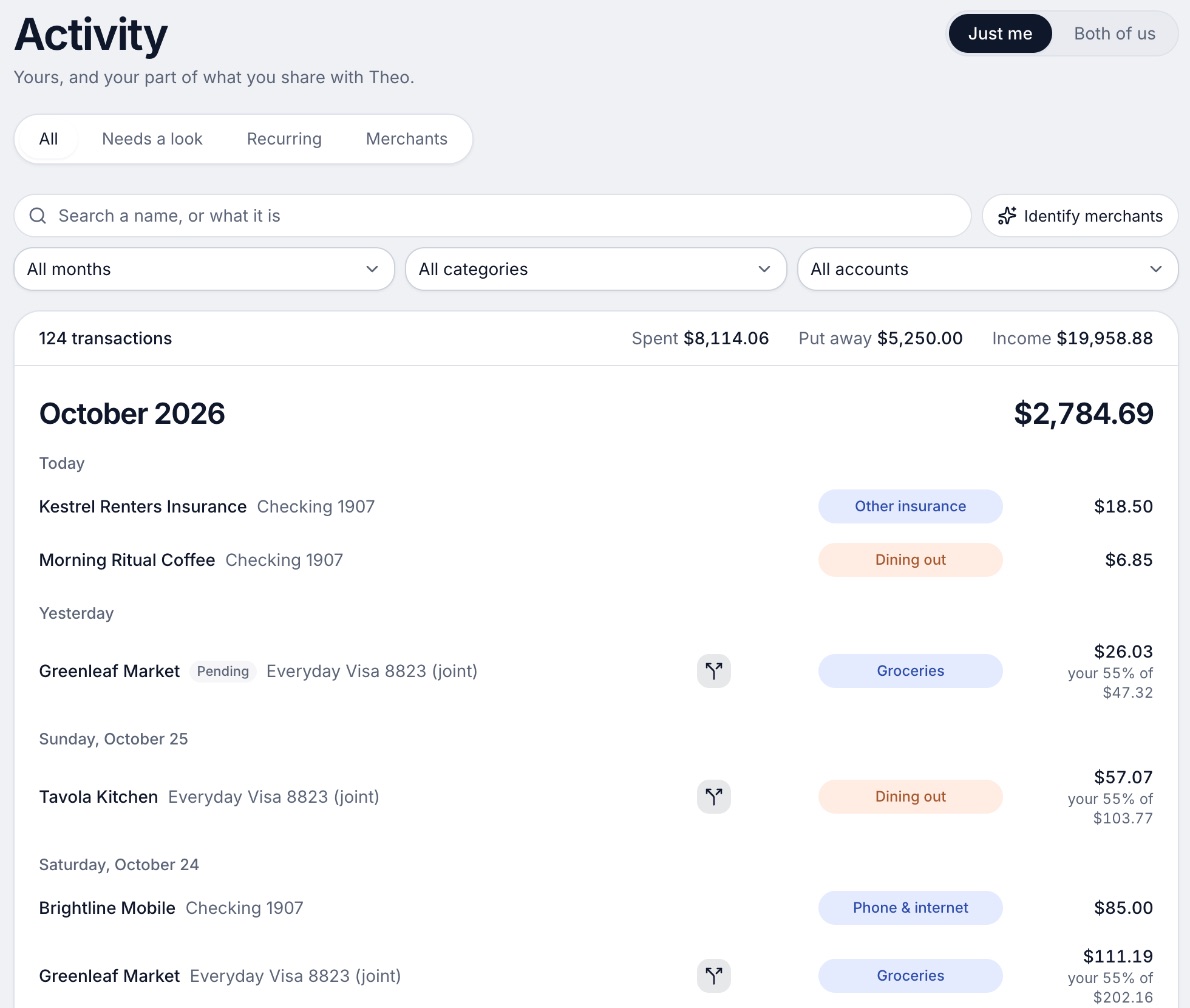
Good
How to choose
Keep the sheet if you will fill it in. Open the Excel or Google Sheets template whose categories look most like your month and run it for two months. If the actual column is still filled in at the end of the second, you are done. If not, you have learned that the typing was the problem, not the budget.
Choose Tiller if you:
- Like sheets and want to keep your own file
- Want a bank feed without leaving Google Sheets or Excel
- Are fine paying $99 a year to avoid typing
Choose Lunch Money if you:
- Want rules and tags like a sheet gives you, in an app
- Share a budget with more than one person
- Follow your pay cycle, not the calendar month
Choose YNAB (You Need A Budget) if you:
- Want to give every dollar a job
- Will use a 34-day trial to learn the method
- Want one subscription for up to six people
Choose Wonderful if you:
- Keep your own accounts and share some costs
- Want each paycheck planned before it lands
- Are fine with a web app for now
Where Wonderful fits, and where it doesn't
If a free sheet works for you, keep it. Wonderful is the wrong pick for someone who wants to pay nothing: it has a free week and no free plan, and Excel, Google Sheets and Notion cost nothing to start. It also isn't the pick if you want to keep every formula yourself; that is Tiller. It is for the reader who has outgrown a sheet: it connects banks, sorts charges, plans each paycheck and, for two people, shows who owes whom. It runs in the browser with no iPhone or Android app yet. See the full list of budgeting apps, the free ones, and our budgeting for couples guide.
Questions people ask
Is there a free budget spreadsheet?
Yes, several. Microsoft's Create page lists 30 free budget templates for Excel, Google Sheets has a template gallery with budgets in it, Notion's gallery has free budget and expense templates, and Tiller publishes free sheets. All of them are blank until you type in your numbers.
Where do I find the Google Sheets budget template?
Open Google Sheets on a computer, click Template Gallery at the top right, pick a template and a copy opens for you to edit. Google's help page says the gallery includes budgets. Its template names and layouts change, so search the gallery for budget and compare two or three.
Is there a free budget template in Excel?
Yes. Microsoft's Create page lists 30 free budget templates, including Household monthly budget, Family monthly budget, Simple annual budget, Personal monthly budget and Basic personal budget. Each opens as an Excel file you can save and edit.
Does Notion have a budget template?
Yes. Notion's template gallery lists free templates under finance and expense tracking, with 472 expense tracker and 138 cash flow templates shown on its finance category page. Most are made by outside creators, and the gallery has a Free filter.
Are Tiller's templates free?
Its templates page calls them free, prebuilt sheets, and lists 18, including Monthly Budget, Yearly Budget and Debt Payoff Planner. They are built to work with the transactions in a Tiller spreadsheet, and Tiller itself costs $99 a year after a 30-day trial.
How do I connect my bank to a budget spreadsheet?
A plain Google Sheets or Excel file can't do it alone. Tiller is a paid service that sends your bank transactions into a Google Sheets or Excel spreadsheet you own, for $99 a year. Otherwise you download your bank's CSV and paste it in, or type each charge.
When should I stop using a spreadsheet to budget?
When the typing stops happening. If you skip a week and then give up, or two people edit one file and nobody trusts the totals, a bank feed does the typing for you. Our own pick for that point is in the last section of this page.
Can a couple share one budget spreadsheet?
Yes. In Google Sheets or Excel you share the file with edit access. The harder part is the file itself: it has no way to hold what each of you owns versus what you share, so you track who owes whom by hand. Our budgeting for couples guide covers how to set that up.
What is the difference between this and your printable template?
The printable monthly budget template on this site is a single sheet you print and fill in by hand. This page is about the files in Excel, Google Sheets, Notion and Tiller, and where each one comes from.
Sources
30 sources · read November 2, 2026
Every number on this page comes from excel.cloud.microsoft, support.google.com, workspace.google.com and 12 more. If a source has changed since, the source is right.
- 1Microsoft Create: free budget templates for Excelexcel.cloud.microsoft
- 2Google Docs Editors Help: create a file from a templatesupport.google.com
- 3Google Workspace: Sheetsworkspace.google.com
- 4Notion templates: financenotion.com
- 5Notion templates: expense trackernotion.com
- 6Tiller: templatestiller.com
- 7Tiller: community templatestiller.com
- 8Tiller: Foundation Templatetiller.com
- 9Tiller hometiller.com
- 10Tiller pricingtiller.com
- 11Tiller featurestiller.com
- 12Hacker News search for Tiller Money commentshn.algolia.com
- 13Lunch Money help center welcomesupport.lunchmoney.app
- 14Lunch Money blog: The Least Annoying Price Increase in History (Oct 16, 2024)lunchmoney.app
- 15Lunch Money help center: Getting startedsupport.lunchmoney.app
- 16Lunch Money blog: 11 Lunch Money Features You Should Be Usinglunchmoney.app
- 17Hacker News search for Lunch Money commentshn.algolia.com
- 18Lunch Money on the App Storeapps.apple.com
- 19Lunch Money pricinglunchmoney.app
- 20YNAB pricingynab.com
- 21YNAB featuresynab.com
- 22The YNAB methodynab.com
- 23YNAB on the App Storeapps.apple.com
- 24YNAB on Google Playplay.google.com
- 25Apple public review feed for YNABitunes.apple.com
- 26YNAB: Using YNAB as Partnerssupport.ynab.com
- 27Trustpilot, ynab.comtrustpilot.com
- 28Wonderful terms of servicewonderful.money
- 29Wonderful privacy policywonderful.money
- 30Wonderfulwonderful.money
App names are trademarks of their owners; Wonderful isn't connected with them. Wonderful gives general information. It isn't a financial or tax advisor.