The short version
Most budgeting apps plan by calendar month and leave a third paycheck for you to deal with. YNAB says to live on two paychecks and treat the third as extra. EveryDollar Premium plans what each paycheck covers, and Simplifi adjusts its plan to a weekly or two-week schedule. Wonderful, which we make, gives every paycheck a plan before it lands.
- 1
Wonderful: Plans every paycheck before it lands
- 2
YNAB (You Need A Budget): Treats the third check as a head start
- 3
EveryDollar: A month plan with a paycheck view on Premium
- 4
Goodbudget: You choose how often envelopes fill
- 5
Quicken Simplifi: Set the schedule once and the plan adjusts
- 6
Monarch Money: A monthly budget; pay timing is up to you
- 7
PocketGuard: Tracks the next paycheck by date
At a glance
| App | Plans by | Pay schedules | A third-paycheck month | Price |
|---|---|---|---|---|
| Wonderful | Each paycheck: every one gets a plan for bills, spending and saving before it lands[14] | Plans paychecks as they land, whatever the schedule | A third check is one more paycheck to plan; the pages don't describe a special rule for it | $14.99/mo or $99/yr |
| YNAB (You Need A Budget) | The month, with only money you have on hand assigned[4] | "YNAB works with any pay cycle," with a guide for a monthly plan on biweekly pay[2] | Live on two paychecks and treat the third as extra income to get ahead[3] | $14.99/mo or $109/yr |
| EveryDollar | The month; Premium adds Paycheck Planning, which decides what each paycheck covers[5] | The pages we read don't list the schedules Paycheck Planning supports | The pages we read don't describe a third-paycheck month | Free, or $17.99/mo or $79.99/yr |
| Goodbudget | A budgeting period you choose; for a 4-week paycheck, a monthly period based off one paycheck[6] | Fills can be scheduled to repeat at the frequency you pick[7] | Income you add stays Available until you put it in an envelope[6] | Free, or $10/mo or $80/yr |
| Quicken Simplifi | The month: a spending plan with income, bills and savings | Recurring income can be every week or every two weeks, and the plan, cash flow and upcoming transactions adjust[8] | A custom income amount works one month at a time. The pages we read don't describe a third-paycheck month[9] | $6.99/mo; $3.99/mo the first year |
| Monarch Money | The month: a flex number worked out from the month's income[10] | The page we read never mentions how often you are paid | Not described; the budget starts from a month's income | $14.99/mo or $99.99/yr |
| PocketGuard | Recurring income with a next deposit date[11] | You enter the frequency; a twice-a-month income expects two deposits in the month[11] | Not described on the page we read | $6.25/mo or $74.99/yr |
How we compared
Nearly every budgeting app shows a calendar month. Pay does not arrive by the calendar, so we looked at what an app does about that:
- What it plans by. A paycheck, a calendar month, or a period you set.
- Which pay schedules it names. Weekly, every two weeks, twice a month, monthly.
- A month with an extra paycheck. Whether its pages say what to do with a third biweekly or fifth weekly check.
- What it costs. So you can weigh a paycheck view against the price.
We read each app's help and pricing pages on November 2, 2026, and each fact is numbered to its page at the end. We haven't used these apps ourselves. Where a page says nothing about a third paycheck, the table says so rather than guess. For all-round picks, see best budgeting apps; to compare costs, see best free budgeting apps.
How many paychecks you get a year
The IRS counts 52 pay periods a year for weekly pay, 26 for biweekly, 24 for semimonthly and 12 for monthly.[1] Monthly pay matches a monthly budget one for one. The others do not.
- Biweekly: 26 checks, so two months a year hold three. Which two depends on your first payday. See biweekly pay and the months with three and the 2026 payroll calendar.
- Weekly: 52 checks, so four or five months a year hold five. Most months hold four.
- Semimonthly: 24 checks, two in every month. That is why it is easy on a monthly budget. See biweekly vs semimonthly.
- Monthly: 12 checks, one a month.
A worked example shows the gap. Take $2,000 per biweekly check: $52,000 a year, or $4,333 a month on average. A two-check month brings in $4,000, which is $333 under that average. A three-check month brings in $6,000, which is $1,667 over it. A budget sized to the average runs short in ten months and flush in two.
Planning by paycheck or by month
There are two ways to build the plan, and the apps split on them.
By calendar month
YNAB, Goodbudget, Simplifi and Monarch are shaped around a month or a budgeting period. YNAB assigns "the dollars you have on hand right now," so each paycheck is assigned when it arrives.[4] Monarch's budget starts from the month's income, and its flex number changes month to month.[10] Simplifi shows a spending plan for each month, and a custom income amount applies to one month at a time.[9] Goodbudget recommends a monthly budgeting period based off one of your paychecks if you are paid every four weeks.[6]
By paycheck
EveryDollar Premium's Paycheck Planning "helps you decide what each paycheck should cover before you spend the money."[5] Wonderful plans each paycheck the same way: every paycheck gets a plan for bills, spending and saving before it lands, and it lists what is due before your next one.
Neither is wrong. A monthly view is easier if your bills follow the calendar. A paycheck view is easier if the money arrives in steps and rent comes due on the 1st. To try it by hand first, the paycheck budget planner shows which check pays each bill, and the biweekly budget planner lays out all 26.
The third-paycheck month, app by app
This is where the apps differ most, and where the pages say least.
- YNAB: "So they live on two paychecks and treat the third one as extra income to get ahead."[3]
- Goodbudget: money you add stays Available until you distribute it to an envelope, so a third check can wait there until you decide.[6]
- Simplifi: once you set every two weeks, the plan, cash flow and upcoming transactions adjust.[8] It doesn't say what the plan does with a third check, so look at that month before it arrives.
- EveryDollar, Monarch and PocketGuard: the pages we read don't describe it. Plan the third check yourself by the same rule.
Whichever app you use, the rule from our three-paycheck-months guide works: build the budget on two checks, and decide in advance what the extra one does.
1. Plans every paycheck before it lands
Wonderful
$14.99/mo or $99/yr· Web
What it is
A budgeting app for couples who keep their own money, and for one person: each of you connects your own bank, chooses what the other sees, and every paycheck gets a plan.
Why it's on this list
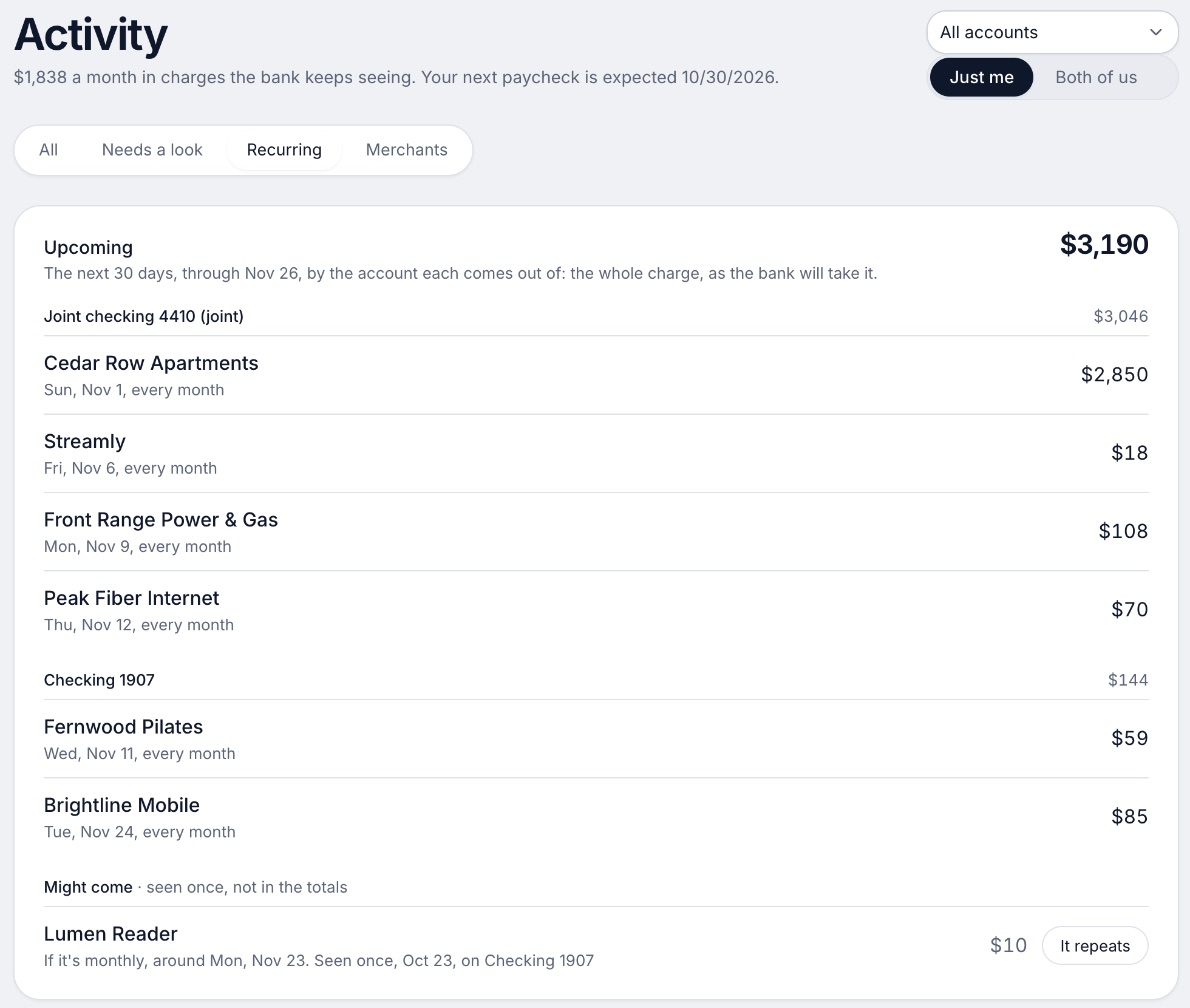
We make Wonderful. Every paycheck gets a plan for bills, spending and saving before it lands, and it lists what is due before your next paycheck. It finds recurring charges and flags a bill that comes in higher than usual. For two people, a partner joins at no extra cost on one household price.
It isn't free: a free week, then $14.99 a month or $99 a year for the household. It runs in the browser; there is no iPhone or Android app yet.
Ideal for: Anyone paid every week or two who wants each check planned for bills, spending and saving.
What it does
- Every paycheck gets a plan for bills, spending and saving before it lands.[14]
- Banks connect through Plaid and every charge is sorted into a category.[13][14]
- Mine, yours and ours: each charge counts for the person or the pair it belongs to.[14]
- Finds recurring charges and subscriptions, lists what's due before your next paycheck, and flags a bill that comes in higher than usual. It doesn't cancel them for you.[14]
- Texts you by iMessage when a bill is charged twice, a price goes up or a refund lands, and you can text it questions.[14]
- Savings goals show the month you'll reach them.[14]
- Net worth for each of you and for both, from the balances your banks send, with its line over time.[14]
- Life events like getting married come step by step, with the deadlines.[14]
Good
How to choose
Choose YNAB (You Need A Budget) if you:
- Want to live on two checks and bank the third
- Want to assign only money you already have
- Will pay $109 a year
Choose EveryDollar if you:
- Want to decide what each paycheck covers
- Will pay for Premium, $79.99 a year
Choose Goodbudget if you:
- Like envelopes you fill on a schedule
- Can type transactions on the free plan
Choose Quicken Simplifi if you:
- Are paid every week or two weeks
- Want the plan to adjust once you set the schedule
Choose Wonderful if you:
- Want each check planned before it lands
- Share bills with a partner
- Are fine with a web app for now
Where Wonderful fits, and where it doesn't
If you are paid monthly, any of these works, and the paycheck view adds little. If you want the lowest price, Goodbudget has a free plan and Wonderful has none. If you want a rule for the third check, YNAB states one and Wonderful doesn't. If you want every paycheck planned before it lands, Wonderful is built for that. It runs in the browser only and gives no investment advice. See also the biweekly budget planner.
Questions people ask
What is the best budgeting app for biweekly pay?
It depends on how you want the third paycheck handled. YNAB suggests living on two paychecks and treating the third as extra income to get ahead. Simplifi lets you set recurring income to every two weeks and adjusts the plan. Wonderful gives every paycheck its own plan before it lands. Our biweekly budget planner is free if you only want to see all 26 checks.
How many paychecks do I get a year on weekly, biweekly or monthly pay?
52, 26 and 12, per the IRS's Publication 15-T, Table 3. Semimonthly, twice a month, is 24. Biweekly has two months with three paychecks a year, and weekly has months with five.
Which months have three paychecks if I am paid biweekly?
It depends on your first payday. Our three-paycheck-months guide lists them for 2026 and 2027 for each start date, and the 2026 payroll calendar shows every payday for the two Friday schedules.
Should I budget my biweekly pay by the month or by the paycheck?
Either works if you plan for the months with three. A monthly budget built on two paychecks treats the third as extra. A paycheck budget assigns each check to the bills due before the next one. The paycheck budget planner on this site shows which check pays each bill.
Does YNAB work with biweekly pay?
Yes. YNAB's support site says it works with any pay cycle and has an article on using a monthly plan when you are paid every two weeks. It assigns only dollars you have on hand, so a paycheck is assigned when it arrives.
Does EveryDollar work with biweekly pay?
Its Premium plan has Paycheck Planning, which lets you decide what each paycheck should cover before you spend it. Premium is $79.99 a year or $17.99 a month, with a 14-day free trial for new users. The pages we read don't list the pay schedules it supports.
Does Goodbudget work if I am paid every two weeks?
Yes, you choose how often envelopes fill and can schedule a repeating fill. For a 4-week paycheck, Goodbudget recommends a monthly budgeting period based off one of your paychecks. The free plan has 10 regular envelopes and 10 annual or goal envelopes.
What do I do with a third paycheck?
Decide before it lands. Common choices are a savings goal, a bill that comes once a year, or getting a month ahead. Our guide on budgeting on two paychecks so the third is extra walks through it.
Is there a budgeting app for weekly pay?
Simplifi lists every week as a recurring income frequency, and Goodbudget lets you schedule fills at the frequency you choose. Weekly pay is 52 paychecks a year, so four or five months have five. See the table above.
Is there a free budgeting app for paycheck-based budgets?
Goodbudget has a free plan with limits and a repeating fill. EveryDollar's free version is a monthly budget, and its paycheck planning is Premium. Wonderful is not free: a free week, then $14.99 a month or $99 a year for the household.
Sources
61 sources · read November 2, 2026
Every number on this page comes from irs.gov, support.ynab.com, ynab.com and 13 more. If a source has changed since, the source is right.
- 1IRS: Publication 15-T, Table 3 (pay periods per year)irs.gov
- 2YNAB support: How to adjust your plan on any pay cyclesupport.ynab.com
- 3YNAB: How to get a month aheadynab.com
- 4YNAB support: Assigning future incomesupport.ynab.com
- 5EveryDollar help: What is Paycheck Planningsmartdollar.help.ramseysolutions.com
- 6Goodbudget help: How to budget with a 4-week paycheckgoodbudget.com
- 7Goodbudget help: Re-fill your envelopes each budgeting periodgoodbudget.com
- 8Quicken: Get the most out of Simplifiquicken.com
- 9Simplifi support: Set a custom income amount in the spending plansupport.simplifi.quicken.com
- 10Monarch: Flex budgetingmonarch.com
- 11PocketGuard help: Track and automate recurring incomepocketguard.com
- 12Wonderful terms of servicewonderful.money
- 13Wonderful privacy policywonderful.money
- 14Wonderfulwonderful.money
- 15YNAB pricingynab.com
- 16YNAB featuresynab.com
- 17The YNAB methodynab.com
- 18YNAB on the App Storeapps.apple.com
- 19YNAB on Google Playplay.google.com
- 20Apple public review feed for YNABitunes.apple.com
- 21YNAB: Using YNAB as Partnerssupport.ynab.com
- 22Trustpilot, ynab.comtrustpilot.com
- 23EveryDollar plans (Ramsey Solutions)ramseysolutions.com
- 24EveryDollar budget page (Ramsey Solutions)ramseysolutions.com
- 25EveryDollar on the App Storeapps.apple.com
- 26EveryDollar on Google Playplay.google.com
- 27Apple public review feed for EveryDollaritunes.apple.com
- 28Goodbudget pricing (signup page)goodbudget.com
- 29Goodbudget help: Subscribe to Goodbudgetgoodbudget.com
- 30Goodbudget refunds and cancellationsgoodbudget.com
- 31Goodbudget home pagegoodbudget.com
- 32Goodbudget help indexgoodbudget.com
- 33App Store listing, Goodbudgetapps.apple.com
- 34App Store reviews, Goodbudgetapps.apple.com
- 35Goodbudget envelope budgeting pagegoodbudget.com
- 36Goodbudget changeloggoodbudget.com
- 37Quicken Simplifi product pagequicken.com
- 38Quicken blog: personal finance software with the best customer supportquicken.com
- 39Simplifi help: How to use Spaces sharingsupport.simplifi.quicken.com
- 40Simplifi help: How to cancel and get a refundsupport.simplifi.quicken.com
- 41Simplifi help: Subscription questionssupport.simplifi.quicken.com
- 42App Store listing, Quicken: Budget & Track Moneyapps.apple.com
- 43App Store reviews, Quicken: Budget & Track Moneyapps.apple.com
- 44Monarch pricingmonarch.com
- 45Monarch on the App Storeapps.apple.com
- 46Monarch on Google Playplay.google.com
- 47Monarch home pagemonarch.com
- 48Monarch for couplesmonarch.com
- 49Monarch collaborationmonarch.com
- 50Monarch budgetingmonarch.com
- 51Monarch planningmonarch.com
- 52Apple public review feed for Monarchitunes.apple.com
- 53Monarch help: Monarch for Couples and Householdshelp.monarch.com
- 54Trustpilot, www.monarchmoney.comtrustpilot.com
- 55PocketGuard home pagepocketguard.com
- 56PocketGuard pricingpocketguard.com
- 57PocketGuard help: Plus overviewpocketguard.com
- 58PocketGuard help: all featurespocketguard.com
- 59App Store listing, PocketGuardapps.apple.com
- 60App Store reviews, PocketGuardapps.apple.com
- 61Trustpilot, pocketguard.comtrustpilot.com
App names are trademarks of their owners; Wonderful isn't connected with them. Wonderful gives general information. It isn't a financial or tax advisor.