The short version
EveryDollar works for couples who want one shared budget. Its Household feature lets two people manage one budget even when each signs in with a separate email.[2][3] It doesn't work as well if you keep separate accounts, because the pages describe no separate views, and Ramsey's own advice is to share everything.[1]
- 1
EveryDollar: Couples who share all their money and follow Ramsey's plan
- 2
Wonderful: Keep your own accounts and choose what the other sees
- 3
YNAB (You Need A Budget): Zero-based, with one subscription for up to 6 people
- 4
Honeydue: A free app made for two
- 5
Goodbudget: Envelopes shared across two phones
- 6
Monarch Money: A household view at one price for both
How sharing works in EveryDollar
EveryDollar calls it Household. These are the things its pages state.
- A Household feature lets a couple manage one budget together, even when each partner signs in with a separate email. The page does not say whether it is free or Premium only.[2][3]
- Ramsey's couples article says to "invite your spouse to your EveryDollar household" so you can each sign in separately, and that with "one shared household budget," both spouses can see where money goes and adjust as needed.[1]
- What each person sees: Not stated. The pages describe one shared budget, not separate views.[2][3]
- Splitting a cost between the two of you: not described. The free version splits one transaction across categories, which is a different thing.[2]
The free version runs on the web and phone, and the paid one imports transactions from your bank.[2]
What EveryDollar costs for two
A free version you can use as long as you want. It has a monthly budget, unlimited categories, manual transactions, sinking funds, split transactions, bill due dates and live-person support. It does not import transactions from a bank.[2][3] Premium is $79.99 billed yearly, about $6.67 a month.[2][4] Billed monthly it is $17.99, which is $215.88 over twelve months. Premium includes a 14-day free trial, for new users only.[2]
What the pages don't say is whether Household is free or Premium only, or whether your spouse needs their own plan. So the cost for two is either $0 or $79.99 a year, and the answer is in the app.
- EveryDollar$79.99
- Goodbudget$80
- Wonderful$99
- Monarch Money$99.99
- YNAB (You Need A Budget)$109
The cheapest way to pay for a year on each app's own pages. Goodbudget's and EveryDollar's pages don't say how a second person is covered. In Wonderful, Monarch and YNAB a partner is included.
More on the plans in EveryDollar pricing in 2026.
What Ramsey recommends for couples
EveryDollar is Ramsey Solutions' app, and Ramsey has a view on how couples should hold money.[1]
- Accounts: fully shared. Ramsey says of that setup, "This is what we recommend." A hybrid of shared and personal accounts: "We don't recommend this."
- Meetings: once a month, before the month begins, plus an optional quick weekly check-in.
- Fun money: "a set amount you budget for personal wants each month." You don't need to agree on every purchase "as long as you're both sticking to the plan." In Baby Step 2, couples may need to keep it lean while attacking debt.
That is a coherent approach, and for couples who are paying off debt together it is one many people follow. If it matches how you already handle money, EveryDollar fits. For a monthly meeting format, see our money date guide.
Where EveryDollar falls short for couples
- One budget, not two. If you keep separate accounts, a shared household budget shows everything to both of you. The pages mention no way to hide an account. See budgeting apps for couples with separate accounts.
- Bank sync costs $79.99 a year. On the free version, someone types every transaction.[2]
- Unclear terms for two. The pages don't say if Household is free, what each person sees, or how costs get split.[2]
- Reliability reports. Several 2026 reviews describe transactions arriving days late or connections that need reconnecting, and updates that removed splitting.[6]
“My wife and I’ve been using this app for eight years. Can’t live without it.”Read it where it was said ↗
“Continually drops bank connections and no refund offered after 30 days. If you download, don’t shell out the $80 to link banks.”Read it where it was said ↗
“The app is extremely helpful and I highly recommend it. Only negative is transactions from the weekend Don’t show up until Tuesday sometimes Wednesday.”Read it where it was said ↗
Alternatives for couples
See also EveryDollar alternatives.
1. Keep your own accounts and choose what the other sees
Wonderful
$14.99/mo or $99/yr· Web
What it is
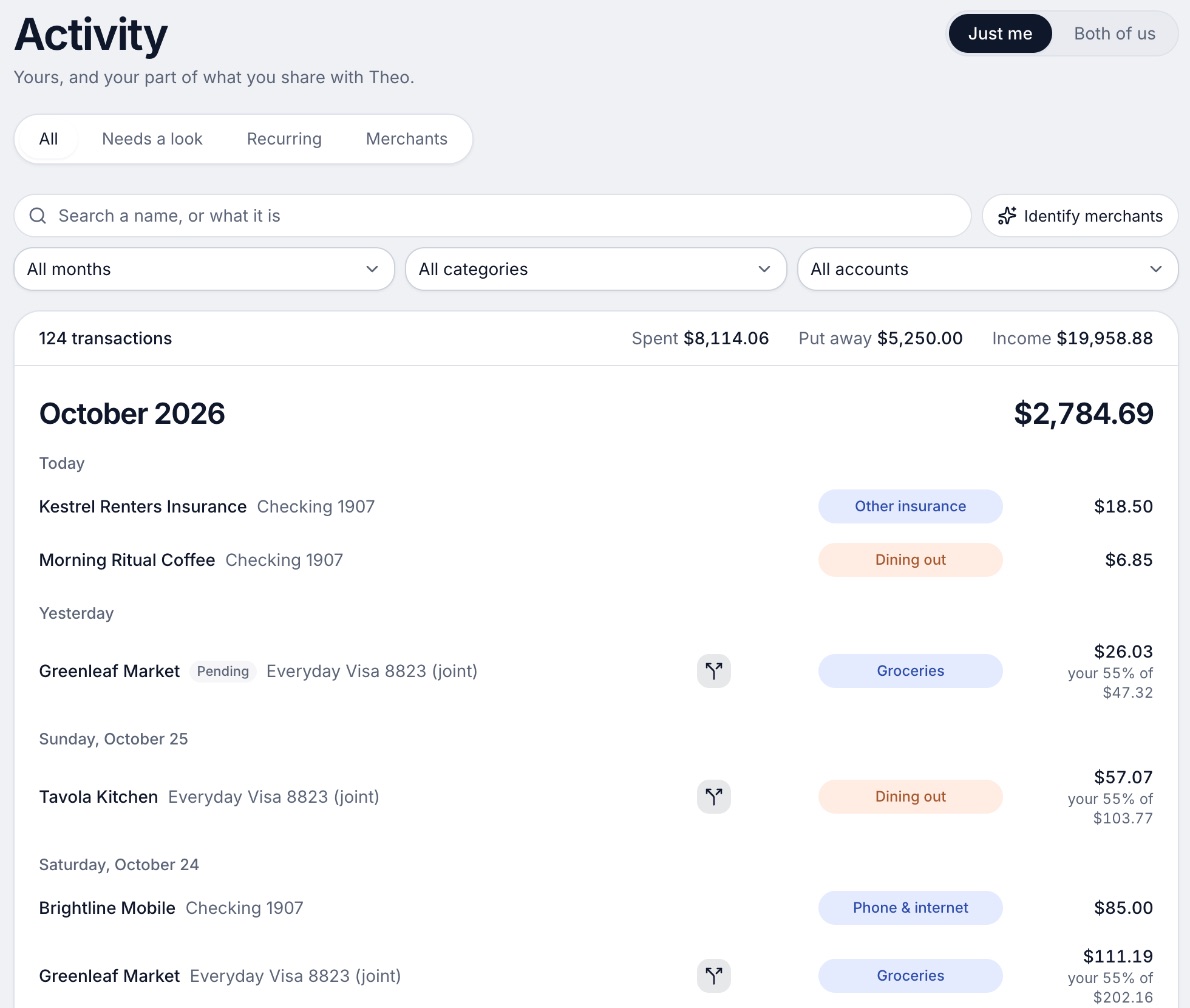
A budgeting app for couples who keep their own money, and for one person: each of you connects your own bank, chooses what the other sees, and every paycheck gets a plan.
Why it's on this list
We make Wonderful, so weigh this entry accordingly. Each of you connects your own bank and chooses, account by account, what the other sees, and every paycheck gets a plan. Shared costs split evenly, by income or any way you choose. It is the opposite of Ramsey's shared-everything advice, and it isn't free: a free week, then $99 a year for both of you. It runs in the browser only.
Ideal for: Two people who keep their own accounts and want the other to see only what they choose.
What it does
- Every paycheck gets a plan for bills, spending and saving before it lands.[9]
- Banks connect through Plaid and every charge is sorted into a category.[8][9]
- Mine, yours and ours: each charge counts for the person or the pair it belongs to.[9]
- Finds recurring charges and subscriptions, lists what's due before your next paycheck, and flags a bill that comes in higher than usual. It doesn't cancel them for you.[9]
- Texts you by iMessage when a bill is charged twice, a price goes up or a refund lands, and you can text it questions.[9]
- Savings goals show the month you'll reach them.[9]
- Net worth for each of you and for both, from the balances your banks send, with its line over time.[9]
- Life events like getting married come step by step, with the deadlines.[9]
Good
YNAB
YNAB Together shares one subscription with up to six people, "for the price of a single subscription." It is meant for partners and other close groups.[10][11][16] It is a zero-based method like EveryDollar, at $109 a year after a 34-day trial.[10][13] See YNAB vs EveryDollar and YNAB for couples.
Honeydue
After you connect a bank, Honeydue asks what your partner can see: balances and transactions, balances only, or nothing.[21] It is free, though reviews report accounts that stopped syncing.[23][24]
Goodbudget
A budget is shared across devices, not across separate logins that the pages describe. The free plan shares with 2 mobile devices; Premium shares with 5. The App Store listing says it suits "sharing a budget with a spouse, family member, or friend".[29][33] Like EveryDollar's free version, the free plan is manual entry.
Monarch
A partner joins at no extra cost under the same subscription and gets their own login. The page says, "Partners will each have their own login, but can view each other's data."[41][42] Both partners see everything, and it costs $99.99 a year.[41][42][46]
How to choose
Choose EveryDollar if you:
- Share all your money and follow Ramsey's plan
- Will type in transactions, or pay $79.99 a year
- Want one budget for both of you
Choose Wonderful if you:
- Keep your own accounts
- Want to choose what your partner sees
- Will pay $99 a year for both of you
Choose YNAB (You Need A Budget) if you:
- Like a zero-based method
- Want separate logins on one subscription
- Are fine paying $109 a year
Choose Honeydue if you:
- Want it free
- Want per-account privacy
- Use phones only
Where Wonderful fits, and where it doesn't
If you and your spouse share every account and want Ramsey's method, EveryDollar's free version is the cheaper start and Wonderful isn't needed. Wonderful fits when you keep some money separate. It is the wrong pick if you want a free plan after the first week, or an iPhone or Android app, since it runs in the browser only for now. See best budgeting apps for couples.
Questions people ask
Does EveryDollar work for couples?
Yes, if you are happy to run one shared budget. EveryDollar's Household feature lets couples manage one budget together, even when each of you signs in with a separate email. It works less well if you each keep your own accounts, since the pages describe one shared budget and no separate views.
How do I share an EveryDollar budget with my spouse?
Ramsey's couples article says to invite your spouse to your EveryDollar household, so you can each sign in separately. The invite goes to your spouse's email and they accept it. Ramsey's plans page doesn't say whether Household needs Premium, so check the app before you rely on it.
Is EveryDollar free for two people?
The free version has no end date, and covers a monthly budget, unlimited categories, sinking funds and split transactions, but you type in transactions. Premium is $79.99 billed yearly or $17.99 billed monthly, after a 14-day free trial for new users.
Do we both need to pay for EveryDollar Premium?
The plans page doesn't say. It describes Household as two people on one budget. Check in the app whether your spouse needs their own Premium before assuming they don't.
Can I keep some accounts private from my spouse in EveryDollar?
EveryDollar's pages don't describe it. They describe one shared budget, not separate views. Ramsey's own advice is to share everything: its couples article recommends fully shared accounts and says of a hybrid setup, "We don't recommend this."
Does Ramsey recommend joint or separate accounts?
Joint. Ramsey's couples article recommends fully shared accounts, advises against a hybrid, and describes fully separate accounts as "how roommates handle money." If you keep separate accounts, EveryDollar is built around a different idea of marriage than yours.
How often should couples meet about their EveryDollar budget?
Ramsey says once a month, before the new month begins, with an optional quick weekly check-in. Our money date guide has a format for the monthly meeting that works in any app.
What is a good EveryDollar alternative for couples?
For separate accounts with a say in what your partner sees, Wonderful and Honeydue. For another zero-based budget, YNAB shares one subscription with up to 6 people. For envelopes, Goodbudget's free plan shares a budget across 2 phones.
Sources
47 sources · read November 3, 2026
Every number on this page comes from ramseysolutions.com, apps.apple.com, play.google.com and 10 more. If a source has changed since, the source is right.
- 1Ramsey Solutions: How to budget as a coupleramseysolutions.com
- 2EveryDollar plans (Ramsey Solutions)ramseysolutions.com
- 3EveryDollar budget page (Ramsey Solutions)ramseysolutions.com
- 4EveryDollar on the App Storeapps.apple.com
- 5EveryDollar on Google Playplay.google.com
- 6Apple public review feed for EveryDollaritunes.apple.com
- 7Wonderful terms of servicewonderful.money
- 8Wonderful privacy policywonderful.money
- 9Wonderfulwonderful.money
- 10YNAB pricingynab.com
- 11YNAB featuresynab.com
- 12The YNAB methodynab.com
- 13YNAB on the App Storeapps.apple.com
- 14YNAB on Google Playplay.google.com
- 15Apple public review feed for YNABitunes.apple.com
- 16YNAB: Using YNAB as Partnerssupport.ynab.com
- 17Trustpilot, ynab.comtrustpilot.com
- 18Honeydue home pagehoneydue.com
- 19Honeydue: How it workshoneydue.com
- 20Honeydue help: How does Honeydue earn moneysupport.honeydue.com
- 21Honeydue help: Will my partner see my accountssupport.honeydue.com
- 22Honeydue Joint Cashhoneydue.com
- 23Honeydue on the App Storeapps.apple.com
- 24Honeydue on Google Playplay.google.com
- 25Apple public review feed for Honeydueitunes.apple.com
- 26Honeydue help: Account issues and inviting a partnersupport.honeydue.com
- 27Honeydue help: How do I cancel my accountsupport.honeydue.com
- 28Goodbudget pricing (signup page)goodbudget.com
- 29Goodbudget help: Subscribe to Goodbudgetgoodbudget.com
- 30Goodbudget refunds and cancellationsgoodbudget.com
- 31Goodbudget home pagegoodbudget.com
- 32Goodbudget help indexgoodbudget.com
- 33App Store listing, Goodbudgetapps.apple.com
- 34App Store reviews, Goodbudgetapps.apple.com
- 35Goodbudget envelope budgeting pagegoodbudget.com
- 36Goodbudget changeloggoodbudget.com
- 37Monarch pricingmonarch.com
- 38Monarch on the App Storeapps.apple.com
- 39Monarch on Google Playplay.google.com
- 40Monarch home pagemonarch.com
- 41Monarch for couplesmonarch.com
- 42Monarch collaborationmonarch.com
- 43Monarch budgetingmonarch.com
- 44Monarch planningmonarch.com
- 45Apple public review feed for Monarchitunes.apple.com
- 46Monarch help: Monarch for Couples and Householdshelp.monarch.com
- 47Trustpilot, www.monarchmoney.comtrustpilot.com
App names are trademarks of their owners; Wonderful isn't connected with them. Wonderful gives general information. It isn't a financial or tax advisor.