The short version
Two apps let you choose, account by account, what your partner sees: Honeydue, which is free and phone-only, and Wonderful, which we make and which costs $99 a year for both of you after a free week. Monarch, Origin and Rocket Money give each partner a login but show both people everything. YNAB gives each person separate plans, though the person who pays can see them all.
- 1
Wonderful: Choose, per account, what the other sees; one price for two
- 2
Honeydue: A free app with the same per-account choice
- 3
YNAB (You Need A Budget): Separate plans and logins, but the manager sees every plan
- 4
Monarch Money: Own logins, and no way to hide an account
- 5
Origin: Own accounts, one combined household view
- 6
Rocket Money: Own logins, but the partner sees everything
- 7
EveryDollar: One shared budget, not separate ones
- 8
Splitwise: Tracks shared costs only, so nothing else is exposed
At a glance
| App | What your partner sees | Own login | Price for two |
|---|---|---|---|
| Wonderful | You choose per account: everything, totals or nothing | Yes, at no extra cost | $99 a year, or $14.99 a month |
| Honeydue | You choose per account: balances and transactions, balances only, or nothing | Yes | Free, optional tips |
| YNAB (You Need A Budget) | Members share plans they own; the manager sees every member's plan | Yes; one subscription for up to 6 | $109 a year, or $14.99 a month |
| Monarch Money | Everything; accounts can't be hidden | Yes, at no extra cost | $99.99 a year, or $14.99 a month |
| Origin | A combined view of both; no way to share only some accounts described | Yes, at no extra cost | $1 first year, then $99 a year |
| Rocket Money | Everything; hiding an account isn't offered | Yes, but Premium is required | One Premium plan, $7 to $14 a month |
| EveryDollar | One shared budget; separate views not stated | Yes, via Household; cost not stated | Free, or Premium $79.99 a year |
| Splitwise | Only the expenses you add to a shared group or friend | Yes, each has an account | Free, 4 expenses a day |
The test: can you keep your own accounts?
Most couples roundups ask which app has the best budget. If you each keep your own accounts, the first question is different: when your partner joins, what happens to your personal checking account? Four things decide it.
- Do you each connect your own bank? Or does one of you link everything and share a single login?
- Can you hide an account, or only its details? Some apps let you show balances without the places and amounts.
- Does the second person pay? A second subscription doubles the cost, and some plans end for the partner when the payer cancels.
- Can you track shared costs without merging? A joint rent or a shared grocery run still has to be split somewhere.
We read each app's pricing and help pages for those four points and numbered every source at the end. Where a page doesn't say, we say it doesn't. For a longer app-by-app look at privacy alone, see what your partner can see in couples budgeting apps. For the whole couples field, see best budgeting apps for couples.
1. Choose, per account, what the other sees; one price for two
Wonderful
$14.99/mo or $99/yr· Web
What it is
A budgeting app for couples who keep their own money, and for one person: each of you connects your own bank, chooses what the other sees, and every paycheck gets a plan.
Why it's on this list
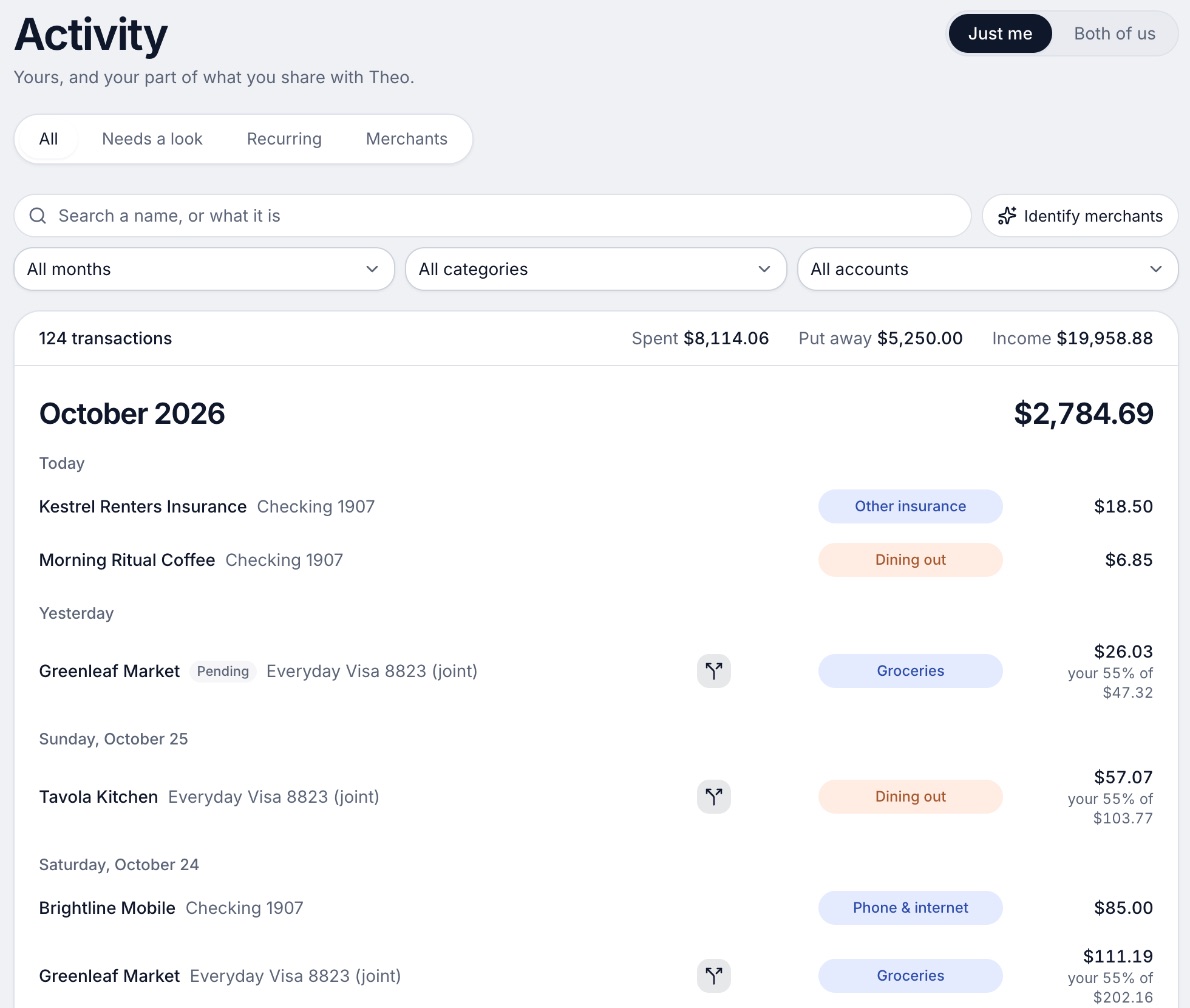
We make Wonderful, so weigh this entry accordingly. It is built for the case this page is about. Each of you connects your own bank, and for each account you choose whether the other person sees everything, only totals, or nothing.[5] A partner joins with their own login at no extra cost, and one subscription covers the household.[4]
Every charge counts for the person or the pair it belongs to, and shared costs split evenly, by income or any way you choose, with a running total of who owes whom. You can also switch from separate to shared money on a date you pick, and earlier months stay as they were. It is not free, it runs in the browser with no iPhone or Android app yet, and it has no store ratings.
Ideal for: Two people who keep their own accounts, share some bills, and will pay $99 a year for the household.
What it does
- Every paycheck gets a plan for bills, spending and saving before it lands.[6]
- Banks connect through Plaid and every charge is sorted into a category.[5][6]
- Mine, yours and ours: each charge counts for the person or the pair it belongs to.[6]
- Finds recurring charges and subscriptions, lists what's due before your next paycheck, and flags a bill that comes in higher than usual. It doesn't cancel them for you.[6]
- Texts you by iMessage when a bill is charged twice, a price goes up or a refund lands, and you can text it questions.[6]
- Savings goals show the month you'll reach them.[6]
- Net worth for each of you and for both, from the balances your banks send, with its line over time.[6]
- Life events like getting married come step by step, with the deadlines.[6]
Good
2. A free app with the same per-account choice
What it is
A free phone app for couples that shows both people's linked accounts, bills and budgets, with a choice of how much each person shares.
Why it's on this list
Honeydue is the clearest match to the test. After you connect a bank, it asks what your partner can see: balances and transactions, balances only, or nothing. Its help article says "You are in control over what you share with your partner."[10] Each of you links your own accounts, and the whole app is free.
The catch is reliability. Many App Store reviews from 2024 to 2026 say accounts stopped syncing and support went unanswered, and the pages we read list no web version. Splitting shared bills is listed, but the pages say less about it than they do about privacy.
Ideal for: Two people who want per-account privacy for free and are fine with a phone app.
What it does
- Shared view of linked bank account balances, loans and investments. The site says it connects "over 20,000 financial institutions across 5 countries."[8][12]
- Choose what your partner sees per account: balances and transactions, balances only, or nothing.[10]
- Monthly household spending limits for each category, with alerts as you and your partner get close.[12]
- Bill reminders that notify you or your partner when a payment is due.[8][12]
Good
Pricing
- Free[9]FreeHoneydue's help center says, "Honeydue is 100% free for everybody, and we don't block any features with a paywall."
- Monthly tip (optional)[9][12]Any amount from $1 to $10 a month through the App Store or Google Play. The help center says tips fund new features. The App Store lists $0.99 to $9.99.
- The whole app is free. The only paid thing is the optional tip, which can be changed or cancelled in the App Store or Google Play.[9]
“My husband and I have used this for years and genuinely love using it.”Read it where it was said ↗
3. Separate plans and logins, but the manager sees every plan
What it is
A paid budgeting app built on a method: give every dollar a job before you spend it.
Why it's on this list
YNAB Together puts up to 6 people on one subscription, and "Each person has their own login."[1] Members create their own plans, share the ones they choose, and can link and manage only the bank connections they created. That suits two people with separate accounts.
The limit is the group manager, the person who pays. YNAB says plans created by members are always visible to the manager, so privacy runs one way. YNAB's pages say nothing about splitting a shared bill between two people.[1] More in is YNAB good for couples.
Ideal for: Two people who like YNAB's method and want separate plans under one subscription.
What it does
- The method: for every dollar, ask "What's it for?" Plan for now (before the next paycheck), for later (non-monthly bills like car repairs), and for ease (get a month ahead).[19]
- Bank import links accounts and brings in transactions automatically. Apple Card import is also listed.[18]
- Targets: set spending and savings goals per category and track progress at a glance.[18]
Good
- A written method, not just a tracker: the app is built around planning before spending.[19]
- One subscription covers up to six people at no extra cost.[17]
- A 34-day trial with no card when you sign up on the site, and a free 365-day trial for college students.[17]
- Rated 4.8 on the App Store (62K ratings) and 4.6 on Google Play (25.4K).[20][21]
Not so good
- No free plan after the trial.[17]
- Paid monthly it is $14.99, which is $179.88 over twelve months, against $109 billed annually.[17]
- The website says a 34-day trial and the App Store says 30 days.[17][20]
- The method asks you to plan each dollar before you spend it, which the company's method page presents as the whole point of the app.[19]
Pricing
“Budgeting works if you want to change your life. In 10 years of using YNAB we went from being a total of $250,000 in debt to $950,000 in net worth. It takes time and commitment to change.”Read it where it was said ↗
4. Own logins, and no way to hide an account
What it is
A paid budgeting and net worth app that pulls every account into one place and lets a partner join under the same subscription.
Why it's on this list
Monarch gives a partner their own login at no extra cost, which fits separate accounts on the money side. On the privacy side it is plain: "both parties will have full visibility into all accounts and transactions," and its help center adds that "You cannot hide bank accounts or transactions in Monarch."[29][30][34]
If your personal account holds anything you want to keep to yourself, this is the wrong shape. If not, it is a fine household view at $99.99 a year. See Wonderful vs Monarch.
Ideal for: Two people who have merged their money in practice and are fine seeing everything.
What it does
- Connects bank accounts, credit cards, loans, investment accounts and real estate, through 13,000+ financial institutions.[28]
- Tracks net worth across all connected accounts.[26][28]
- Sorts transactions automatically and searches across every account in one list.[26][28]
Good
- A partner joins under the same subscription at no extra cost, with a separate login.[29][30]
- Two people can fund a shared goal even when their money sits in separate accounts.[30]
- Works on iPhone, iPad, Android and the web.[26][27][28]
- Rated 4.9 on the App Store (116K ratings) and 4.8 on Google Play (26.1K reviews).[26][27]
Not so good
- No free plan after the first week.[25][26]
- Paid monthly it is $14.99, which is $179.88 over twelve months, against $99.99 billed yearly.[25]
- Forecasting, several income sources and deeper investment tracking sit in the Plus tier. The App Store shows Plus at $199.99 a year; the pricing page lists no Plus price.[25][26]
- A partner sees all accounts and transactions. The couples page describes no way to keep one account private.[29][30]
Pricing
- Monthly[25][26]$14.99 a monthPricing page and App Store both show $14.99. The pricing page does not say which tier it is.
- Yearly[25][26]$99.99 a yearBilled yearly. The pricing page names two tiers, Core and Plus, but lists only these two prices.
- Yearly Plus[25][26]$199.99 a yearShown only as an in-app purchase on the App Store. The pricing page says Plus adds forecasting tools, tracking several income sources like a small business, and deeper investment tracking.
- The pricing page says "Your first week is on us." The App Store says the app is free to try for 7 days before a monthly or annual membership is billed. Neither says whether a card is needed.[25][26]
- No free plan is listed on the pricing page or the App Store. The only free access is the first week.[25][26]
“My wife loves being able to see every thing in one place. It took us 10 years to find this app. Thank you monarch!”Read it where it was said ↗
5. Own accounts, one combined household view
Origin
$99/yr; $1 the first year· iPhone, Android, Web, Mac· App Store 4.6 (3,980)[40]
What it is
A subscription app for iPhone, Android, Mac and web that tracks spending and investments, has an AI advisor, and lets a partner join at no extra cost.
Why it's on this list
Origin lets one partner invite the other by email, and each connects their own accounts. Accounts stay in each person's name and neither can move money in the other's. Both then see a combined view of net worth, spending by category, budget and goals, and the pages we read describe no way to share only some accounts.[37][39] Partner access carries no extra cost. See Wonderful vs Origin.
Ideal for: Two people who connect separately and want one combined picture.
What it does
- An AI advisor ("Ask Origin") that answers money questions using your connected accounts. Origin says there are "no usage limits on the AI Advisor".[36][37]
- Tracks spending, cash flow, subscriptions and bills, and builds budgets from your habits.[40]
- Automatic categorization of transactions; you can edit transactions and add new ones.[37]
Good
- Partner access is included in the price.[37][39]
- Free DIY tax filing is part of the membership, including joint filing.[37][38]
- One flat fee: $99 a year after the first year, with no add-ons for tax filing or partner access.[37]
- Covers budgeting, investing, estate planning and an AI advisor in one app.[36][40]
Not so good
- No free plan or free trial on the pages opened; the first year is $1, then $99 a year.[37][38]
- Many 5-star App Store reviews in 2026 end with "Entered a sweepstakes for this review."[41]
- Origin's claim that its AI Advisor scored 98.3% on the CFP exam is its own marketing and was not checked.[37]
- App Store reviewers in 2026 report bank connections that expire or will not reconnect, and slow support.[41]
Pricing
- First year promotion[37][38]$1 a year"$1 for the first year." Per Origin's blog.
- Annual after year one[37]$99 a year"$99/year", a flat annual fee. Partner access and tax filing carry no add-on.
- Origin's blog says it offers no free trial, only the first-year price: "Try Origin for $1 for your first year." Whether a card is needed was not stated on the pages opened.[38]
- No free plan is described on the pages opened. The App Store listing is free to download, and 2026 reviewers say the app is unusable without a subscription.[40][41]
“My wife and I are able to combine all our accounts here — and see who’s is who’s. It’s got a great AI integration as well.”Read it where it was said ↗
6. Own logins, but the partner sees everything
What it is
An app that finds your subscriptions, can cancel them and negotiate bills for you, and tracks spending and budgets, with a free plan and two paid ones.
Why it's on this list
Rocket Money's Share With Your Partner is Premium only. The partner gets their own login and Premium features through the sharing.[2][3] Its help pages say both members see all transactions and account balances, and that the feature doesn't currently allow hiding specific accounts.[2]
Sharing ends in a way to plan for: if the primary member cancels Premium, the secondary member loses Premium too. See Rocket Money for couples.
Ideal for: Two people where one pays for Premium and neither minds the other seeing every account.
What it does
- Finds recurring subscriptions in one place. On Premium, a team cancels them for you; its cost article says this usually takes 2 to 10 days. On Free you cancel them yourself.[43]
- Negotiates bills for Premium+ members with no success fee since November 2, 2026; before that the fee was 35% to 60% of the first year's savings.[43][44][45][50]
- Tracks upcoming bills, net income and spending, with automatic categories.[43]
Good
- A free plan exists and covers subscription tracking, spending breakdowns and a credit score, with bill reminders per the help center.[43][44]
- Cancels subscriptions for you on Premium and negotiates bills.[43]
- Large installed base: 403K ratings on the App Store at 4.5 stars and 141K on Google Play at 4.5.[46][47]
- Premium is a sliding scale you pick yourself, with a 7-day trial.[43][44]
Not so good
- The price is not fixed: the learn article says $7 to $14 a month, the help center gives no numbers, and the App Store lists purchases from $2.99 to $9.99.[43][44][46]
- New bill negotiations need Premium+ at $15 a month plus tax (since November 2, 2026); Free and Premium members can no longer submit them.[43][44][50]
- On Free you cancel subscriptions yourself. Hands-off cancelling is Premium.[43][45]
- Budgets are not in the free plan per the cost article and help center (the FAQ still says two custom category budgets), so budgeting needs Premium.[43][44][45]
Pricing
- Free[43]FreeMobile only. Links accounts, lists subscriptions, spending breakdowns and a credit score. The cost article and help center list budgets, the bill timeline and custom categories as Premium; the FAQ still says Free allows up to two custom category budgets.
- Premium[43][44][46]Pay what you think is fair, "typically $7 to $14 per month, subject to change," per the learn article. The help center says the price varies by platform and gives no numbers. The App Store lists Premium purchases from $2.99 to $9.99 without billing periods.
- Premium+[43][44][46]$15 a monthA fixed $15 a month plus tax. Adds Rowan, an AI assistant that works through text messages, and no fee on bill negotiation.
- The help center says new Premium members get a 7-day free trial, then the subscription continues at the price chosen at sign-up. The learn article states no trial.[43][44]
- A free plan exists. It links accounts (not in real time), lists your subscriptions but you cancel them yourself, shows spending breakdowns and a credit score, and is mobile only. The cost article lists budgets and the bill timeline as Premium.[43][44]
“They are not good at cancelling your subscriptions as advertised. it’s more of a hassle than just calling yourself.”Read it where it was said ↗
7. One shared budget, not separate ones
What it is
Ramsey Solutions' zero-based budgeting app: a free version where you type in transactions, and a paid version that imports them from your bank.
Why it's on this list
EveryDollar's Household lets "couples manage one budget together, even if you each sign in with separate emails."[51][52] That is one budget, not two, so it works for couples who have already decided to share. Its pages say nothing about hiding an account, and don't say whether Household is free or Premium only. See EveryDollar for couples.
Ideal for: Two people who are happy to run one budget and just need a shared plan.
What it does
- Zero-based budgeting: plan every dollar before the month starts so income minus expenses equals zero.[52]
- Free: monthly budget, unlimited categories and line items, split transactions, due dates for bills, and savings goals for big purchases.[51][53]
- Sinking funds for future expenses, in the free version.[51][52]
Good
Not so good
- No bank import on the free version. You type every transaction.[51]
- Premium is $17.99 billed monthly, which is $215.88 over twelve months, against $79.99 billed yearly.[51]
- Rated 4.3 on Google Play, lower than the App Store's 4.7.[53][54]
- The plans page and the App Store show different Premium plans and prices.[51][53]
Pricing
- Free[51]FreeUsable as long as you want. Manual transaction entry, no bank import.
- Premium, monthly[51][53]$17.99 a monthBank import and the rest of Premium.
- Premium, yearly[51][53]$79.99 a yearShown by Ramsey as about $6.67 a month.
- Ramsey+, yearly[53]$129.99 a yearListed only as an in-app purchase on the App Store, along with Ramsey+ at $59.99 for three months. The plans page does not describe it.
- Premium includes a 14-day free trial, for new users only.[51]
- A free version you can use as long as you want. It has a monthly budget, unlimited categories, manual transactions, sinking funds, split transactions, bill due dates and live-person support. It does not import transactions from a bank.[51][52]
“My wife and I’ve been using this app for eight years. Can’t live without it.”Read it where it was said ↗
8. Tracks shared costs only, so nothing else is exposed
What it is
An app for iPhone, Android and web that tracks shared expenses with a partner, roommates or a group and works out who owes whom.
Why it's on this list
Splitwise connects no bank on its free plan, so your personal accounts are never exposed. You add shared expenses and it works out who owes whom, with equal splits or unequal ones by percentage, share or exact amount.[57][58] It is not a budget. The free plan allows 4 expenses a day, and Pro removes the limit; no Splitwise page we read gives Pro's price.[56][57][61][58]
Ideal for: Two people who want nothing connected, only a tally of shared costs.
What it does
- Groups and private friendships for any splitting situation, with balances across groups.[56][58]
- Split equally, or unequally by percentages, shares or exact amounts, and add multiple payers on one expense.[56][58]
- Simplifies debts into the easiest repayment plan.[56][58]
Good
Not so good
- The free plan allows up to 4 expenses a day, per Splitwise's help center; Pro removes the limit.[57][61][62]
- Pro's price is not on Splitwise's own pages or help center; the App Store lists several Pro purchases from $2.99 to $39.99.[57][58][61]
- Trustpilot shows 2.0 stars from 72 reviews.[60]
- Card transaction import is a Pro feature and works in the US only.[57]
Pricing
- Free[56][57][61]Free"Free for iPhone, Android, and web." Splitwise's help center says "free users can add up to 4 expenses each day"; Pro removes the limit.
- Splitwise Pro[57][58][61]No price on splitwise.com or its help center. The help center lists Individual and Duo annual plans (Duo is for two people) and a monthly plan for one person. The App Store lists Splitwise Pro purchases at $2.99, $3.99, $4.99, $29.99 and $39.99 without saying which plan is which.
- A free plan exists. Pro adds unlimited expenses each day, card transaction import (US only), currency conversion, charts, receipt scanning, itemization, expense search, default split settings, early access to features and no ads.[57]
“My partner and I just throw our shared expenses in here and then just settle up when the deficit is >$1,000 - works great!”Read it where it was said ↗
Four ways apps treat separate accounts
Put side by side, the eight apps fall into four setups. Knowing which one you are choosing is more useful than any ranking.
- Per-account control. Honeydue and Wonderful. You decide for each account what your partner sees. This is the only setup where a personal account can stay personal inside a shared app.
- Separate logins, one shared view. Monarch, Origin and Rocket Money. You each connect and sign in on your own, but the other person sees what you connect. Choose these when the accounts are already open books.
- Separate plans, one manager. YNAB. You each build your own plans and share the ones you pick, but the manager can see every member's plan.
- One budget. EveryDollar's Household. Two sign-ins, one shared budget.
Splitwise sits outside the four: it connects nothing, so there is nothing to hide. It pairs with any of the others.
Copilot isn't listed because it doesn't offer this yet. Its pricing page marks Households as "Coming soon" and partner invites as coming this fall.[63][64]
A worked example
Say one of you has a personal checking account for hobbies and gifts, and the two of you pay rent and groceries from a joint account. Here is what each setup does with the personal account.
- Honeydue: set the personal account to "Nothing at all," or "balances only" if you want your partner to see the total.[10]
- Wonderful: set it to "nothing" or "totals." The joint account is shared, and its charges are split the way you choose.[5]
- Monarch, Origin, Rocket Money: your partner sees it. To keep it private you would leave that account out of the app.
- YNAB: link it in your own plan and don't share that plan, knowing the manager can see it.[1]
If you each earn something different, set up the pots first. Our guide to yours, mine and ours walks through a worked month, and keeping separate finances after marriage covers what stays separate legally.
Tracking shared costs without merging
Separate accounts still have shared costs. The apps differ on whether they track them.
- Wonderful: Shared costs split evenly, by income, or any way you choose, and it keeps a running total of who owes whom.[6]
- Honeydue: The App Store lists expense splitting and settling up, and emoji reactions to a partner's spending. The how-it-works page also describes a chat on specific transactions.[8][12]
- Splitwise: Splits can be equal, or unequal by percentage, share or exact amount, with multiple payers on one expense. On Pro you can set a default split for a group, such as 55%/45%.[57][58]
- Monarch, YNAB, Origin, Rocket Money, EveryDollar: none of their pages we read describe splitting a cost between two people.
If your app doesn't split, the pairing of an app and Splitwise works, or you can send each other the difference by hand. Our guides to paying a partner back and splitting bills by income show how to work out the number.
How to choose
If a personal account has to stay private, you need Honeydue or Wonderful. If you are comfortable with an open book, the rest are simpler and you can pick on price and platform.
Choose Honeydue if you:
- Want per-account privacy for free
- Are fine with a phone-only app
- Can live with some sync problems
Choose Wonderful if you:
- Want per-account privacy and shared-cost tracking in one app
- Will pay $99 a year for both of you
- Are fine in a browser for now
Choose YNAB (You Need A Budget) if you:
- Want separate plans under one subscription
- Don't mind the payer seeing every plan
- Like zero-based budgeting
Choose Monarch Money if you:
- Have no account to hide
- Want a household view with a partner login
- Will pay about $99.99 a year
Choose Splitwise if you:
- Want nothing connected
- Only need to settle shared costs
- Can stay within 4 expenses a day
Where Wonderful fits, and where it doesn't
Wonderful is made for this exact case, which is why it is first here. It is the wrong pick if you need an app for iPhone or Android, since it runs in the browser only for now, if you want a free plan after the first week, or if you want investment analysis, which it doesn't give. If you want the free version of the same privacy idea, use Honeydue and read Wonderful vs Honeydue first. If you have already merged everything, the main couples roundup will serve you better.
Questions people ask
What is the best budgeting app for couples who keep separate accounts?
The apps that fit best let each person connect their own bank and choose what the other can see, account by account. Honeydue and Wonderful both do that. Honeydue is free and phone-only; Wonderful is $99 a year for both of you after a free week and runs in the browser. Monarch, Origin and Rocket Money give each partner a login but show everything to both.
Can my partner see my accounts in a budgeting app?
It depends on the app. Honeydue asks you after you connect a bank: share balances and transactions, balances only, or nothing. Monarch says both people have full visibility into all accounts and transactions, and its help center says you can't hide accounts. Rocket Money shows both members every transaction and balance and doesn't offer hiding an account.
Do we need two subscriptions?
Not in the apps here. Monarch, Origin, Wonderful and YNAB each cover a partner under one subscription, and YNAB's covers up to 6 people. Honeydue is free. Rocket Money needs one Premium subscription, and the partner loses Premium access if the person who pays cancels.
Can we keep separate accounts and still split shared bills?
Yes, but few budgeting apps do both. Wonderful splits shared costs evenly, by income or any way you choose, and keeps a running total of who owes whom. Honeydue lists expense splitting and settling up. Splitwise only tracks what you owe each other. For the method, see our guide to splitting bills by income.
Is YNAB good when we keep our own money?
It can be. Under YNAB Together each person has their own login, creates their own plans and links only the bank connections they created. The catch is that the group manager can always see plans that members create, so a member's plan isn't private from the person paying. YNAB's pages don't say how shared bills get split.
Which app lets me hide a single account from my partner?
Of the apps here, Honeydue and Wonderful. Honeydue's choice is balances and transactions, balances only, or nothing. Wonderful's choice is everything, totals or nothing, per account. Monarch states you can't hide accounts, and Rocket Money's help pages describe no way to hide one.
What if we want to merge our money later?
Pick an app that lets you change what you share without starting over. Wonderful lets you switch from separate to shared on a date you pick and keeps earlier months as they were. Our guide to moving from separate to shared money covers the steps.
Is there a free budgeting app for couples with separate accounts?
Honeydue is the only one here, and it earns from optional tips. Splitwise has a free plan that allows 4 expenses a day, but it is not a budget. Wonderful is not free: a free week, then $14.99 a month or $99 a year for the household.
- Couples budgeting apps and privacy: what your partner can see →
- Best budgeting apps for couples →
- Yours, mine and ours: how a three-pot budget works →
- Keeping separate finances after marriage →
- Moving from separate to shared money →
- Is YNAB good for couples? →
- Does Rocket Money work for couples? →
- Wonderful vs Honeydue for couples →
- What's a fair split? Split bills by income →
Sources
67 sources · read November 3, 2026
Every number on this page comes from support.ynab.com, help.rocketmoney.com, wonderful.money and 17 more. If a source has changed since, the source is right.
- 1YNAB support: YNAB Togethersupport.ynab.com
- 2Rocket Money help: How to invite a partnerhelp.rocketmoney.com
- 3Rocket Money help: Account sharinghelp.rocketmoney.com
- 4Wonderful terms of servicewonderful.money
- 5Wonderful privacy policywonderful.money
- 6Wonderfulwonderful.money
- 7Honeydue home pagehoneydue.com
- 8Honeydue: How it workshoneydue.com
- 9Honeydue help: How does Honeydue earn moneysupport.honeydue.com
- 10Honeydue help: Will my partner see my accountssupport.honeydue.com
- 11Honeydue Joint Cashhoneydue.com
- 12Honeydue on the App Storeapps.apple.com
- 13Honeydue on Google Playplay.google.com
- 14Apple public review feed for Honeydueitunes.apple.com
- 15Honeydue help: Account issues and inviting a partnersupport.honeydue.com
- 16Honeydue help: How do I cancel my accountsupport.honeydue.com
- 17YNAB pricingynab.com
- 18YNAB featuresynab.com
- 19The YNAB methodynab.com
- 20YNAB on the App Storeapps.apple.com
- 21YNAB on Google Playplay.google.com
- 22Apple public review feed for YNABitunes.apple.com
- 23YNAB: Using YNAB as Partnerssupport.ynab.com
- 24Trustpilot, ynab.comtrustpilot.com
- 25Monarch pricingmonarch.com
- 26Monarch on the App Storeapps.apple.com
- 27Monarch on Google Playplay.google.com
- 28Monarch home pagemonarch.com
- 29Monarch for couplesmonarch.com
- 30Monarch collaborationmonarch.com
- 31Monarch budgetingmonarch.com
- 32Monarch planningmonarch.com
- 33Apple public review feed for Monarchitunes.apple.com
- 34Monarch help: Monarch for Couples and Householdshelp.monarch.com
- 35Trustpilot, www.monarchmoney.comtrustpilot.com
- 36Origin home pageuseorigin.com
- 37Origin blog: Why Origin is the best personal finance app in 2026useorigin.com
- 38Origin blog: Why Origin is the best all-in-one AI finance appuseorigin.com
- 39Origin blog: Finance apps that let you add a partner in 2026useorigin.com
- 40App Store listing, Origin: AI Budget and Trackapps.apple.com
- 41App Store reviews, Originapps.apple.com
- 42Origin legal pageuseorigin.com
- 43Rocket Money: How much does Rocket Money costrocketmoney.com
- 44Rocket Money help center: How much does Rocket Money costhelp.rocketmoney.com
- 45Rocket Money FAQframer.rocketmoney.com
- 46Rocket Money on the App Storeapps.apple.com
- 47Rocket Money on Google Playplay.google.com
- 48Apple public review feed for Rocket Moneyitunes.apple.com
- 49Trustpilot, rocketmoney.comtrustpilot.com
- 50Rocket Money help center: Bill Negotiations is moving to Premium+help.rocketmoney.com
- 51EveryDollar plans (Ramsey Solutions)ramseysolutions.com
- 52EveryDollar budget page (Ramsey Solutions)ramseysolutions.com
- 53EveryDollar on the App Storeapps.apple.com
- 54EveryDollar on Google Playplay.google.com
- 55Apple public review feed for EveryDollaritunes.apple.com
- 56Splitwise home pagesplitwise.com
- 57Splitwise Pro pagesplitwise.com
- 58App Store listing, Splitwiseapps.apple.com
- 59App Store reviews, Splitwiseapps.apple.com
- 60Trustpilot, splitwise.comtrustpilot.com
- 61Splitwise help center: What is Splitwise Pro?kb.splitwise.com
- 62Splitwise help: Why am I seeing an expense limit?feedback.splitwise.com
- 63Copilot Money homecopilot.money
- 64Copilot Money pricingcopilot.money
- 65Copilot Money FAQcopilot.money
- 66Copilot on the App Storeapps.apple.com
- 67Apple public review feed for Copilotitunes.apple.com
App names are trademarks of their owners; Wonderful isn't connected with them. Wonderful gives general information. It isn't a financial or tax advisor.