The short version
Tiller Money is $99 a year after a 30 day trial and feeds your bank into a spreadsheet you build.[5] If you want the money tracked without building the sheet, Monarch is the finished app and Lunch Money the sheet-like one. Actual Budget is the free option if you will host it. Wonderful suits two people who keep their own paychecks. If the sheet is the point, stay.
- 1
Wonderful: Two people with their own paychecks who want the plan made for them
- 2
Monarch Money: A finished app with phone apps, net worth and a partner login
- 3
Lunch Money: A web app with rules, tags and many currencies, closest to a sheet's control
- 4
Actual Budget: A free, open-source budget you host yourself and keep the data
- 5
Copilot Money: One person on Apple devices who wants a polished app
At a glance
| App | Price | Free trial | Works on | Partner |
|---|---|---|---|---|
| Tiller | $99/yr | 30 days free | Web | The pages opened do not describe a partner login. Because the data sits in a spreadsheet you own, sharing the sheet is up to you.[4] |
| Wonderful | $14.99/mo or $99/yr | A free week | Web | A partner joins with their own login at no extra cost. One subscription covers the household.[8] |
| Monarch Money | $14.99/mo or $99.99/yr | The pricing page says "Your first week is on us | iPhone, Android, Web | A partner joins at no extra cost under the same subscription and gets their own login. The page says, "Partners will each have their own login, but can view each other's data."[15][16] |
| Lunch Money | $10/mo or $100/yr | A 30-day free trial | iPhone, Web | You can invite collaborators from Settings, each with an individual login. The blog says Lunch Money allows "unlimited contributors to your budget".[24][25] |
| Actual Budget | Free | None stated | Web, Mac | The pages opened do not describe a partner login.[29] |
| Copilot Money | $13/mo or $95/yr | The App Store and the FAQ say one month free for new users | iPhone, Web, Mac | Households are marked "Coming soon" and partner invites "coming this fall" on the home and pricing pages. Once live, the pages say up to 3 people share one subscription at no extra cost with full access.[34][35] |
- Tiller$99
- Wonderful$99
- Monarch Money$99.99
- Lunch Money$100
- Copilot Money$109
The cheapest way to pay for a year on each app's own pricing page, with Copilot at the website's prices. Actual Budget is left out because it is free, though bank sync costs extra: SimpleFIN Bridge lists $15 a year.
Tiller Money, fairly
A page of alternatives owes Tiller a fair hearing first. A service that sends your bank transactions into Google Sheets or Excel spreadsheets you own, with budget templates on top.[4] Its own comparison page frames the difference this way: apps like YNAB, Monarch and Copilot are "complete, self-contained systems," where Tiller delivers the bank data and you build the categories, budgets and dashboards.[3]
Syncs bank accounts into private spreadsheets you own, with daily automation.[4] Works with both Google Sheets and Microsoft Excel.[6] AutoCat sorts transactions into categories, and you can set your own category rules.[4][6] The Foundation Template is an automated spreadsheet budget; other templates cover expenses, debt, net worth and savings.[4][6] If you already think in sheets, none of the apps below is an obvious reason to move. They are for the specific reasons in the next section.
Good
Pricing
- Tiller[5]$99 a year"After 30 days, Tiller is just $99/year." The only plan listed; no monthly option shown.
“...I haven't found anything better than Tiller.”Read it where it was said ↗
Why people leave Tiller
These reasons come from Tiller's own pages and posts on its community forum. A forum skews toward people with a problem, so read the posts as examples, not a vote.
- No phone app. People who want a phone app with built-in charts and budgets look elsewhere, since Tiller's pages describe sheets and an email, not an app.[4]
- You build and maintain the budget. The charts and budgets are sheets and formulas, not a screen made for the job.[4]
- Bank feeds that stop. Tiller's pages do not name its data provider or say which banks work.[4][6] Posts on its forum report accounts that stop syncing.
- Sign-in is Google or Microsoft only. Sign-in is by Google or Microsoft account only.[5]
- Nothing for two people. The pages opened do not describe a partner login. Because the data sits in a spreadsheet you own, sharing the sheet is up to you.[4]
“None of my banks will sync at all. Yodlee’s support of Canadian Banks (I live in Canada) is non-existent.”Read it where it was said ↗
“I spoke for 40 minutes with Ally today, and they got to someone who says that Tiller and Ally don’t work together anymore.”Read it where it was said ↗
The second post is a user relaying a phone call, and the same thread has another user syncing Ally without trouble, so it is a report of a problem, not a confirmed end of support. The broader point is that bank sync depends on the bank and the data provider, and that holds for the apps below too.
“I’ve pretty much given up on Tiller since I can only use awkward manual imports.”Read it where it was said ↗
How we compared
Someone leaving Tiller usually cares about a few things, so those are what we looked at:
- Does it build the budget for you? The main reason to leave a sheet.
- Price for a year. Tiller is $99, so the question is what you get for about the same.
- A phone app. Which have one, and on what.
- A partner. Whether a second person is included, and what they see.
- Owning your data. Where it lives and whether you can take it with you.
We read Tiller's pricing, features and comparison pages, each alternative's own pages, the app stores and public posts, on November 2 and 3, 2026. Each fact is numbered to its source at the bottom. Where a page was silent we say so. We have not used these apps ourselves, so nothing here is a hands-on verdict.
1. Two people with their own paychecks who want the plan made for them
Wonderful
$14.99/mo or $99/yr· Web
What it is
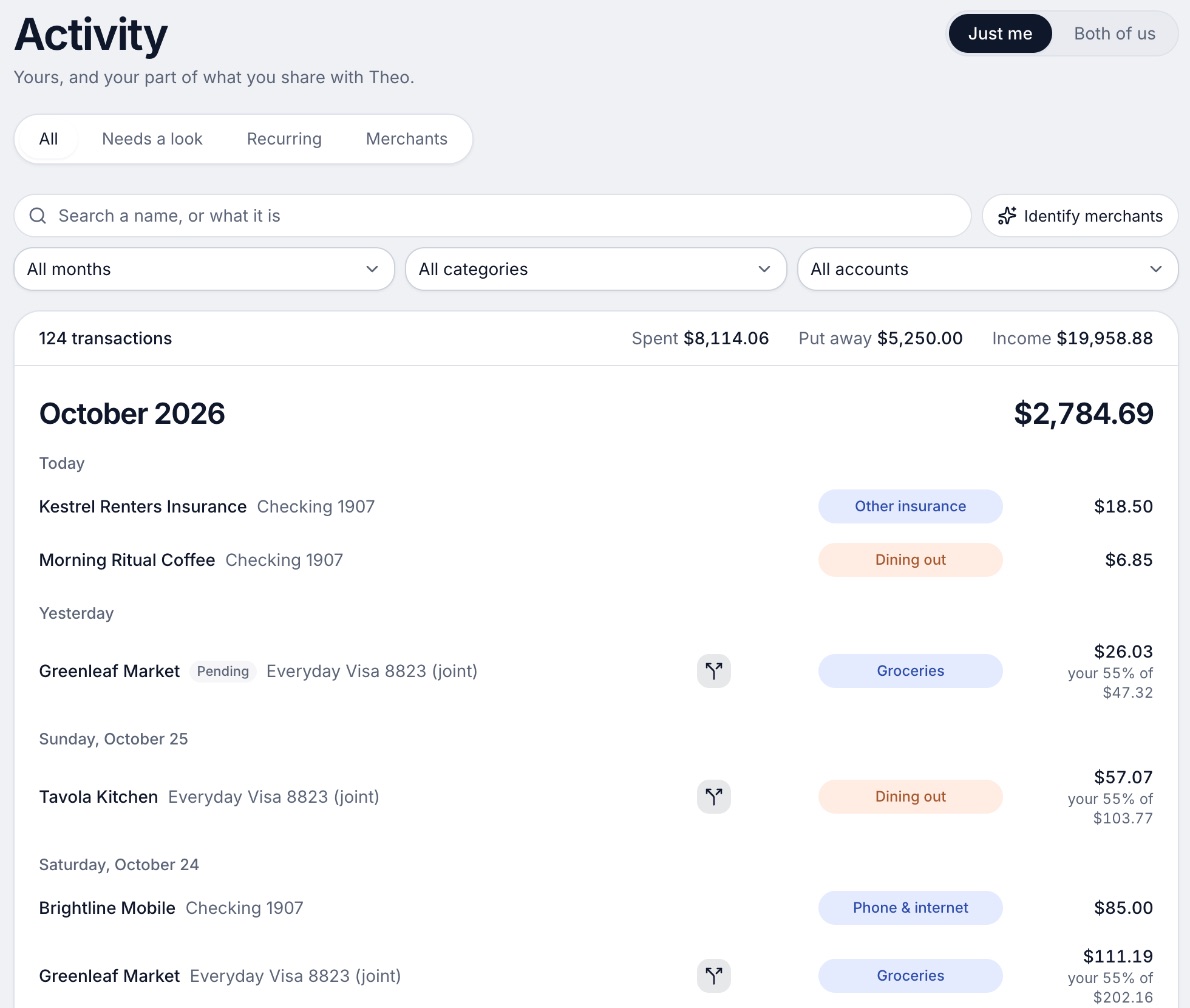
A budgeting app for couples who keep their own money, and for one person: each of you connects your own bank, chooses what the other sees, and every paycheck gets a plan.
Why it's on this list
Tiller gives you the bank data and leaves the plan to you. Wonderful does the plan: every paycheck gets one for bills, spending and saving before it lands, banks connect through Plaid and every charge is sorted into a category. It also finds recurring charges and lists what is due before your next paycheck.
Tiller's pages describe no partner login. In Wonderful a partner joins with their own login at no extra cost, each person connects their own bank, and each chooses, account by account, whether the other sees everything, only totals or nothing. The price is close to Tiller's: $14.99 a month or $99 a year for both of you. Where Tiller is ahead is plain: you own a spreadsheet you can shape any way you like, and Wonderful is a web app with no iPhone or Android app yet, no free plan after its free week and no investment analysis.
Ideal for: Two people with their own paychecks and accounts who want every paycheck planned without maintaining a sheet.
What it does
- Every paycheck gets a plan for bills, spending and saving before it lands.[10]
- Banks connect through Plaid and every charge is sorted into a category.[9][10]
- Mine, yours and ours: each charge counts for the person or the pair it belongs to.[10]
- Finds recurring charges and subscriptions, lists what's due before your next paycheck, and flags a bill that comes in higher than usual. It doesn't cancel them for you.[10]
- Texts you by iMessage when a bill is charged twice, a price goes up or a refund lands, and you can text it questions.[10]
- Savings goals show the month you'll reach them.[10]
- Net worth for each of you and for both, from the balances your banks send, with its line over time.[10]
- Life events like getting married come step by step, with the deadlines.[10]
Good
2. A finished app with phone apps, net worth and a partner login
What it is
A paid budgeting and net worth app that pulls every account into one place and lets a partner join under the same subscription.
Why it's on this list
Monarch is the usual first stop when leaving a sheet. It connects accounts through 13,000+ institutions, tracks net worth, and offers two ways to budget, Flex or Category with rollovers, with iPhone, iPad, Android and web apps.[14] [12][17] It is $14.99 a month or $99.99 billed yearly after a free first week, within a dollar of Tiller's $99.[11][12] [11][12] A partner joins at no extra cost with their own login, though both partners see every account and transaction.[15][16][20] What you give up is the sheet: your data lives in Monarch's app. See Monarch alternatives if you want to compare further.
Ideal for: Someone who wants a finished app and does not want to maintain formulas.
What it does
- Connects bank accounts, credit cards, loans, investment accounts and real estate, through 13,000+ financial institutions.[14]
- Tracks net worth across all connected accounts.[12][14]
- Sorts transactions automatically and searches across every account in one list.[12][14]
- Two ways to budget: Flex, which splits spending into fixed, flexible and non-monthly buckets and gives one main number to watch, or Category budgeting.[12][17]
- Rollovers: money left in a category carries into the next month, to cover bills that do not come every month.[17]
Good
- A partner joins under the same subscription at no extra cost, with a separate login.[15][16]
- Two people can fund a shared goal even when their money sits in separate accounts.[16]
- Works on iPhone, iPad, Android and the web.[12][13][14]
- Rated 4.9 on the App Store (116K ratings) and 4.8 on Google Play (26.1K reviews).[12][13]
Not so good
- No free plan after the first week.[11][12]
- Paid monthly it is $14.99, which is $179.88 over twelve months, against $99.99 billed yearly.[11]
- Forecasting, several income sources and deeper investment tracking sit in the Plus tier. The App Store shows Plus at $199.99 a year; the pricing page lists no Plus price.[11][12]
- A partner sees all accounts and transactions. The couples page describes no way to keep one account private.[15][16]
Pricing
- Monthly[11][12]$14.99 a monthPricing page and App Store both show $14.99. The pricing page does not say which tier it is.
- Yearly[11][12]$99.99 a yearBilled yearly. The pricing page names two tiers, Core and Plus, but lists only these two prices.
- Yearly Plus[11][12]$199.99 a yearShown only as an in-app purchase on the App Store. The pricing page says Plus adds forecasting tools, tracking several income sources like a small business, and deeper investment tracking.
- The pricing page says "Your first week is on us." The App Store says the app is free to try for 7 days before a monthly or annual membership is billed. Neither says whether a card is needed.[11][12]
- No free plan is listed on the pricing page or the App Store. The only free access is the first week.[11][12]
“I switched to Monarch after Mint was discontinued. I initially wasn’t too interested in a paid service, but Monarch is fantastic for budgeting and doing personal finance at $100 a year. Well worth the price.”Read it where it was said ↗
3. A web app with rules, tags and many currencies, closest to a sheet's control
Lunch Money
$10/mo or $100/yr· iPhone, Web· App Store 4.8 (58)[27]
What it is
A web budgeting app that pulls in bank transactions, with rules, recurring items, multi-currency support and unlimited contributors to a budget.
Why it's on this list
Lunch Money is the closest to a sheet in an app. It has a rules engine, tags, category groups, a Query Tool on its Analyze page and budget periods that can follow your pay cycle.[25] [25] It connects banks through Plaid, and takes CSV imports and manual accounts for cash and crypto, which helps when a bank feed fails.[24][25] [24] The price is $10 monthly or $100 yearly, with a 30 day trial, and it allows unlimited collaborators, each with their own login.[28][23] [24][25] Its pages describe no Android app, and a Hacker News commenter says it is not envelope-based.
Ideal for: Someone who liked the control of a sheet and wants a web app with rules, tags and queries.
What it does
- Connects to bank and credit card accounts through Plaid so transactions pull in automatically.[24][25]
- Also takes manual entry and CSV imports, and manual accounts for cash, assets, gift cards and crypto.[24]
- Custom budget periods that match your pay cycle.[25]
- A rules engine that categorizes transactions based on conditions you set.[25]
- Recurring items that match imported transactions automatically.[25]
Good
Not so good
- Current prices could not be confirmed: the pricing page returned HTTP 403 when we tried it.[23]
- The pages opened show no iOS or Android app.[24]
- Bank syncing goes through Plaid, and the guide says to open bank syncing tickets from the in-app support menu when something breaks.[24]
- Not envelope budgeting: a Hacker News commenter says its philosophy is "fundamentally different from YNAB".[26]
Pricing
“...I'm a big fan of lunchmoney, and I'm rooting for the success of the app.”Read it where it was said ↗
4. A free, open-source budget you host yourself and keep the data
Actual Budget
Free· Web, Mac
What it is
A free, open-source, local-first budgeting app you run as a desktop app or on a server you host, with envelope-style budgeting and optional bank sync.
Why it's on this list
Actual Budget is the alternative that keeps what people like about Tiller: you own the data. It is free and open source, local-first, with optional end-to-end encryption.[29] [29] It runs as a desktop app for Windows, Mac and Linux or on a server you host.[30] Bank sync is optional and takes more setup than Tiller: it needs your own server and credentials, runs only while Actual is open, and uses SimpleFIN Bridge at $15 a year for North American banks.[31] [32] The pages we read describe no phone app and no partner login.
Ideal for: Someone who wants to own the data like Tiller, pay nothing for the app and does not mind setting up a server.
What it does
- "Unabashedly local-first software": the app works on your device and your data is synced in the background so all devices have access.[29]
- Optional end-to-end encryption means your data "remains unreadable, even to the server".[29]
- Desktop app for Windows, Mac and Linux (download from GitHub), a browser version at app.actualbudget.org that keeps data only in the browser and is "not recommended for long-term use", or a server you host with Docker, a command, PikaPods or Fly.io.[30]
- Bank sync: SimpleFIN Bridge for North American banks and Pluggy.ai for Brazilian banks are listed as supported; GoCardless for European banks is "not accepting new accounts"; Akahu and Enable Banking are also listed.[31]
- Bank sync needs actual-server and your own API credentials. Syncing "only happens while Actual is open", and the shortest sync interval you can set is 15 minutes.[31]
Good
Not so good
- No official hosted service is described; the docs point to third-party hosts, which charge fees.[30]
- Bank sync works only through actual-server with your own credentials, and the bank sync tokens "are stored on the server and are not covered by end-to-end encryption".[31]
- The bank-data service SimpleFIN Bridge costs $15 a year, paid to SimpleFIN, and is for North American banks.[32]
- The pages describe no phone app and no app store listing.[29][30]
Pricing
“self hosted ActualBudget and SimpleFin for fetching data automatically works great for me so far.”Read it where it was said ↗
5. One person on Apple devices who wants a polished app
Copilot Money
$13/mo or $95/yr· iPhone, Web, Mac· App Store 4.8 (31K)[37]
What it is
A paid budgeting and net worth app for Apple devices and the web, with an AI money assistant and one plan that does everything.
Why it's on this list
Copilot is a polished paid app for spending, net worth, investments and subscriptions, with an AI assistant. Its website price is $109 a year, and its App Store shows $95.00, so check which you are shown.[35] It has no Android app, and partner sharing is not live yet: its pages mark households "Coming soon."[34][35][36] For one person on Apple devices who wants to stop maintaining a sheet, it fits. See Copilot Money alternatives.
Ideal for: One person on iPhone, iPad or Mac who wants a polished app with one plan and no tiers.
What it does
- Money Assistant: an AI you can ask about your money. The page says it "always asks before acting." It can fix transactions, run instructions in the background and flag spending trends with budget suggestions. The App Store says it is available only on iPhone.[34][37]
- Connects to 16,000+ US institutions through read-only integrations, with direct links for Venmo, Apple Card and Coinbase.[36][37]
- Sorts transactions automatically, and the assistant can change a category or match a refund to its purchase. You can set your own categories with colors and emojis.[34][37]
- Adaptive budgets that adjust to your spending.[37]
- Tracks spending, investments, net worth and subscriptions.[34][37]
Good
Not so good
- No Android app. The pages list iPhone, iPad, Mac and web only.[34][35][36]
- Sharing with a partner is not live. Households are marked "Coming soon."[34][35][36]
- No free plan after the trial.[36]
- The website and the App Store show different prices: $18 a month or $109 a year (shown as $9 a month) on the site, $13.00 and $95.00 on the App Store.[35][37]
Pricing
- Website, monthly[35]$18 a monthBilled monthly. The pricing page calls it "One simple plan" (checked in a browser 10/27).
- Website, yearly[35]$109 a yearShown as $9 a month, billed yearly, "instead of $119", and labeled a limited time offer.
- App Store, monthly[37]$13 a monthListed as $13.00 on the App Store, which is not what the pricing page shows.
- App Store, yearly[37]$95 a yearListed as $95.00 on the App Store.
“I switched to Copilot when Mint shut down. This app is much better than Mint ever was. The annual fee is a small price to pay to manage my budget and transactions.”Read it where it was said ↗
Which fixes which
Moving apps fixes some reasons for leaving Tiller and not others. This is what each reason points to, including the one where nothing here helps.
- No phone app. Monarch has iPhone, iPad, Android and web. Copilot and Lunch Money have iPhone apps. Wonderful and Actual Budget have no phone app that we found.
- Don't want to build the budget. Monarch, Copilot and Wonderful. Lunch Money and Actual Budget still ask you to set up rules or envelopes.
- Want to own the data. Actual Budget, which is local first. Lunch Money and the paid apps keep data in their service.
- Partner. Monarch and Lunch Money give a partner their own login, with a shared view. Wonderful adds a choice of what the other sees. Copilot's households are not live.
- Bank feeds that fail. None of them fixes this. Reviews of Monarch and Copilot also report accounts that disconnect, and Actual Budget depends on its own data service. Use a trial to test your own banks.[19][38]
If you want to keep a sheet
If the spreadsheet is what you like and the bank feed is what you pay for, the alternative may be a template you fill in yourself, with no subscription. That is a different trade: free, and typed in by hand. Our guide to the best budget spreadsheets and templates compares them. Tiller's own 60 risk-free days, 30 free and 30 refundable, is also a cheap way to find out whether you will keep up the sheet.[5]
How to choose
Choose Wonderful if you:
- Want every paycheck planned for you
- Have a partner with their own paycheck and bank
- Are fine in a browser and want one price for two
Choose Monarch Money if you:
- Want phone apps, net worth and a partner login
- Don't mind your partner seeing every account
- Want a free first week to try it
Choose Lunch Money if you:
- Like rules, tags and queries
- Want a 30 day trial and collaborators
- Can live without an Android app
Choose Actual Budget if you:
- Want to own your data and pay nothing for the app
- Are comfortable hosting a server
- Do not need a phone app
Choose Copilot Money if you:
- Use Apple devices only
- Budget alone for now
- Want an AI assistant for questions
Choose Tiller if you:
- Are comfortable in a spreadsheet
- Want to own your data and shape every sheet
- Can live with a daily email instead of an app
Where Wonderful fits, and where it doesn't
We make Wonderful, so weigh this section accordingly. It fits two people with their own paychecks and banks who want a plan made for each paycheck, not a sheet to maintain. If Tiller's missing partner story or the work of the sheet is why you are leaving, that is what it was built for. For more options, see the best budgeting apps for couples.
It is the wrong move if you want to own the spreadsheet and shape every formula. It is web only, with no iPhone or Android app yet, has no free plan after the trial, and gives no investment analysis. If you like Tiller, keep it. If you want a finished phone app for one person, Monarch or Copilot is the safer pick.
Questions people ask
What is the best alternative to Tiller Money?
It depends on why you are leaving. For a finished app with iPhone and Android versions, Monarch at $99.99 a year. For a sheet-like web app with rules and tags, Lunch Money at $10 a month or $100 a year. For free and self-hosted, Actual Budget. For two people with their own paychecks, Wonderful at $99 a year for both.
Is there a free alternative to Tiller Money?
Actual Budget is free and open source, and your data stays on your devices. Bank sync is optional and needs your own server plus a bank-data service: SimpleFIN Bridge lists $15 a year for North American banks. Tiller itself has no free plan, only a 30-day trial and 30 more days with a full refund.
Does Tiller Money have a mobile app?
The pages we read name no Tiller app. Tiller's phone-side view is a daily email, Hello, Money, that shows balances and recent charges, and the spreadsheets themselves open in Google Sheets or Excel. Monarch, Copilot and Lunch Money have iPhone apps; Monarch also has Android.
Is Tiller Money good for couples?
Tiller's pages describe no partner login. Because the data sits in a spreadsheet you own, sharing the sheet is up to you, and the sheet then shows whatever you connected. Monarch gives a partner their own login but both partners see everything. Wonderful lets each person choose, account by account, what the other sees.
Tiller vs Monarch: which is better?
Tiller is a bank feed into a sheet you build and own, at $99 a year. Monarch is a finished app with budgets, net worth and goals at $99.99 a year after a free week, with a partner login. Pick Tiller if you want to own the data and shape the sheet; pick Monarch if you do not want to build anything.
How much does Tiller Money cost?
$99 a year after a 30 day free trial, with 30 more days backed by a full refund. The pricing page shows no monthly option, and sales tax may be added where your state requires it.
Why do Tiller bank connections fail?
Tiller's pages do not name its bank-data provider. Posts on its community forum say it uses Yodlee, and report accounts that stop syncing, including Canadian banks (May 2025). An October 2024 report about Ally drew replies from members whose Ally accounts synced fine. Every app with bank sync relies on some data provider, so check your own banks in a trial.
Can I keep my Tiller spreadsheet if I cancel?
Tiller's pages say the spreadsheets are yours and the data is not locked inside an app. Check Tiller's help docs before you cancel for what happens to the live bank feed. Monarch, Copilot and Lunch Money keep data in their own apps.
Is there a spreadsheet alternative to Tiller that is not a bank feed?
Yes, a plain template you fill in yourself. Our guide to the best budget spreadsheets and templates covers those, including what each costs and whether it connects to a bank.
Sources
38 sources · read November 3, 2026
Every number on this page comes from community.tiller.com, tiller.com, hn.algolia.com and 12 more. If a source has changed since, the source is right.
- 1Tiller community: Growing increasingly frustrated with Tillercommunity.tiller.com
- 2Tiller community: Ally says they're no longer compatible with Tillercommunity.tiller.com
- 3Tiller: Tiller vs budgeting appstiller.com
- 4Tiller hometiller.com
- 5Tiller pricingtiller.com
- 6Tiller featurestiller.com
- 7Hacker News search for Tiller Money commentshn.algolia.com
- 8Wonderful terms of servicewonderful.money
- 9Wonderful privacy policywonderful.money
- 10Wonderfulwonderful.money
- 11Monarch pricingmonarch.com
- 12Monarch on the App Storeapps.apple.com
- 13Monarch on Google Playplay.google.com
- 14Monarch home pagemonarch.com
- 15Monarch for couplesmonarch.com
- 16Monarch collaborationmonarch.com
- 17Monarch budgetingmonarch.com
- 18Monarch planningmonarch.com
- 19Apple public review feed for Monarchitunes.apple.com
- 20Monarch help: Monarch for Couples and Householdshelp.monarch.com
- 21Trustpilot, www.monarchmoney.comtrustpilot.com
- 22Lunch Money help center welcomesupport.lunchmoney.app
- 23Lunch Money blog: The Least Annoying Price Increase in History (Oct 16, 2024)lunchmoney.app
- 24Lunch Money help center: Getting startedsupport.lunchmoney.app
- 25Lunch Money blog: 11 Lunch Money Features You Should Be Usinglunchmoney.app
- 26Hacker News search for Lunch Money commentshn.algolia.com
- 27Lunch Money on the App Storeapps.apple.com
- 28Lunch Money pricinglunchmoney.app
- 29Actual Budgetactualbudget.org
- 30Actual Budget docs: installingactualbudget.org
- 31Actual Budget docs: bank syncactualbudget.org
- 32Actual Budget docs: SimpleFINactualbudget.org
- 33Actual Budget on GitHubgithub.com
- 34Copilot Money homecopilot.money
- 35Copilot Money pricingcopilot.money
- 36Copilot Money FAQcopilot.money
- 37Copilot on the App Storeapps.apple.com
- 38Apple public review feed for Copilotitunes.apple.com
App names are trademarks of their owners; Wonderful isn't connected with them. Wonderful gives general information. It isn't a financial or tax advisor.