The short version
Two apps in this list can split shared costs unevenly and keep a running who-owes-whom total: Wonderful, which we make, and Splitwise. Wonderful also builds your budget and costs $99 a year for both of you after a free week or a $1 first month. Splitwise is a tracker only and is free for up to 4 expenses a day. For the other six, their pages describe no way to split a bill by income, so you would do the math yourselves.
- Similar pay: any app works; an even split is close to fair. Honeydue is free.
- One of you earns far more: Wonderful or Splitwise.
- Keep money separate: Wonderful, which also lets you choose what your partner sees.
- One pot: Monarch, YNAB or Origin. With one pot there is nothing to split.
- 1
Wonderful: Splits by income or any way, with a running total, from your own banks
- 2
Splitwise: Splits by percentage and tracks who owes whom, but it is not a budget
- 3
Honeydue: Free, lists splitting, but the pages don't say by income
- 4
Monarch Money: A good household budget with no bill splitting described
- 5
YNAB (You Need A Budget): Zero-based budgeting; splitting between two people not stated
- 6
Origin: A combined view; bill splitting not described
- 7
Copilot Money: Polished, but households and splitting aren't live yet
- 8
Goodbudget: Envelope budgeting; no splitting stated
At a glance
| App | Can split by income | Can split any way | Running who-owes-whom total | Own login | Price and free trial | Platform |
|---|---|---|---|---|---|---|
| Wonderful | Yes | Yes, any way you choose | Yes | Yes, one price for both | $99 a year or $14.99 a month, both partners. Free week | Web only |
| Splitwise | Yes, by percentage | Yes: percentage, shares or exact amounts | Yes, that is its job | Yes, each has an account | Free, 4 expenses a day. Pro price not on its pages | iPhone, Android, web |
| Honeydue | Not stated | Not stated | Settling up listed; a running total isn't described | Yes | Free, optional tips | iPhone, Android |
| Monarch Money | No | No | No | Yes, no extra cost | $99.99 a year or $14.99 a month. Free week | iPhone, Android, web |
| YNAB (You Need A Budget) | Not stated | Not stated | Not stated | Yes, up to 6 on one plan | $109 a year or $14.99 a month. 34-day trial | iPhone, Android, web |
| Origin | No | No | No | Yes, no extra cost | $1 first year, then $99 a year. No trial | iPhone, Android, web, Mac |
| Copilot Money | Not stated | Not stated | Not stated | Coming; marked "coming this fall" | $109 a year or $18 a month on its site. One month free per its FAQ | iPhone, Mac, web |
| Goodbudget | Not stated | Not stated | Not stated | Shares a budget across devices; separate logins not described | Free plan; Premium $80 a year or $10 a month. No trial | iPhone, Android, web |
The test
Most couples roundups ask which app has the best budget. If one of you earns a lot more, a different question comes first: when the rent and groceries are shared, can the app divide them fairly, and does it remember who has paid what? Two things decide it.
- Can it split by income, and any other way? Even, by income, or a number you pick.
- Does it keep a running total? One number, updated as you both spend, that says who owes whom.
Where an app's pages are silent on splitting, we say so. For the thinking behind the choice, see when one partner earns more: 6 ways to make sharing fair and how to split bills by income. To try your own numbers, use the fair split calculator.
The example we use for every app
You share $5,000 of bills a month. One of you earns 65% of the pay.
| Split | Higher earner | Other partner |
|---|---|---|
| 50/50 | $2,500 | $2,500 |
| By income (65/35) | $3,250 | $1,750 |
The income split moves $750 a month from one partner to the other. To keep a running total, say the lower earner paid $3,000 of the bills and the higher earner paid $2,000. The higher earner owed $3,250 and paid $2,000, so owes $1,250. The other owed $1,750 and paid $3,000, so is owed $1,250. One number settles it.
1. Splits by income or any way, with a running total, from your own banks
Wonderful
$14.99/mo or $99/yr· Web
What it is
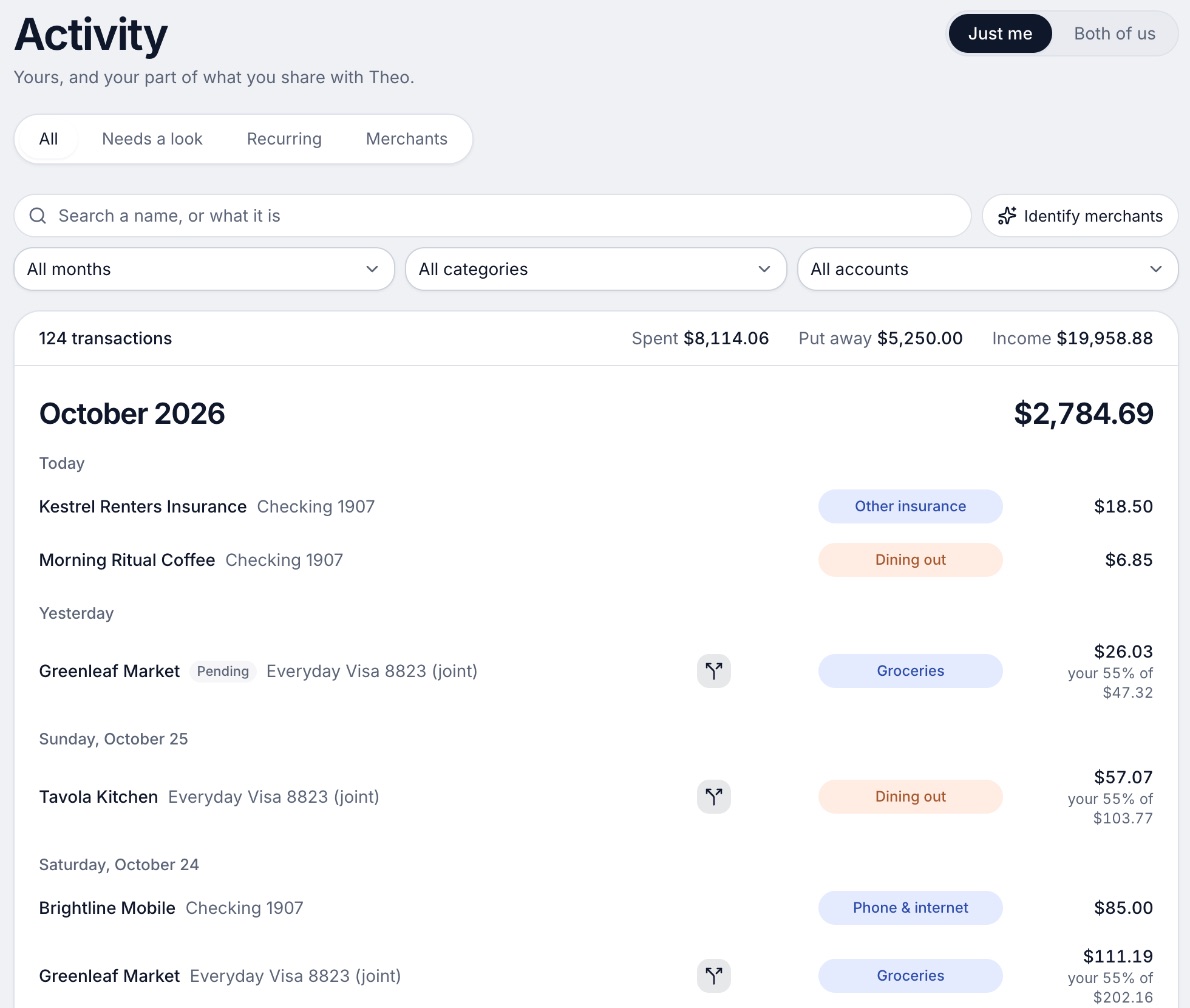
A budgeting app for couples who keep their own money, and for one person: each of you connects your own bank, chooses what the other sees, and every paycheck gets a plan.
Why it's on this list
We make Wonderful, so weigh this entry accordingly. Shared costs split evenly, by income, or any way you choose, and it keeps a running total of who owes whom.[5] Your $5,000 would be $3,250 and $1,750 at 65/35, or $2,500 each if you pick even, and the total updates as you each spend.
Each of you connects your own bank, and a partner joins with their own login at no extra cost.[3] The catches: it runs in the browser only, with no iPhone or Android app yet, it has no free plan after the free week or $1 first month, and it does not move money, so you settle up yourselves.
Ideal for: Two people with different pay who want the budget, the split and the running total in one place, and will pay $99 a year for both.
What it does
- Every paycheck gets a plan for bills, spending and saving before it lands.[5]
- Banks connect through Plaid and every charge is sorted into a category.[4][5]
- Mine, yours and ours: each charge counts for the person or the pair it belongs to.[5]
- Finds recurring charges and subscriptions, lists what's due before your next paycheck, and flags a bill that comes in higher than usual. It doesn't cancel them for you.[5]
- Texts you by iMessage when a bill is charged twice, a price goes up or a refund lands, and you can text it questions.[5]
- Savings goals show the month you'll reach them.[5]
- Net worth for each of you and for both, from the balances your banks send, with its line over time.[5]
- Life events like getting married come step by step, with the deadlines.[5]
Good
2. Splits by percentage and tracks who owes whom, but it is not a budget
What it is
An app for iPhone, Android and web that tracks shared expenses with a partner, roommates or a group and works out who owes whom.
Why it's on this list
Splitwise passes the test, as a tracker. Splits can be equal, or unequal by percentage, share or exact amount, and its Pro page asks, "Want to split all expenses with your partner 55%/45%?" and offers a default split.[1][7] Your $5,000 at 65/35 is entered as $3,250 and $1,750, and it shows who owes whom across everything you add.
It is not a budget: its pages describe no income plan, bills or savings goals. The free plan allows 4 expenses a day, and no Splitwise page we read states Pro's price. See Splitwise alternatives.
Ideal for: Two people who want only a tally of shared costs and will budget somewhere else.
What it does
- Groups and private friendships for any splitting situation, with balances across groups.[6][7]
- Split equally, or unequally by percentages, shares or exact amounts, and add multiple payers on one expense.[6][7]
- Simplifies debts into the easiest repayment plan.[6][7]
Good
Not so good
- The free plan allows up to 4 expenses a day, per Splitwise's help center; Pro removes the limit.[1][10][11]
- Pro's price is not on Splitwise's own pages or help center; the App Store lists several Pro purchases from $2.99 to $39.99.[1][7][10]
- Trustpilot shows 2.0 stars from 72 reviews.[9]
- Card transaction import is a Pro feature and works in the US only.[1]
Pricing
- Free[6][1][10]Free"Free for iPhone, Android, and web." Splitwise's help center says "free users can add up to 4 expenses each day"; Pro removes the limit.
- Splitwise Pro[1][7][10]No price on splitwise.com or its help center. The help center lists Individual and Duo annual plans (Duo is for two people) and a monthly plan for one person. The App Store lists Splitwise Pro purchases at $2.99, $3.99, $4.99, $29.99 and $39.99 without saying which plan is which.
- A free plan exists. Pro adds unlimited expenses each day, card transaction import (US only), currency conversion, charts, receipt scanning, itemization, expense search, default split settings, early access to features and no ads.[1]
3. Free, lists splitting, but the pages don't say by income
What it is
A free phone app for couples that shows both people's linked accounts, bills and budgets, with a choice of how much each person shares.
Why it's on this list
The App Store lists expense splitting and settling up.[2][16] We couldn't find a Honeydue page that says whether the split can be 65/35, and its how-it-works page does not mention splitting. So for the $5,000 example, we can't say it gets to $3,250 and $1,750. Check in the app before you rely on it.
It is free, with optional tips, and has no web version. See Wonderful vs Honeydue.
Ideal for: Two people who want a free phone app and will check how its splitting works first.
What it does
- Shared view of linked bank account balances, loans and investments. The site says it connects "over 20,000 financial institutions across 5 countries."[2][16]
- Choose what your partner sees per account: balances and transactions, balances only, or nothing.[14]
- Monthly household spending limits for each category, with alerts as you and your partner get close.[16]
Good
Pricing
- Free[13]FreeHoneydue's help center says, "Honeydue is 100% free for everybody, and we don't block any features with a paywall."
- Monthly tip (optional)[13][16]Any amount from $1 to $10 a month through the App Store or Google Play. The help center says tips fund new features. The App Store lists $0.99 to $9.99.
- The whole app is free. The only paid thing is the optional tip, which can be changed or cancelled in the App Store or Google Play.[13]
4. A good household budget with no bill splitting described
What it is
A paid budgeting and net worth app that pulls every account into one place and lets a partner join under the same subscription.
Why it's on this list
Monarch's couples page does not describe splitting an expense between two people. It describes shared goals funded from separate accounts, and tagging a partner to review a transaction.[25][26] With the $5,000 example, you would work out $3,250 and $1,750 yourselves. It costs $99.99 a year after a free week, and a partner has a login at no extra cost.
Ideal for: Two people who run one household budget and are happy to split by hand.
What it does
- Connects bank accounts, credit cards, loans, investment accounts and real estate, through 13,000+ financial institutions.[24]
- Tracks net worth across all connected accounts.[22][24]
- Sorts transactions automatically and searches across every account in one list.[22][24]
Good
- A partner joins under the same subscription at no extra cost, with a separate login.[25][26]
- Two people can fund a shared goal even when their money sits in separate accounts.[26]
- Works on iPhone, iPad, Android and the web.[22][23][24]
- Rated 4.9 on the App Store (116K ratings) and 4.8 on Google Play (26.1K reviews).[22][23]
Not so good
- No free plan after the first week.[21][22]
- Paid monthly it is $14.99, which is $179.88 over twelve months, against $99.99 billed yearly.[21]
- Forecasting, several income sources and deeper investment tracking sit in the Plus tier. The App Store shows Plus at $199.99 a year; the pricing page lists no Plus price.[21][22]
- A partner sees all accounts and transactions. The couples page describes no way to keep one account private.[25][26]
Pricing
- Monthly[21][22]$14.99 a monthPricing page and App Store both show $14.99. The pricing page does not say which tier it is.
- Yearly[21][22]$99.99 a yearBilled yearly. The pricing page names two tiers, Core and Plus, but lists only these two prices.
- Yearly Plus[21][22]$199.99 a yearShown only as an in-app purchase on the App Store. The pricing page says Plus adds forecasting tools, tracking several income sources like a small business, and deeper investment tracking.
- The pricing page says "Your first week is on us." The App Store says the app is free to try for 7 days before a monthly or annual membership is billed. Neither says whether a card is needed.[21][22]
- No free plan is listed on the pricing page or the App Store. The only free access is the first week.[21][22]
5. Zero-based budgeting; splitting between two people not stated
What it is
A paid budgeting app built on a method: give every dollar a job before you spend it.
Why it's on this list
YNAB's pages say nothing about splitting a bill between two people.[35] One subscription covers up to six, so a partner joins free. The $5,000 example is a number you would work out yourselves. More in is YNAB good for couples.
Ideal for: Two people who like zero-based budgeting and settle shared costs on their own.
What it does
- The method: for every dollar, ask "What's it for?" Plan for now (before the next paycheck), for later (non-monthly bills like car repairs), and for ease (get a month ahead).[34]
- Bank import links accounts and brings in transactions automatically. Apple Card import is also listed.[33]
- Targets: set spending and savings goals per category and track progress at a glance.[33]
Good
- A written method, not just a tracker: the app is built around planning before spending.[34]
- One subscription covers up to six people at no extra cost.[32]
- A 34-day trial with no card when you sign up on the site, and a free 365-day trial for college students.[32]
- Rated 4.8 on the App Store (62K ratings) and 4.6 on Google Play (25.4K).[35][36]
Not so good
- No free plan after the trial.[32]
- Paid monthly it is $14.99, which is $179.88 over twelve months, against $109 billed annually.[32]
- The website says a 34-day trial and the App Store says 30 days.[32][35]
- The method asks you to plan each dollar before you spend it, which the company's method page presents as the whole point of the app.[34]
6. A combined view; bill splitting not described
Origin
$99/yr; $1 the first year· iPhone, Android, Web, Mac· App Store 4.6 (3,980)[44]
What it is
A subscription app for iPhone, Android, Mac and web that tracks spending and investments, has an AI advisor, and lets a partner join at no extra cost.
Why it's on this list
Origin lets you filter transactions by member to see whose spending is whose, but a bill-splitting feature is not described on the pages we opened.[43] There is no running who-owes-whom total, so the $3,250 and $1,750 stay in your head. Partner access is free, and it is $99 a year after a $1 first year. See Wonderful vs Origin.
Ideal for: Two people who want one combined view and no bill splitting.
What it does
- An AI advisor ("Ask Origin") that answers money questions using your connected accounts. Origin says there are "no usage limits on the AI Advisor".[40][41]
- Tracks spending, cash flow, subscriptions and bills, and builds budgets from your habits.[44]
- Automatic categorization of transactions; you can edit transactions and add new ones.[41]
Good
- Partner access is included in the price.[41][43]
- Free DIY tax filing is part of the membership, including joint filing.[41][42]
- One flat fee: $99 a year after the first year, with no add-ons for tax filing or partner access.[41]
- Covers budgeting, investing, estate planning and an AI advisor in one app.[40][44]
Not so good
- No free plan or free trial on the pages opened; the first year is $1, then $99 a year.[41][42]
- Many 5-star App Store reviews in 2026 end with "Entered a sweepstakes for this review."[45]
- Origin's claim that its AI Advisor scored 98.3% on the CFP exam is its own marketing and was not checked.[41]
- App Store reviewers in 2026 report bank connections that expire or will not reconnect, and slow support.[45]
Pricing
- First year promotion[41][42]$1 a year"$1 for the first year." Per Origin's blog.
- Annual after year one[41]$99 a year"$99/year", a flat annual fee. Partner access and tax filing carry no add-on.
- Origin's blog says it offers no free trial, only the first-year price: "Try Origin for $1 for your first year." Whether a card is needed was not stated on the pages opened.[42]
- No free plan is described on the pages opened. The App Store listing is free to download, and 2026 reviewers say the app is unusable without a subscription.[44][45]
7. Polished, but households and splitting aren't live yet
Copilot Money
$13/mo or $95/yr· iPhone, Web, Mac· App Store 4.8 (31K)[50]
What it is
A paid budgeting and net worth app for Apple devices and the web, with an AI money assistant and one plan that does everything.
Why it's on this list
Copilot's pages mark households as "Coming soon" and say nothing about splitting.[47][48][49] Today it is built for one person, so for two people the $5,000 split would be done outside it. It has no Android app.
Ideal for: One person who wants a polished app now and may add a partner later.
What it does
- Money Assistant: an AI you can ask about your money. The page says it "always asks before acting." It can fix transactions, run instructions in the background and flag spending trends with budget suggestions. The App Store says it is available only on iPhone.[47][50]
- Connects to 16,000+ US institutions through read-only integrations, with direct links for Venmo, Apple Card and Coinbase.[49][50]
- Sorts transactions automatically, and the assistant can change a category or match a refund to its purchase. You can set your own categories with colors and emojis.[47][50]
Good
Not so good
- No Android app. The pages list iPhone, iPad, Mac and web only.[47][48][49]
- Sharing with a partner is not live. Households are marked "Coming soon."[47][48][49]
- No free plan after the trial.[49]
- The website and the App Store show different prices: $18 a month or $109 a year (shown as $9 a month) on the site, $13.00 and $95.00 on the App Store.[48][50]
Pricing
- Website, monthly[48]$18 a monthBilled monthly. The pricing page calls it "One simple plan" (checked in a browser 10/27).
- Website, yearly[48]$109 a yearShown as $9 a month, billed yearly, "instead of $119", and labeled a limited time offer.
- App Store, monthly[50]$13 a monthListed as $13.00 on the App Store, which is not what the pricing page shows.
- App Store, yearly[50]$95 a yearListed as $95.00 on the App Store.
8. Envelope budgeting; no splitting stated
Goodbudget
Free, or $10/mo or $80/yr· iPhone, Android, Web· App Store 4.6 (13,522)[57]
What it is
An envelope budgeting app for the web, iPhone and Android where you divide income into virtual envelopes and share the budget across devices.
Why it's on this list
Goodbudget shares a budget across devices, and the pages we read describe no bill splitting or who-owes-whom total. You could make an envelope for each partner's share and fund the $3,250 and $1,750 yourselves. It has a free plan; Premium adds bank sync at $80 a year.
Ideal for: Two people who like envelopes and will divide shared bills by hand.
What it does
- Envelope budgeting: you divide income into category envelopes, spend from the matching envelope and stop when it is empty, with no physical cash.[59]
- The free plan has 10 regular envelopes and 10 annual or goal envelopes; Premium removes the cap.[52][53]
- Syncs and shares a budget across iPhone, Android and the web, with data backed up to Goodbudget's website.[55][57]
Good
Pricing
- Free[52][53]FreeCalled "Free Forever" on the page. 10 regular envelopes, 10 annual or goal envelopes, 1 account, 2 devices, 1 year of history, debt tracking, community support.
- Premium[52][53]$10 a month · $80 a yearAdds automatic bank sync (US banks only), unlimited envelopes and accounts, 5 devices, 7 years of history and email support.
Work out your own split
Put in what each of you takes home and the bills you share. It shows an even split, a split by income and one pot side by side, in dollars for each of you.
Take-home is what lands in the bank after tax. Nothing you type here leaves this page.
50/50
Each of you pays half the shared bills from your own pay.
The bills are the same dollars for each of you, but they take 29% of one pay and 44% of the other.
By income
Each of you pays the share of the bills that your pay is of the two pays together.
60% and 40% of the bills. The bills take the same 35% of each pay, so the one who earns more still keeps more.
Pool it all
Both pays go in one pot, the bills come out, and what's left is split evenly.
You each end up with the same $2,800. The one who earns more puts in more to get there.
Wonderful does this every month, with your real bills.
You each connect your own bank and choose what the other sees. It divides what you share half each or by income, or treats it all as one pot, and keeps track of who owes whom.
Start freeWhich apps only split evenly, or not at all
We found no app here that splits only 50/50. The honest picture is that most don't split at all.
- Splits by income and other ways: Shared costs split evenly, by income, or any way you choose, and it keeps a running total of who owes whom.[5] Splitwise does the same with percentages, shares and exact amounts.
- Lists splitting, details not stated: Honeydue.
- No splitting described: Monarch, YNAB, Origin, Copilot and Goodbudget. With these, an even split or an income split is the same job: you work it out and track it yourselves.
If you go that way, the fair split calculator gives you the two numbers, and should couples split bills 50/50 helps you decide.
How to choose
If you want the split done for you, pick one of the first two. If you are happy doing the math once and the rest is budgeting, pick on price and platform.
Choose Wonderful if you:
- Want the split and the running total in a budget
- Will pay $99 a year for both of you
- Are fine in a browser for now
Choose Splitwise if you:
- Only need to track who owes whom
- Budget somewhere else
- Can stay within 4 expenses a day
Choose Honeydue if you:
- Want free and phone-only
- Will check how its splitting works
Choose Monarch Money if you:
- Share one pot, so nothing needs splitting
- Will pay about $99.99 a year
Where Wonderful fits, and where it doesn't
Wonderful splits shared costs evenly, by income or any way you choose, and keeps a running total of who owes whom. One price covers both of you. It is the wrong pick if you need an iPhone or Android app, since it runs in the browser only for now, or if you want a free plan after the first week. If you only want the tally, Splitwise is cheaper. For the method behind the numbers, read how to split bills by income.
Questions people ask
What is the best budgeting app for couples with different incomes?
The best fit is an app that can split shared costs by income and keep a running total of who owes whom. Of the apps here, Wonderful does both inside a budget, and Splitwise does both as a stand-alone tracker with no budget. The rest either don't describe splitting on their pages or only show a combined household.
Which budgeting apps only split 50/50?
None of the apps here advertise a 50/50-only split. Monarch, Origin, YNAB, Copilot and Goodbudget describe no bill splitting on the pages we read, so with them you work out the split yourselves. Honeydue lists expense splitting, but its pages don't say whether it can do anything other than even.
How do I split $5,000 of bills when one of us earns 65% of the pay?
Multiply the bills by each share. 65% of $5,000 is $3,250 and 35% is $1,750. At 50/50 each would pay $2,500, so the higher earner pays $750 more under an income split. Our fair split calculator does it for any numbers.
Is Splitwise good for couples with different incomes?
For the tally, yes. Splitwise splits unevenly by percentage, share or exact amount, and its Pro plan can set a default such as 55%/45%. It is not a budget, and the free plan allows 4 expenses a day.
Do we both need to pay for the app?
Not in most of these. Wonderful, Monarch, Origin and YNAB each cover a partner on one subscription, and Honeydue is free. Splitwise has a free plan for each of you.
Does splitting by income mean we have to merge accounts?
No. In Wonderful each of you connects your own bank, and shared costs are split on top, with a running total of who owes whom. It does not move money, so you settle up yourselves.
Sources
60 sources · read November 7, 2026
Every number on this page comes from splitwise.com, honeydue.com, wonderful.money and 14 more. If a source has changed since, the source is right.
- 1Splitwise Pro page (read 11/07/2026)splitwise.com
- 2Honeydue: How it works (read 11/07/2026)honeydue.com
- 3Wonderful terms of servicewonderful.money
- 4Wonderful privacy policywonderful.money
- 5Wonderfulwonderful.money
- 6Splitwise home pagesplitwise.com
- 7App Store listing, Splitwiseapps.apple.com
- 8App Store reviews, Splitwiseapps.apple.com
- 9Trustpilot, splitwise.comtrustpilot.com
- 10Splitwise help center: What is Splitwise Pro?kb.splitwise.com
- 11Splitwise help: Why am I seeing an expense limit?feedback.splitwise.com
- 12Honeydue home pagehoneydue.com
- 13Honeydue help: How does Honeydue earn moneysupport.honeydue.com
- 14Honeydue help: Will my partner see my accountssupport.honeydue.com
- 15Honeydue Joint Cashhoneydue.com
- 16Honeydue on the App Storeapps.apple.com
- 17Honeydue on Google Playplay.google.com
- 18Apple public review feed for Honeydueitunes.apple.com
- 19Honeydue help: Account issues and inviting a partnersupport.honeydue.com
- 20Honeydue help: How do I cancel my accountsupport.honeydue.com
- 21Monarch pricingmonarch.com
- 22Monarch on the App Storeapps.apple.com
- 23Monarch on Google Playplay.google.com
- 24Monarch home pagemonarch.com
- 25Monarch for couplesmonarch.com
- 26Monarch collaborationmonarch.com
- 27Monarch budgetingmonarch.com
- 28Monarch planningmonarch.com
- 29Apple public review feed for Monarchitunes.apple.com
- 30Monarch help: Monarch for Couples and Householdshelp.monarch.com
- 31Trustpilot, www.monarchmoney.comtrustpilot.com
- 32YNAB pricingynab.com
- 33YNAB featuresynab.com
- 34The YNAB methodynab.com
- 35YNAB on the App Storeapps.apple.com
- 36YNAB on Google Playplay.google.com
- 37Apple public review feed for YNABitunes.apple.com
- 38YNAB: Using YNAB as Partnerssupport.ynab.com
- 39Trustpilot, ynab.comtrustpilot.com
- 40Origin home pageuseorigin.com
- 41Origin blog: Why Origin is the best personal finance app in 2026useorigin.com
- 42Origin blog: Why Origin is the best all-in-one AI finance appuseorigin.com
- 43Origin blog: Finance apps that let you add a partner in 2026useorigin.com
- 44App Store listing, Origin: AI Budget and Trackapps.apple.com
- 45App Store reviews, Originapps.apple.com
- 46Origin legal pageuseorigin.com
- 47Copilot Money homecopilot.money
- 48Copilot Money pricingcopilot.money
- 49Copilot Money FAQcopilot.money
- 50Copilot on the App Storeapps.apple.com
- 51Apple public review feed for Copilotitunes.apple.com
- 52Goodbudget pricing (signup page)goodbudget.com
- 53Goodbudget help: Subscribe to Goodbudgetgoodbudget.com
- 54Goodbudget refunds and cancellationsgoodbudget.com
- 55Goodbudget home pagegoodbudget.com
- 56Goodbudget help indexgoodbudget.com
- 57App Store listing, Goodbudgetapps.apple.com
- 58App Store reviews, Goodbudgetapps.apple.com
- 59Goodbudget envelope budgeting pagegoodbudget.com
- 60Goodbudget changeloggoodbudget.com
App names are trademarks of their owners; Wonderful isn't connected with them. Wonderful gives general information. It isn't a financial or tax advisor.