The short version
Almost every budgeting app that connects to your bank does it through a data provider, and Plaid is the one named most often: Wonderful, Rocket Money, PocketGuard, Lunch Money, Honeydue, Goodbudget, YNAB and Copilot all say they use it. They differ in how many banks they reach, how often they refresh and what they do when a connection breaks. Wonderful, which we make, connects through Plaid and is not free after a week.
- 1
Wonderful: Plaid, with each partner connecting their own bank
- 2
Monarch Money: Three named providers, and you can switch between them
- 3
Copilot Money: Plaid first, with Mastercard, MX and Akoya as backups
- 4
Quicken Simplifi: Updates every 4 to 6 hours, provider not named
- 5
Rocket Money: Plaid, a daily refresh, free to link
- 6
YNAB (You Need A Budget): Plaid and MX, a nightly refresh, read-only
- 7
PocketGuard: Plaid, Finicity and Salt Edge, 20,000+ institutions
- 8
Empower Personal Dashboard: A free dashboard that updates nightly
- 9
Lunch Money: Plaid, a manual fetch, and a CSV fallback
- 10
Tiller: Yodlee and Plaid feeds into a spreadsheet you own
- 11
Honeydue: Free, and Plaid, with several refreshes a day
- 12
Origin: Plaid, MX and Mastercard, though its pages differ
- 13
EveryDollar: Plaid with a Mastercard Connect fallback, on Premium only
- 14
Goodbudget: Plaid sync on Premium, file import on the free plan
At a glance
| App | Data provider | Banks | Refresh | Cost to connect |
|---|---|---|---|---|
| Wonderful | Plaid | Not stated | Not stated | A free week, then paid |
| Monarch Money | Plaid, Mastercard (Finicity), MX | 13,000+ | No schedule stated | A free week, then paid |
| Copilot Money | Plaid; Mastercard, MX, Akoya | 16,000+ (US only) | No schedule; depends on the bank | A one-month trial, then paid |
| Quicken Simplifi | Not named | 14,000+ | Every 4 to 6 hours | Paid; 30-day refund, no trial |
| Rocket Money | Plaid | Not stated | Once every 24 hours | Free plan links accounts |
| YNAB (You Need A Budget) | Plaid, MX | Not stated | Nightly, and on open after 6 hours | A 34-day trial, then paid |
| PocketGuard | Plaid, Finicity, Salt Edge | 20,000+ (US, Canada, UK) | Not stated | A 7-day trial, then paid |
| Empower Personal Dashboard | Not named | Not stated | Nightly, and on login (every 8 hours at most) | Free dashboard |
| Lunch Money | Plaid | Most in 19 countries | When Plaid notifies it; manual fetch | Paid |
| Tiller | Yodlee, Plaid | Not stated here | About daily (Yodlee); twice a day (Plaid) | A 30-day trial, then paid |
| Honeydue | Plaid | 20,000+ (5 countries) | Several times a day | Free |
| Origin | Plaid, MX, Mastercard (pages differ) | Not stated | Once every 24 hours per its help center | Paid; no free trial |
| EveryDollar | Plaid, Mastercard Connect | Not stated | Not stated | Premium only |
| Goodbudget | Plaid | US banks | Set by your bank | Premium only |
How a bank connection works
When you connect a bank, the app usually does not talk to the bank itself. A data provider does, and the app receives the result. Plaid describes its own part this way: you verify your ownership of the account with your username and password, Plaid retrieves the account information you have permitted from your bank, and shares it with the app you are using.[1] The same page says you can view the data types you have shared and control ongoing access at my.plaid.com.
Three things follow from that. The provider decides which banks work, so an app with two or three providers can often reach a bank another app cannot. The bank decides how often data moves and how long permission lasts, so refresh rates and reconnects are partly out of the app's hands. And your login goes through the provider. Most apps here say they never see it; their own wording is in each section.
For how this plays out for two people, with one login each, see what your partner can see in couples budgeting apps. For the longer roundup with prices and ratings, see best budgeting apps.
How we compared
We read each app's help center, security page and pricing page and looked for the same six things:
- Aggregator: the data provider, if the app's own pages name it.
- Institutions: how many banks it says it reaches.
- Refresh: how often new transactions arrive, as the app states it.
- What breaks: why connections stop, and what the app tells you to do.
- Manual or CSV: whether you can keep going without a live connection.
- Security: the points the app states itself, not our opinion of them.
We have not used these apps ourselves. A row that says "not stated" means the pages we read do not say, and you should ask the app before you rely on it. Help centers change, so check the page linked from each row. Our free budgeting apps and expense tracker roundups cover price and features.
1. Plaid, with each partner connecting their own bank
Wonderful
$14.99/mo or $99/yr· Web
What it is
A budgeting app for couples who keep their own money, and for one person: each of you connects your own bank, chooses what the other sees, and every paycheck gets a plan.
Why it's on this list
We make Wonderful, and it is not free after a free week: $14.99 a month or $99 a year, one price for the household.
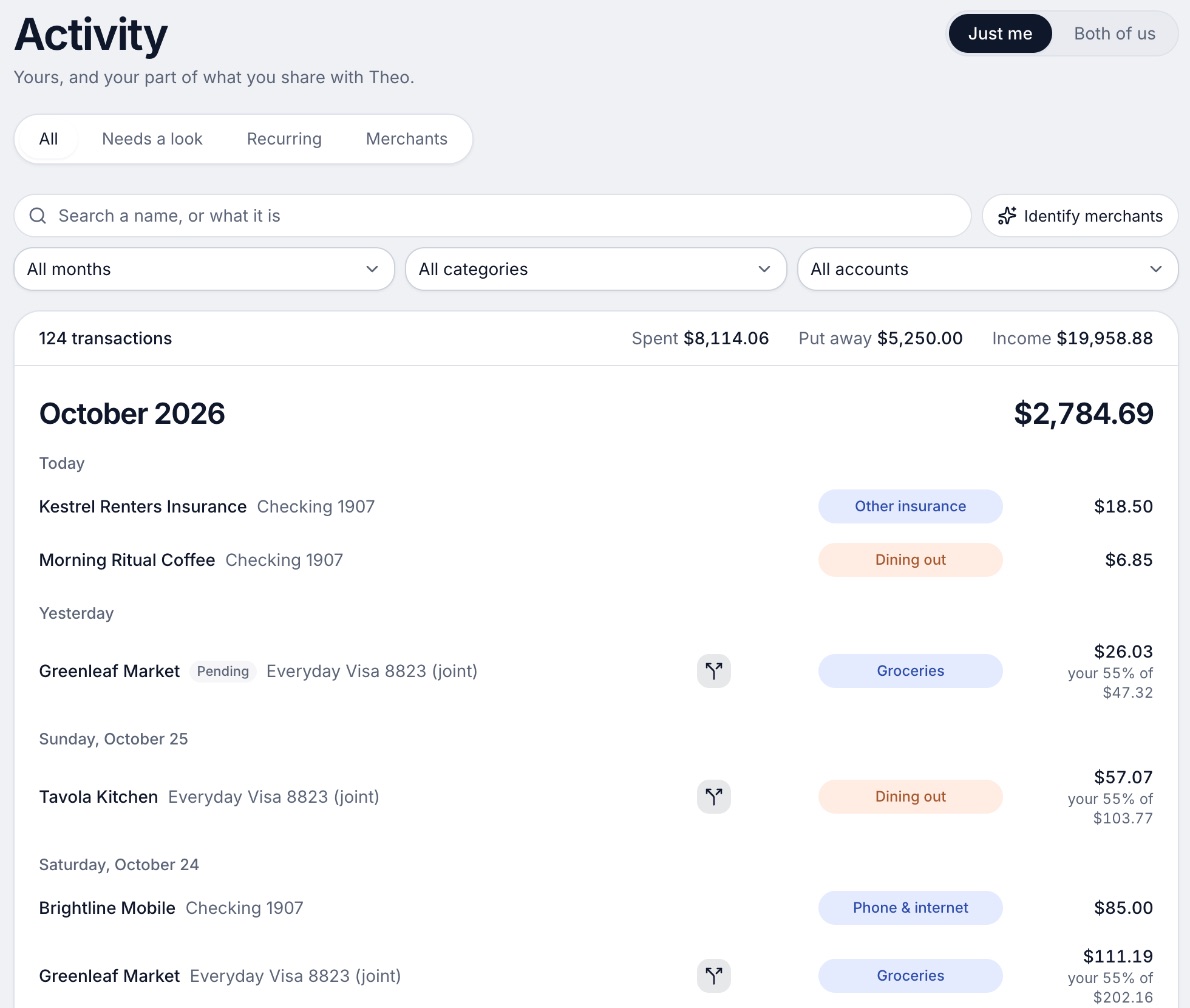
On bank connection, this is what its own pages state. Banks connect through Plaid, and every charge is sorted into a category. Each person connects their own bank and chooses, account by account, whether the other sees everything, only totals, or nothing.[39][40] Its pages do not give the number of banks it reaches, a refresh schedule, or a CSV import, so we have no row to fill for those. Ask before you pay, or use the free week to test your own bank. It runs in the browser only, with no iPhone or Android app yet.
Ideal for: Someone, or a couple, who wants each person to connect their own bank, have every charge sorted, and pick what the other sees.
What it does
- Every paycheck gets a plan for bills, spending and saving before it lands.[40]
- Banks connect through Plaid and every charge is sorted into a category.[39][40]
- Mine, yours and ours: each charge counts for the person or the pair it belongs to.[40]
- Finds recurring charges and subscriptions, lists what's due before your next paycheck, and flags a bill that comes in higher than usual. It doesn't cancel them for you.[40]
- Texts you by iMessage when a bill is charged twice, a price goes up or a refund lands, and you can text it questions.[40]
- Savings goals show the month you'll reach them.[40]
- Net worth for each of you and for both, from the balances your banks send, with its line over time.[40]
- Life events like getting married come step by step, with the deadlines.[40]
Good
2. Monarch Money
Monarch connects banks, cards, loans, investments and real estate. It is the app here that lets you choose the provider.
- Aggregator: Plaid, Mastercard Data Connect (formerly Finicity) and MX. Its help center says it defaults to the provider that should offer the best connection for your bank, and you can choose another.[2]
- Institutions: 13,000+ financial institutions, per its home page.[43]
- Refresh: The pages we read give no fixed interval. The help center says that if transactions stop syncing, wait 24 to 48 hours, then use Refresh all on the Accounts page.[2]
- What breaks: Connections can expire with the message that the institution grants only temporary access, and the fix is to reauthorize. The help center says frequent re-authorization is usually set by the bank, not Monarch.[2]
- Manual or CSV: Yes. The help center suggests a manual account when a bank keeps forcing reconnects, and a CSV import to keep an account current if nothing else works.[2]
- Security: "We have read-only permissions and can't access your money, ever." All data is fully encrypted, and Monarch says it does not see or store your login credentials. The page lists two-factor authentication.[3]
3. Copilot Money
Copilot is a paid app for Apple devices and the web, and it is the only one here to name Akoya.
- Aggregator: "We connect most institutions via Plaid." Mastercard, MX and Akoya cover some Plaid does not. It also has direct integrations with Apple, Capital One, Public and Coinbase.[7]
- Institutions: 16,000+ US financial institutions; it works with US-based accounts only.[11]
- Refresh: No schedule is given. You can force a refresh at any time, and accounts that have not updated within two days need troubleshooting.[8]
- What breaks: Your bank may require you to re-verify, and the connection will not update until you do. Connections that need attention are listed on the Accounts tab. Do not delete a connection that has stalled, because that permanently removes the account's history. App Store reviewers name Bank of America, Fidelity, Merrill and Schwab as banks that failed to reconnect.[8][9][54]
- Manual or CSV: Manual accounts exist. The pages we read do not mention CSV import.[9][11]
- Security: Data is encrypted at rest (256-bit) and in transit, Copilot says it does not see or store your bank login credentials, and "We never sell your financial data." The FAQ says connections are read-only.[10][11]
4. Quicken Simplifi
Quicken's Simplifi is the one here that lets you choose how often each bank updates.
- Aggregator: Not named. Its help says only "our aggregation partner," which logs in to your bank during nightly updates.[13]
- Institutions: Over 14,000, per its product page.[14]
- Refresh: Accounts refresh when you sign in, and new transactions and balances are downloaded from your bank every 4 to 6 hours.[12] A separate help article says you can set each bank to update always, daily, weekly, monthly or never.[15]
- What breaks: If an account has not updated in over 24 hours, the help says there may be an issue and you might need to reset the connection.[12]
- Manual or CSV: The pages we read cover only bank connections and do not mention manual accounts or CSV import.[13][14]
- Security: "We use a one-way connection, which means data is imported into Quicken Simplifi." Your login details are encrypted and stored by its aggregation partner.[13]
5. Rocket Money
Rocket Money is the only app here whose free plan links your accounts and also finds subscriptions.
- Aggregator: Plaid. Its help center calls Plaid "our secure linking provider."[17]
- Institutions: The pages we read do not give a number.
- Refresh: "Accounts linked to your Rocket Money account automatically update once every 24 hours." Syncing on demand is available to Premium users.[17]
- What breaks: A password change, or a temporary problem with Plaid getting data from your bank. A banner says "An account requires attention" and Fix Connection relinks it. If it keeps happening, your bank may have a security setting that limits third-party access, and Rocket Money cannot override it.[16]
- Manual or CSV: Manual transactions and CSV export are listed as Premium. The pages we read do not mention CSV import.[61]
- Security: Bank logins go straight to Plaid and are not stored by Rocket Money. Data is encrypted in transit with TLS and at rest with 256-bit AES.[63]
6. YNAB (You Need A Budget)
YNAB calls its connection Direct Import, and its security page spells out the read-only claim.
- Aggregator: Plaid and MX: "It's handled by regulated aggregators (Plaid and MX), so your bank credentials go to them, not us."[4]
- Institutions: The pages we read do not give a number.
- Refresh: YNAB's system checks for transactions in a nightly refresh, and again when you open YNAB.[5]
- What breaks: YNAB has a help article for the case where you have to reconnect to your bank every day. A replacement card can take up to 48 hours to appear in the bank connection, and then needs to be unlinked and relinked.[6][5]
- Manual or CSV: The pages we read do not describe a file import or manual-only mode.
- Security: "The connection is read-only, so transactions import but no one can move money through YNAB." The data is encrypted in transit and at rest, and YNAB says it does not sell your financial data.[4]
7. PocketGuard
PocketGuard names three providers and covers three countries.
- Aggregator: "Powered by Plaid, Finicity & Salt Edge." The security page lists them as secured data connectors, along with Apple Wallet.[19][18]
- Institutions: "20,000+ institutions across the US, Canada, and the UK."[19]
- Refresh: The pages we read do not give a schedule.
- What breaks: App Store reviewers in 2025 and 2026 report transactions disappearing and banks such as USAA no longer syncing.[78]
- Manual or CSV: Yes: up to 50 cash accounts, plus CSV import and export.[75]
- Security: 256-bit encryption and read-only access to transaction history, so it cannot move money or change account settings. It says it does not store users' card account credentials.[18]
8. Empower Personal Dashboard
Empower's personal dashboard is free, and it is a net worth and investment tracker more than a monthly budget.
- Aggregator: The pages we read do not name one.
- Institutions: The pages we read do not give a number.
- Refresh: Linked accounts refresh once every night, usually around midnight but varying by institution, and each time you log in, up to once every 8 hours.[20]
- What breaks: A red icon means more steps are needed, such as re-entering credentials, and a yellow one a syncing error on Empower's side. Deleting an account and re-adding it does not bring the old transactions back. Reviewers say other investment accounts need constant reconnecting.[20][84]
- Manual or CSV: The pages we read do not describe manual accounts or CSV. It does say connecting every account is optional.[21]
- Security: Encryption and multi-factor authentication, with biometric login in the app. The dashboard and its financial tools are free; advisory services are paid.[21][83][21]
9. Lunch Money
Lunch Money is the most detailed about what Plaid does and what to do when it fails.
- Aggregator: Plaid, which it describes as "a third-party banking provider, to import transactions and balances."[22]
- Institutions: "Some or most" institutions in the US, Canada and 17 European countries.[22]
- Refresh: Balances and transactions are fetched automatically when a webhook notice arrives from your bank and Plaid. You can also trigger a fetch manually, which usually finishes in under a minute.[22]
- What breaks: Plaid can lose access, and the account then needs a relink. The help says some jurisdictions require banks to renew third-party access every 90 or 120 days. A new connection can sometimes get fresh data while an old one stays stuck.[22][23]
- Manual or CSV: Yes. While you wait on a fix, download a CSV from your bank, import it, and set the earliest import date to the last transaction in the file so sync does not create duplicates. It also has manual accounts for cash and assets.[23][88]
- Security: The pages we read do not list security points.
10. Tiller
Tiller sends bank data into a Google Sheets or Excel spreadsheet you own, so the connection is only half of the product.
- Aggregator: "Our aggregation partners are Yodlee and Plaid." MX is not mentioned on the help page.[24]
- Institutions: The page we read does not give a number.
- Refresh: Yodlee can only automatically refresh about once per day. Plaid updates may happen daily or as often as every few hours, and Tiller checks Plaid data twice a day, at 4AM and 6PM Pacific.[24]
- What breaks: Plaid connections do not offer a manual refresh right now, and automatic refreshes stop if you do not refresh a connection at least once every 90 days. Some loans refresh only twice a month.[24]
- Manual or CSV: The help page we read does not say. The data lives in your spreadsheet, which you can edit.[93]
- Security: The pages we read do not list security points.
11. Honeydue
Honeydue is free, made for two people, and each partner links their own accounts.
- Aggregator: Plaid: login credentials are stored in "a separate database operated by Plaid Technologies."[26]
- Institutions: "Over 20,000 financial institutions across 5 countries."[25]
- Refresh: Honeydue says it updates bank data several times a day. Some banks post transactions the same day and others take a day or two.[27]
- What breaks: Many App Store reviews from 2024 to October 2026 say accounts worked for a week to a few months and then stopped syncing, and that emails to support got no reply.[102]
- Manual or CSV: The pages we read do not say.
- Security: Information is "securely encrypted in 256 bits, both in transit and in storage," and multi-factor authentication is required.[26]
12. Origin
Origin's own pages disagree on providers and refresh, so read this one closely.
- Aggregator: One Origin page lists Plaid, MX and Mastercard; its help center says Plaid and Mastercard. Its pages do not agree on the list.[105][106][28]
- Institutions: The pages we read do not give a number.
- Refresh: Its help center says Origin automatically syncs linked accounts once every 24 hours; its marketing describes real-time syncing.[29]
- What breaks: App Store reviewers in 2026 say banks disconnect, will not reconnect, or reset an account's value so the history looks wrong.[109]
- Manual or CSV: Yes, it accepts CSV uploads.[105][106]
- Security: Origin says it is SOC 2 compliant, read-only by design, and encrypts data in transit and at rest. The App Store listing says it never sells data.[28][108]
13. EveryDollar
EveryDollar's free version does not connect to a bank. Bank connection is Premium.
- Aggregator: Plaid, with Mastercard Connect as the other option. Ramsey says Premium uses Mastercard Connect and Plaid, and the help center says to try Mastercard Connect if Plaid gives you trouble.[111][30]
- Institutions: The pages we read do not give a number.
- Refresh: The pages we read do not give a schedule.
- What breaks: Several 2026 reviews describe transactions arriving days late or needing a reconnect.[115]
- Manual or CSV: Yes. The free version is built on manual transactions. CSV export is a Premium feature; the pages we read do not mention CSV import.[111][112][113]
- Security: The pages we read do not list security points.
14. Goodbudget
Goodbudget is envelope budgeting, and bank sync is a Premium add-on for US banks.
- Aggregator: Plaid: its help tells you to follow Plaid's prompts to enter your bank username and password.[32]
- Institutions: US banks only, on Premium ($10 a month or $80 a year).[33]
- Refresh: Its help says the timing is "largely determined by your bank."[32]
- What breaks: Re-linking the broken connection usually fixes it. Some banks require explicit permission before sharing data with apps. A new card number can break a connection in a way re-linking does not fix, and then you remove the old connection and make a new one.[32]
- Manual or CSV: Yes. Without Premium you record transactions as you make them, or import downloaded bank activity; the page lists QFX and OFX file types.[31]
- Security: The pages we read do not list security points.
Which ones connect to your bank for free
If you searched for a free budgeting app that connects to a bank account, the answer is short.
- Honeydue is free, and its whole app links accounts.[97]
- Empower has a free dashboard, more for net worth than for a monthly budget.[21]
- Rocket Money links accounts on its free plan, mobile only, and not in real time.[61][62]
- EveryDollar and Goodbudget keep bank sync for paid plans. Their free versions mean typing or importing a file.
Everything else here is paid after a trial or a free week. Our guides to free budgeting apps and free budgeting apps for couples go further.
When a bank connection breaks
It will happen to everyone at some point, and the apps agree on the causes more than on the fixes.
- The bank sets the clock. Monarch's help center says frequent re-authorization is usually set by the bank. Lunch Money says some jurisdictions require banks to renew third-party access every 90 or 120 days.[2][22]
- A security setting at your bank may be the cause. Rocket Money says these settings are controlled by your financial institution and can only be changed with the bank.[16]
- A new card or password. Both YNAB and Goodbudget describe a replacement card number as something that needs a new link.[5][32]
- Do not delete a stalled connection first. Copilot warns that doing so permanently removes the account's historic data. Empower says the same of deleted accounts.[8][20]
- Keep a fallback. Monarch and Lunch Money both describe a CSV import as the stopgap, and Monarch suggests a manual account when a bank keeps forcing reconnects.[2][23]
You can also see which apps you have given access to your bank data, and end them, in the Plaid Portal at my.plaid.com.[1]
How to choose
Pick by the thing that has failed you before. If a bank keeps dropping off, prefer an app with more than one provider. If you want no live connection at all, prefer one with strong CSV or manual support. If you share money with someone, check what the other person sees before you link anything.
Choose Monarch Money if you:
- Want to switch data providers when one bank fails
- Want a CSV or manual fallback in the help center
- Accept that a partner sees everything
Choose Copilot Money if you:
- Want Plaid plus three backup providers
- Use Apple devices and US banks
- Do not need CSV import
Choose Quicken Simplifi if you:
- Want to choose each bank's update schedule
- Do not need to know the provider
- Accept an annual plan
Choose Lunch Money if you:
- Want a detailed, honest help center
- Want a manual fetch and a CSV stopgap
- Have banks in Canada or Europe
Choose Tiller if you:
- Want bank data in a spreadsheet you own
- Are fine with a refresh once or twice a day
- Are comfortable with formulas
Choose Honeydue if you:
- Want to pay nothing and are two people
- Want each partner to pick what the other sees
- Accept reports of syncs that stop
Choose Wonderful if you:
- Want each partner to connect their own bank through Plaid
- Want every charge sorted and counted as mine, yours or ours
- Are fine paying $99 a year, on the web only
Where Wonderful fits, and where it doesn't
Wonderful fits if you want a bank connection that works for two people: each of you connects your own bank, each chooses what the other sees, and every charge is sorted into a category and counted as mine, yours or ours.
It is the wrong pick if you need a free app, because after the free week it is $14.99 a month or $99 a year, or if you want a CSV import, a stated refresh schedule or a bank count to check first, because its pages do not state those. It is also web only, with no iPhone or Android app yet. For two people, see the budgeting apps for couples roundup; for one, best budgeting apps.
Questions people ask
Which budgeting apps connect to your bank?
Fourteen are compared here, and all of them connect to a bank in at least one plan: Wonderful, Monarch, Copilot, Simplifi, Rocket Money, YNAB, PocketGuard, Empower, Lunch Money, Tiller, Honeydue, Origin, EveryDollar and Goodbudget. Most use Plaid, and several add a second provider such as MX or Mastercard (Finicity) for banks Plaid handles badly.
Is there a free budgeting app that connects to my bank account?
Honeydue is free and links accounts, and Empower's dashboard is free. Rocket Money's free plan links accounts too, but real-time and on-demand syncing are Premium. EveryDollar and Goodbudget keep bank connection for their paid plans. Their free versions mean typing in transactions, or importing a file in Goodbudget's case.
Is it safe to connect a budgeting app to my bank?
Most apps here say the connection is read-only, so they can see transactions but not move money, and that your bank login goes to the data provider, not to them. Check the fine print: YNAB, Monarch, PocketGuard and Origin each say read-only on their own pages. You can also see and end what you have shared through Plaid at my.plaid.com.
Why do budgeting apps keep asking me to reconnect my bank?
Usually the bank decides. Monarch's help center says frequent re-authorization is usually set by the bank. Lunch Money's says some jurisdictions require banks to renew third-party access every 90 or 120 days. Rocket Money says security settings at your bank can limit third-party access, and you have to change them with the bank.
How often do budgeting apps update from the bank?
It varies. Simplifi downloads new transactions every 4 to 6 hours, Rocket Money refreshes once every 24 hours, and Honeydue says several times a day. YNAB checks nightly and again when you open it after 6 hours. Empower updates nightly and on login. Several others, including Monarch and Copilot, state no fixed schedule.
What does Plaid do in a budgeting app?
Plaid is the company that sits between the app and your bank. You verify you own the account with your bank login, and Plaid retrieves the data you permit from your bank and shares it with the app. Plaid's page says you can view the data types you have shared and control ongoing access through the Plaid Portal.
Can I use a budgeting app without connecting my bank?
Yes. Goodbudget's free plan and EveryDollar's free version rely on typing in transactions. Lunch Money and Origin accept CSV files, and Goodbudget's free plan can import QFX or OFX files downloaded from your bank. Monarch suggests a manual account when a bank keeps forcing reconnects.
What do I do when a bank connection stops working?
First wait a day or two and use the app's refresh. Then re-enter your login through the app's reconnect or reverify button. Do not delete the connection in Copilot, because that removes the account's history. If it still fails, switch provider where the app lets you (Monarch does), import a CSV (Lunch Money's help suggests it as a stopgap) or contact support.
Which app lets each partner connect their own bank?
Wonderful and Honeydue are built so each partner links their own accounts and chooses what the other sees. Monarch and YNAB share one subscription, but Monarch's couples page says both people have full visibility into all accounts. Our couples guides go into more detail.
Does a budgeting app see my bank password?
It depends on the app. Monarch, Copilot and YNAB each say they do not see or store your bank credentials; they go to the data provider. Simplifi says your login details are encrypted and stored by its aggregation partner. PocketGuard says it does not store users' credit or debit card account credentials.
Sources
123 sources · read November 2, 2026
Every number on this page comes from plaid.com, help.monarch.com, monarch.com and 29 more. If a source has changed since, the source is right.
- 1Plaid, how we handle dataplaid.com
- 2Monarch help: Understanding data providers and connectionshelp.monarch.com
- 3Monarch securitymonarch.com
- 4YNAB securityynab.com
- 5YNAB help: Pending transactions in YNABsupport.ynab.com
- 6YNAB help: I have to reconnect to my financial institution every daysupport.ynab.com
- 7Copilot help: How do you get my financial data?help.copilot.money
- 8Copilot help: Improving connections performancehelp.copilot.money
- 9Copilot help: Adding and managing connected accountshelp.copilot.money
- 10Copilot privacy and securitycopilot.money
- 11Copilot FAQcopilot.money
- 12Simplifi help: How often does Simplifi update my accounts?support.simplifi.quicken.com
- 13Simplifi help: How does Simplifi connect to my bank?support.simplifi.quicken.com
- 14Quicken Simplifi product pagequicken.com
- 15Simplifi help: Managing when your connected bank updatessupport.simplifi.quicken.com
- 16Rocket Money help: Frequently disconnected accountshelp.rocketmoney.com
- 17Rocket Money help: Wrong account balancehelp.rocketmoney.com
- 18PocketGuard securitypocketguard.com
- 19PocketGuard home pagepocketguard.com
- 20Empower help: How often does the dashboard update my data?support-personalwealth.empower.com
- 21Empower toolsempower.com
- 22Lunch Money help: Automatic importssupport.lunchmoney.app
- 23Lunch Money help: Handling syncing issuessupport.lunchmoney.app
- 24Tiller help: How often is new data added?help.tiller.com
- 25Honeydue: How it workshoneydue.com
- 26Honeydue securityhoneydue.com
- 27Honeydue help: How often do you update?support.honeydue.com
- 28Origin help: How Origin protects your financial datasupport.useorigin.com
- 29Origin help: Why may transactions not appear immediately?support.useorigin.com
- 30EveryDollar help: Getting started with bank connectioneverydollar.help.ramseysolutions.com
- 31Goodbudget help: Can I link my bank accounts?goodbudget.com
- 32Goodbudget help: Re-link accounts when syncing stopsgoodbudget.com
- 33Goodbudget pricing (signup page)goodbudget.com
- 34Monarch pricingmonarch.com
- 35Tiller pricingtiller.com
- 36PocketGuard pricingpocketguard.com
- 37YNAB pricingynab.com
- 38Wonderful terms of servicewonderful.money
- 39Wonderful privacy policywonderful.money
- 40Wonderfulwonderful.money
- 41Monarch on the App Storeapps.apple.com
- 42Monarch on Google Playplay.google.com
- 43Monarch home pagemonarch.com
- 44Monarch for couplesmonarch.com
- 45Monarch collaborationmonarch.com
- 46Monarch budgetingmonarch.com
- 47Monarch planningmonarch.com
- 48Apple public review feed for Monarchitunes.apple.com
- 49Monarch help: Monarch for Couples and Householdshelp.monarch.com
- 50Trustpilot, www.monarchmoney.comtrustpilot.com
- 51Copilot Money homecopilot.money
- 52Copilot Money pricingcopilot.money
- 53Copilot on the App Storeapps.apple.com
- 54Apple public review feed for Copilotitunes.apple.com
- 55Quicken blog: personal finance software with the best customer supportquicken.com
- 56Simplifi help: How to use Spaces sharingsupport.simplifi.quicken.com
- 57Simplifi help: How to cancel and get a refundsupport.simplifi.quicken.com
- 58Simplifi help: Subscription questionssupport.simplifi.quicken.com
- 59App Store listing, Quicken: Budget & Track Moneyapps.apple.com
- 60App Store reviews, Quicken: Budget & Track Moneyapps.apple.com
- 61Rocket Money: How much does Rocket Money costrocketmoney.com
- 62Rocket Money help center: How much does Rocket Money costhelp.rocketmoney.com
- 63Rocket Money FAQframer.rocketmoney.com
- 64Rocket Money on the App Storeapps.apple.com
- 65Rocket Money on Google Playplay.google.com
- 66Apple public review feed for Rocket Moneyitunes.apple.com
- 67Trustpilot, rocketmoney.comtrustpilot.com
- 68YNAB featuresynab.com
- 69The YNAB methodynab.com
- 70YNAB on the App Storeapps.apple.com
- 71YNAB on Google Playplay.google.com
- 72Apple public review feed for YNABitunes.apple.com
- 73YNAB: Using YNAB as Partnerssupport.ynab.com
- 74Trustpilot, ynab.comtrustpilot.com
- 75PocketGuard help: Plus overviewpocketguard.com
- 76PocketGuard help: all featurespocketguard.com
- 77App Store listing, PocketGuardapps.apple.com
- 78App Store reviews, PocketGuardapps.apple.com
- 79Trustpilot, pocketguard.comtrustpilot.com
- 80Empower home pageempower.com
- 81Empower net worth toolempower.com
- 82Empower retirement plannerempower.com
- 83App Store listing, Empowerapps.apple.com
- 84App Store reviews, Empowerapps.apple.com
- 85Empower free tools pageempower.com
- 86Lunch Money help center welcomesupport.lunchmoney.app
- 87Lunch Money blog: The Least Annoying Price Increase in History (Oct 16, 2024)lunchmoney.app
- 88Lunch Money help center: Getting startedsupport.lunchmoney.app
- 89Lunch Money blog: 11 Lunch Money Features You Should Be Usinglunchmoney.app
- 90Hacker News search for Lunch Money commentshn.algolia.com
- 91Lunch Money on the App Storeapps.apple.com
- 92Lunch Money pricinglunchmoney.app
- 93Tiller hometiller.com
- 94Tiller featurestiller.com
- 95Hacker News search for Tiller Money commentshn.algolia.com
- 96Honeydue home pagehoneydue.com
- 97Honeydue help: How does Honeydue earn moneysupport.honeydue.com
- 98Honeydue help: Will my partner see my accountssupport.honeydue.com
- 99Honeydue Joint Cashhoneydue.com
- 100Honeydue on the App Storeapps.apple.com
- 101Honeydue on Google Playplay.google.com
- 102Apple public review feed for Honeydueitunes.apple.com
- 103Honeydue help: Account issues and inviting a partnersupport.honeydue.com
- 104Origin home pageuseorigin.com
- 105Origin blog: Why Origin is the best personal finance app in 2026useorigin.com
- 106Origin blog: Why Origin is the best all-in-one AI finance appuseorigin.com
- 107Origin blog: Finance apps that let you add a partner in 2026useorigin.com
- 108App Store listing, Origin: AI Budget and Trackapps.apple.com
- 109App Store reviews, Originapps.apple.com
- 110Origin legal pageuseorigin.com
- 111EveryDollar plans (Ramsey Solutions)ramseysolutions.com
- 112EveryDollar budget page (Ramsey Solutions)ramseysolutions.com
- 113EveryDollar on the App Storeapps.apple.com
- 114EveryDollar on Google Playplay.google.com
- 115Apple public review feed for EveryDollaritunes.apple.com
- 116Goodbudget help: Subscribe to Goodbudgetgoodbudget.com
- 117Goodbudget refunds and cancellationsgoodbudget.com
- 118Goodbudget home pagegoodbudget.com
- 119Goodbudget help indexgoodbudget.com
- 120App Store listing, Goodbudgetapps.apple.com
- 121App Store reviews, Goodbudgetapps.apple.com
- 122Goodbudget envelope budgeting pagegoodbudget.com
- 123Goodbudget changeloggoodbudget.com
App names are trademarks of their owners; Wonderful isn't connected with them. Wonderful gives general information. It isn't a financial or tax advisor.