The short version
The best financial planning app depends on the question. For retirement odds, Empower's planner and ProjectionLab's Basic plan are free, and Boldin charges $168 a year for the full planner. For goals and net worth beside a monthly budget, Monarch, Copilot and Wonderful cover it, and a partner joins at no extra cost in Monarch and Wonderful. Wonderful, which we make, gives no investment advice and is sixth here for that reason.
- 1
Empower Personal Dashboard: A free dashboard with a retirement planner
- 2
ProjectionLab: Modeling your own plan, with no bank login
- 3
Boldin: Social Security and Roth scenarios near retirement
- 4
Monarch Money: Budget, goals and net worth for two in one app
- 5
Origin: Couples who want planning and investing under one fee
- 6
Wonderful: Goals and net worth beside the monthly plan, no projections
- 7
Copilot Money: Apple users who want goals and net worth in a polished app
- 8
Kubera: Net worth across every kind of asset
At a glance
| App | Looks ahead with | Accounts | Price |
|---|---|---|---|
| Empower Personal Dashboard | Retirement planner: compare retirement ages and goals | Links bank, card, loan and investment accounts | Free dashboard; advisory services extra |
| ProjectionLab | Year-by-year projection with Monte Carlo odds, free on Basic | No direct linking; plugins from third parties | Free Basic; Premium $129 a year |
| Boldin | Plan with what-ifs free; Monte Carlo on PlannerPlus | Connected accounts are a PlannerPlus feature | Free; PlannerPlus $14 a month or $168 a year |
| Monarch Money | Goals and net worth; forecasting is a Plus feature | Links banks, cards, loans, investments, real estate | $14.99 a month or $99.99 a year |
| Origin | Forecasts life events, including retirement | Links accounts through Plaid, MX and Mastercard | $99 a year after a first-year promotion |
| Wonderful | Goals with a reach-by month; net worth line over time | Banks connect through Plaid | A free week, then $99 a year for two |
| Copilot Money | Savings goals and a cash flow view; net worth | Links 16,000+ US institutions, read-only | $18 a month or $109 a year on its website |
| Kubera | Daily net worth history; no budget or projection | Several aggregators, or by hand | $250 a year |
What a planning app does that a budget doesn't
A budget answers one month. A planning app answers the next ten or thirty years. It takes what you have, what you add each month and a guess at growth, then shows when a goal is reached or how long savings last. That is the whole job, and it is why a budgeting roundup and this page rank different apps.
Three kinds of tool sit under the name. A projection tool such as ProjectionLab or Boldin models retirement year by year. A dashboard such as Empower or Kubera adds up what you own today and draws the line over time. A budgeting app with a planning layer such as Monarch, Copilot or Wonderful keeps goals and net worth next to the monthly plan. Many people need one of the first two and the third together.
This page compares the looking-ahead part. For which accounts each app connects and how it draws net worth, see best net worth trackers. For the monthly side and the all-round picks, see best personal finance apps and best budgeting apps.
How we compared
Five things decide whether a planning app is the right one:
- The question it answers. Retirement odds, a goal date, or a net worth line. An app can be strong at one and silent on the others.
- Typing or linking. A projection needs rough numbers. Linking keeps net worth current but needs a bank login.
- What is free. Some projection features are free; others, such as Monte Carlo on Boldin, are not.
- Two people. Whether a partner joins, pays, and sees everything.
- What it says about advice. Each states whether its output is advice.
Every fact comes from the app's own pages, read between October 27 and November 3, 2026, and is numbered to its source at the end. We haven't used these apps ourselves. Where a page didn't say, we say it didn't.
1. A free dashboard with a retirement planner
Empower Personal Dashboard
Free· iPhone, Android, Web· App Store 4.8 (421,639)[7]
What it is
A free dashboard and app that links your bank, card, loan and investment accounts to show net worth, spending and retirement scenarios, paid for by Empower's advisory services.
Why it's on this list
Empower's page says of the dashboard and its tools, "The dashboard experience and financial tools are completely free." The retirement planner lets you compare retirement ages and see what goals like college or travel need. The catch is the business model: the company earns from advisory services priced on assets managed, and its own pages give two different minimums, $100,000 and more than $250,000.[6][4][3][7]
Ideal for: Someone who wants a free place to see investments, net worth and a retirement scenario, and is fine with a company that also sells advisory services.
What it does
- Net worth: total holdings minus total debts, across accounts in one place, with the effect of paying down debt or saving more.[5]
- Retirement planner: compare retirement ages, see what goals such as college or travel need, and set up withdrawals.[6]
- Budgeting and cash flow: tracks daily spending and expenses; transactions are categorized automatically.[4]
- Portfolio analysis: performance, risk level and where your money is invested.[4]
- Fee Analyzer, to find hidden fees in investment accounts.[9]
Good
- The dashboard and its tools are free.[4]
- Covers retirement and investment accounts, not just bank and card spending.[4][6]
- 4.8 stars on the App Store from 421,639 ratings, for the app that also serves retirement-plan users.[7]
- Includes a Fee Analyzer and a retirement planner that tests different retirement ages.[6][9]
Not so good
- Advisory services are paid for with a fee based on assets under management; the free tools are offered next to them.[3][4]
- The pages describe budgeting only as tracking daily spending; no envelope, zero-based or per-category plan is described.[4]
- Nothing on the pages opened describes a spouse, partner or joint view.[3][4][5][6]
- Its own pages give two different advisory minimums: $100,000 and more than $250,000.[3][4][6]
Pricing
- Personal Dashboard[4]Free"Nothing! The dashboard experience and financial tools are completely free."
- The dashboard and its financial tools are free. The high-yield cash account is described as having "no account fees, no minimums".[4]
“I have used this through my current employer for a few years and it’s steadily become a lot more functional and less buggy”Read it where it was said ↗
2. Modeling your own plan, with no bank login
ProjectionLab
Free, or $129/yr· Web
What it is
A planning tool, not a budgeting app: you enter your accounts, income, expenses and goals, and it projects your net worth and retirement years ahead, including Monte Carlo odds.
Why it's on this list
ProjectionLab is the most direct planning tool here. Its free Basic plan lists forecasting, Monte Carlo simulations and historical backtesting, and Premium at $129 a year adds cash-flow projections, tax optimization, withdrawal strategies, Roth conversions and multiple plans.[10]
It does not link to your accounts. The home page says "No link to your accounts," and a help article says the data comes in by typing or through third-party plugins, such as a Lunch Money sync or a Monarch Money import.[11][12] That suits someone who would rather not connect a bank, and it means more typing for someone who would.
Ideal for: Someone who likes to model their own numbers and wants Monte Carlo odds without handing over a bank login.
What it does
- Projects your finances year by year toward goals such as financial independence or a retirement date, and tests the plan with Monte Carlo simulations.[11]
- Milestones you define, such as a retirement date, shown on the projection.[11]
- Records your actual progress and compares it with your original projections.[11]
- Does not link to your accounts: "No link to your accounts." Data can come in through third-party plugins, such as a Lunch Money sync or a Monarch Money import, which are built by third-party developers.[11][12]
- Premium adds tax estimation, withdrawal strategies, Roth conversion modeling and multiple plans.[10]
Good
Not so good
- Does not link directly to financial accounts; the help article says "ProjectionLab doesn't support linking financial accounts directly."[12]
- Not a budget: the pages describe projections and plans, not tracking each month's spending.[11]
- Its disclaimer says the content is education and "should not be construed as professional financial or investment advice."[11]
Pricing
- Basic[10]FreeForecasting, financial planning, Monte Carlo simulations, historical backtesting and flexible modeling.
- Premium[10]$129 a yearAdds cash-flow projections, tax optimization, withdrawal strategies, estate planning, Roth conversions, ACA subsidies, multiple plans, tax estimation, international planning and premium support. The page shows annual prices only.
- Pro[10]$549 a yearFor financial advisors and coaches: client management and 10 client seats.
3. Social Security and Roth scenarios near retirement
Boldin
Free, or $14/mo or $168/yr· Web
What it is
A do-it-yourself retirement planner: you enter income, expenses, taxes, real estate, home equity and Social Security, and it builds a plan with what-if scenarios.
Why it's on this list
Boldin's free plan is real: a personalized plan and what-if scenarios. Its strength sits in PlannerPlus, $14 a month or $168 a year after a 14-day trial, which adds Monte Carlo and stress testing, a Roth conversion explorer, a Social Security explorer, and Medicare and IRMAA strategies.[13][15]
There is also a human option: Boldin Advisors, a $3,200 flat fee for a retirement plan checkup with a CERTIFIED FINANCIAL PLANNER professional who is a fee-only fiduciary. Its pages do not describe a shared login for a couple, only a Social Security comparison for you and your spouse.[13][15]
Ideal for: Someone within a few years of retirement who wants to test when to claim Social Security and whether a Roth conversion helps.
What it does
- Builds a plan from your income, expenses, taxes, real estate, home equity and Social Security, and gets "more accurate as you continue to share info."[15]
- Monte Carlo analysis tests the plan "across 1,000 simulated markets to estimate your odds." It is a PlannerPlus feature.[13][14]
- PlannerPlus adds a Roth conversion explorer, a Social Security explorer, lifetime tax planning, Medicare and IRMAA strategies and early withdrawal penalty modeling.[13]
- PlannerPlus lists connected accounts, an encrypted document vault and live classes and Q&A sessions.[13]
- Also has a Lifetime Annuity Calculator and a Roth Conversion Calculator.[14]
Good
Not so good
- Monte Carlo, the Roth and Social Security explorers and tax and withdrawal strategies need PlannerPlus at $14 a month or $168 a year.[13]
- Its disclaimer says the tools are "for informational and educational purposes only and are not investment advice."[14]
- The pages opened describe no couple login or partner view.[13][15]
Pricing
- Basic[13][15]FreeA personalized plan, planning answers and what-if scenarios; 100+ inputs, limited Boldin AI Q&A and up to 5 alerts. No Monte Carlo analysis.
- PlannerPlus, monthly[13]$14 a monthUnlimited Boldin AI Q&A, 250+ inputs, Monte Carlo and stress testing, Roth conversion and Social Security explorers, connected accounts.
- PlannerPlus, yearly[13]$168 a year"$168 billed annually after your 14 day free trial. Cancel anytime."
- Boldin Advisors[13]A $3,200 flat fee for a retirement plan checkup with a CERTIFIED FINANCIAL PLANNER professional who is a fee-only fiduciary. The page does not say how it is billed.
4. Budget, goals and net worth for two in one app
What it is
A paid budgeting and net worth app that pulls every account into one place and lets a partner join under the same subscription.
Why it's on this list
Monarch is a budgeting app with a planning layer. It tracks net worth across connected accounts, and goals have a target, a planned monthly contribution and an account whose balance tracks progress. Two people can fund a shared goal from separate accounts. Forecasting sits in the Plus tier, which the App Store shows at $199.99 a year; the pricing page lists $14.99 a month and $99.99 a year and no Plus price.[17][19][23][21][16]
Ideal for: Two people who want budget, goals and net worth in one paid app, and are fine with a partner seeing it all.
What it does
- Connects bank accounts, credit cards, loans, investment accounts and real estate, through 13,000+ financial institutions.[19]
- Tracks net worth across all connected accounts.[17][19]
- Sorts transactions automatically and searches across every account in one list.[17][19]
- Two ways to budget: Flex, which splits spending into fixed, flexible and non-monthly buckets and gives one main number to watch, or Category budgeting.[17][22]
Good
- A partner joins under the same subscription at no extra cost, with a separate login.[20][21]
- Two people can fund a shared goal even when their money sits in separate accounts.[21]
- Works on iPhone, iPad, Android and the web.[17][18][19]
- Rated 4.9 on the App Store (116K ratings) and 4.8 on Google Play (26.1K reviews).[17][18]
Not so good
- No free plan after the first week.[16][17]
- Paid monthly it is $14.99, which is $179.88 over twelve months, against $99.99 billed yearly.[16]
- Forecasting, several income sources and deeper investment tracking sit in the Plus tier. The App Store shows Plus at $199.99 a year; the pricing page lists no Plus price.[16][17]
- A partner sees all accounts and transactions. The couples page describes no way to keep one account private.[20][21]
Pricing
- Monthly[16][17]$14.99 a monthPricing page and App Store both show $14.99. The pricing page does not say which tier it is.
- Yearly[16][17]$99.99 a yearBilled yearly. The pricing page names two tiers, Core and Plus, but lists only these two prices.
- Yearly Plus[16][17]$199.99 a yearShown only as an in-app purchase on the App Store. The pricing page says Plus adds forecasting tools, tracking several income sources like a small business, and deeper investment tracking.
- The pricing page says "Your first week is on us." The App Store says the app is free to try for 7 days before a monthly or annual membership is billed. Neither says whether a card is needed.[16][17]
- No free plan is listed on the pricing page or the App Store. The only free access is the first week.[16][17]
“My wife loves being able to see every thing in one place. It took us 10 years to find this app. Thank you monarch!”Read it where it was said ↗
5. Couples who want planning and investing under one fee
Origin
$99/yr; $1 the first year· iPhone, Android, Web, Mac· App Store 4.6 (3,980)[31]
What it is
A subscription app for iPhone, Android, Mac and web that tracks spending and investments, has an AI advisor, and lets a partner join at no extra cost.
Why it's on this list
Origin forecasts life events such as buying a home, having a child or retirement, shows net worth across accounts and property, and has an investing view of holdings, allocation and performance. It also offers its own automated index portfolios. Both partners see a combined household view, and partner access carries no add-on fee. The listed price is $99 a year after a first-year promotion.[31][29][30][28]
Ideal for: Couples who want net worth, a life-event forecast and an investing view under one annual fee.
What it does
- An AI advisor ("Ask Origin") that answers money questions using your connected accounts. Origin says there are "no usage limits on the AI Advisor".[27][28]
- Tracks spending, cash flow, subscriptions and bills, and builds budgets from your habits.[31]
- Automatic categorization of transactions; you can edit transactions and add new ones.[28]
- Connects accounts through Plaid, MX and Mastercard, and accepts CSV uploads.[28][29]
- Investing view: holdings, allocation and performance across connected brokerage and retirement accounts, plus Origin's own automated index portfolios.[29][31]
Good
- Partner access is included in the price.[28][30]
- Free DIY tax filing is part of the membership, including joint filing.[28][29]
- One flat fee: $99 a year after the first year, with no add-ons for tax filing or partner access.[28]
- Covers budgeting, investing, estate planning and an AI advisor in one app.[27][31]
Not so good
- No free plan or free trial on the pages opened; the first year is $1, then $99 a year.[28][29]
- Many 5-star App Store reviews in 2026 end with "Entered a sweepstakes for this review."[32]
- Origin's claim that its AI Advisor scored 98.3% on the CFP exam is its own marketing and was not checked.[28]
- App Store reviewers in 2026 report bank connections that expire or will not reconnect, and slow support.[32]
Pricing
- First year promotion[28][29]$1 a year"$1 for the first year." Per Origin's blog.
- Annual after year one[28]$99 a year"$99/year", a flat annual fee. Partner access and tax filing carry no add-on.
- Origin's blog says it offers no free trial, only the first-year price: "Try Origin for $1 for your first year." Whether a card is needed was not stated on the pages opened.[29]
- No free plan is described on the pages opened. The App Store listing is free to download, and 2026 reviewers say the app is unusable without a subscription.[31][32]
“My wife and I are able to combine all our accounts here — and see who’s is who’s. It’s got a great AI integration as well.”Read it where it was said ↗
6. Goals and net worth beside the monthly plan, no projections
Wonderful
$14.99/mo or $99/yr· Web
What it is
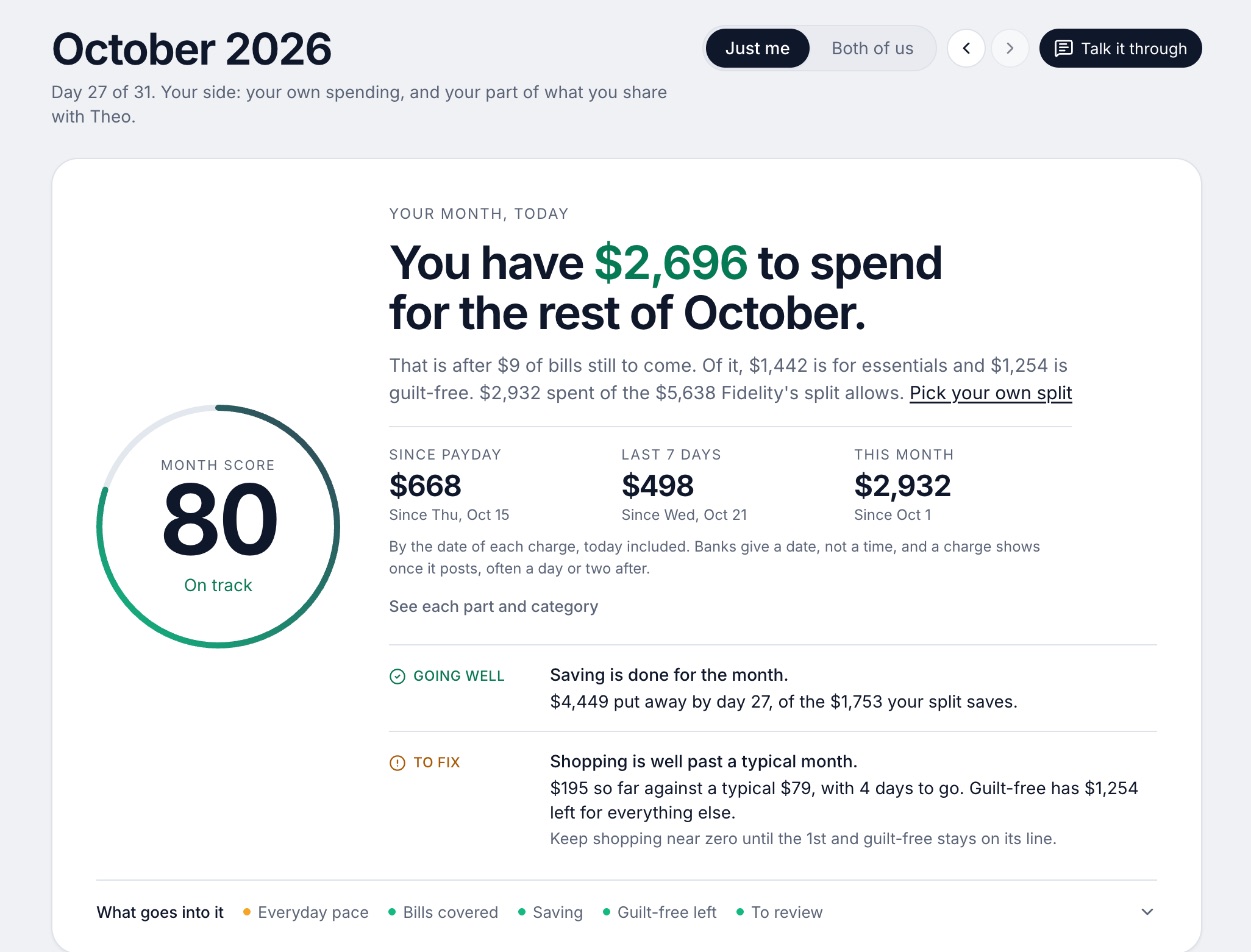
A budgeting app for couples who keep their own money, and for one person: each of you connects your own bank, chooses what the other sees, and every paycheck gets a plan.
Why it's on this list
We make Wonderful, and it is not a retirement projector. It gives no investment advice or portfolio analysis; investments count toward net worth as balances. What it offers for planning ahead is narrower: savings goals that show the month you'll reach them, and net worth for each of you and for both, from the balances your banks send, with its line over time.
Life events like getting married come step by step, with the deadlines. You can also switch from separate to shared money on a date you pick, and earlier months stay as they were. After a free week it is $14.99 a month or $99 a year for the household.
Ideal for: Two people, or one, who want goals, net worth and the monthly plan in one place, and will use another tool for retirement odds.
What it does
- Every paycheck gets a plan for bills, spending and saving before it lands.[36]
- Banks connect through Plaid and every charge is sorted into a category.[35][36]
- Mine, yours and ours: each charge counts for the person or the pair it belongs to.[36]
- Finds recurring charges and subscriptions, lists what's due before your next paycheck, and flags a bill that comes in higher than usual. It doesn't cancel them for you.[36]
- Texts you by iMessage when a bill is charged twice, a price goes up or a refund lands, and you can text it questions.[36]
- Savings goals show the month you'll reach them.[36]
- Net worth for each of you and for both, from the balances your banks send, with its line over time.[36]
- Life events like getting married come step by step, with the deadlines.[36]
Good
7. Apple users who want goals and net worth in a polished app
Copilot Money
$13/mo or $95/yr· iPhone, Web, Mac· App Store 4.8 (31K)[40]
What it is
A paid budgeting and net worth app for Apple devices and the web, with an AI money assistant and one plan that does everything.
Why it's on this list
Copilot tracks spending, investments and net worth, with savings goals and a cash flow view. It has no retirement projection in the pages we read. It is priced at $18 a month or $109 a year on its website, with different prices in the App Store, and has no Android app.[37][40][38]
Ideal for: One person, or two on Apple devices, who want a polished app that tracks net worth and savings goals.
What it does
- Money Assistant: an AI you can ask about your money. The page says it "always asks before acting." It can fix transactions, run instructions in the background and flag spending trends with budget suggestions. The App Store says it is available only on iPhone.[37][40]
- Connects to 16,000+ US institutions through read-only integrations, with direct links for Venmo, Apple Card and Coinbase.[39][40]
- Sorts transactions automatically, and the assistant can change a category or match a refund to its purchase. You can set your own categories with colors and emojis.[37][40]
- Adaptive budgets that adjust to your spending.[40]
Good
Not so good
- No Android app. The pages list iPhone, iPad, Mac and web only.[37][38][39]
- Sharing with a partner is not live. Households are marked "Coming soon."[37][38][39]
- No free plan after the trial.[39]
- The website and the App Store show different prices: $18 a month or $109 a year (shown as $9 a month) on the site, $13.00 and $95.00 on the App Store.[38][40]
Pricing
- Website, monthly[38]$18 a monthBilled monthly. The pricing page calls it "One simple plan" (checked in a browser 10/27).
- Website, yearly[38]$109 a yearShown as $9 a month, billed yearly, "instead of $119", and labeled a limited time offer.
- App Store, monthly[40]$13 a monthListed as $13.00 on the App Store, which is not what the pricing page shows.
- App Store, yearly[40]$95 a yearListed as $95.00 on the App Store.
“Mostly good, but slow to implement basic features. It feels like they did a sprint to launch and stopped improving it. Disappointed given the premium price point.”Read it where it was said ↗
8. Net worth across every kind of asset
Kubera
$250/yr· iPhone, Android, Web
What it is
A net worth tracker built as a balance sheet, not a budget, for banks, brokerages, crypto, homes, private investments and other assets in any currency.
Why it's on this list
Kubera is a balance sheet, not a plan. It takes a daily snapshot from the day you start, draws net worth over time, and shows an "investable" figure that leaves out what you cannot sell quickly. It costs $250 a year and says plainly it is not a budget. It earns a place here for the net worth line and for assets other apps leave out.[43]
Ideal for: Someone whose money sits in many places, including private holdings, other countries and trusts.
What it does
- Connects banks and brokerages through several aggregators, with "Web Sync" for institutions that will not connect. You do not have to connect anything: "Plenty of people run Kubera entirely by hand."[43]
- Assets it lists: cash, brokerages and retirement accounts, crypto in exchanges, wallets and DeFi, homes, rentals and land, private company stock and fund positions, gold, cars, art, watches and domains.[43]
- Debts it lists: mortgages, HELOCs, margin, credit cards and private loans, tracked against the asset they sit on.[43]
- Homes are valued by address, cars by model and year and metals by weight; anything without a feed gets a manual value with full history.[43]
- A snapshot every day from the day you start, with the chart, growth as an annual rate next to the S&P 500, and a Recap of what moved.[43]
Good
What a year costs
The free options are Empower, ProjectionLab Basic and Boldin's free plan. The rest charge once projections or net worth are the main event.
- Copilot Money$95
- Wonderful$99
- Origin$99
- Monarch Money$99.99
- ProjectionLab$129
- Boldin$168
- Kubera$250
ProjectionLab is the Premium plan at $129 a year and Boldin is PlannerPlus at $168 a year; both have a free plan with fewer features. Origin's $99 is the price after a first-year promotion. Copilot is the website's yearly price. Empower is free and is not shown.
Planning as a couple
Planning for two adds a question a single-person tool skips: whose money, and who sees it. The apps answer it differently. For the long version, read financial planning for couples and the couples roundup.
- Monarch: Both partners see everything. The page says, "both parties will have full visibility into all accounts and transactions associated with it," and tells people to check they are comfortable with that first. The help center adds: "You cannot hide bank accounts or transactions in Monarch."[20][21][25]
- Origin: Both partners see a combined household view of net worth, spending by category, budget and goals. Individual accounts stay in each person's name and neither partner can move money in the other's accounts. The blog describes no way to share only some accounts.[30]
- Wonderful: Each person chooses, account by account, whether the other sees everything, only totals, or nothing.[35]
- ProjectionLab: The home page lists "Plan as a couple" as a feature. The pages opened give no more detail and no separate partner price.[11]
- Boldin: The only spouse mention on the pricing page is PlannerPlus's Social Security Explorer, which compares claiming strategies "for you and your spouse." The pages opened describe no shared login and no couple price.[13][15]
The other three are thinner. Nothing on Empower's pages describes a spouse or partner view, Copilot lists partner invites as coming this fall, and Kubera lists sharing but does not say what a partner pays.[3][4][5][6][42][37][38]
The numbers a plan needs
Whatever you pick, a retirement plan asks for the same few inputs. Have them ready: your balances, what you add each month, your expected retirement age, and your Social Security estimate. The Social Security Administration's retirement page says you can typically get benefits starting at age 62 if you have worked and paid Social Security taxes for 10 years or more, and it links to tools for estimating your benefit and deciding when to apply.[2]
Contribution limits are also inputs. The IRS says the 401(k) employee limit is $24,500 for 2026, with an $8,000 catch-up at 50 and older, and the IRA limit is $7,500, with a $1,100 catch-up.[1] For a quick cushion check before you model anything long-range, our emergency fund guide and retirement savings by age pages give the starting numbers.
Advice, and what these apps do not give
A projection is arithmetic on your guesses. None of these apps can know your returns, and each says its output is not advice. ProjectionLab states its content is for education and "should not be construed as professional financial or investment advice." Boldin says its content and tools are "for informational and educational purposes only and are not investment advice."[11][14] Wonderful gives none either.
If you want a person, Boldin sells a $3,200 checkup with a CFP professional, and Origin lists sessions with one at $119.[13][28] Neither is a reason to skip comparing the free tools first.
How to choose
Start with the question. If it is "will my money last," take a planner: ProjectionLab or Empower for free, Boldin if Social Security and Roth timing matter. If it is "are we on track this year," take a budgeting app with goals. Many people use one of each.
Choose Empower Personal Dashboard if you:
- Want a free retirement scenario
- Are fine linking investment accounts
- Know the company also sells advisory services
Choose ProjectionLab if you:
- Want Monte Carlo odds on a free plan
- Would rather not link a bank
- Don't mind typing your numbers
Choose Boldin if you:
- Are close to retirement
- Want Social Security and Roth explorers
- Will pay $168 a year for the full planner
Choose Monarch Money if you:
- Want budget, goals and net worth together
- Are fine seeing every account as a pair
- Will pay about $99.99 a year
Choose Origin if you:
- Want planning and investing under one fee
- Are a couple who share a household view
- Accept a $99 price after the first year
Choose Wonderful if you:
- Keep your own accounts and share some money
- Want goals and net worth beside the monthly plan
- Will use another tool for retirement odds
Where Wonderful fits, and where it doesn't
If you want retirement odds, Social Security timing or a Roth conversion model, Wonderful is the wrong pick. It gives no investment advice or portfolio analysis, runs in the browser with no iPhone or Android app yet, and has no free plan after the trial. If you want each paycheck planned, goals with a reach-by month, net worth for each of you and both, and one price for two, it fits. See best net worth trackers, budgeting apps for couples and best savings apps.
Questions people ask
What is the best financial planning app?
For a retirement projection, Empower's planner is free, ProjectionLab's Basic plan is free and includes Monte Carlo simulations, and Boldin's free plan gives what-if scenarios. For goals and net worth sitting next to a budget, Monarch, Copilot and Wonderful cover those. Pick by what you want the app to answer, not by the longest feature list.
What is the best free financial planning software for individuals?
Three have a free plan with projections. Empower's dashboard and tools are free, with advisory services paid separately. ProjectionLab's Basic plan is free and lists forecasting and Monte Carlo simulations. Boldin says it is free to get started, but Monte Carlo analysis needs PlannerPlus at $14 a month or $168 a year.
Is there a financial planning app for couples?
Origin and Monarch let a partner join at no extra cost and show a household view. Wonderful covers both partners on one price and shows net worth for each of you and for both. ProjectionLab lists "Plan as a couple" without detail, and Boldin's pages we read mention a spouse only in the Social Security explorer.
What is the difference between a financial planning app and a budgeting app?
A budgeting app looks at this month: what came in, what went out, what is left. A planning app looks at years: how long savings last, when a goal is reached, how net worth grows. Most budgeting apps now show net worth and goals, and a few add forecasts, so the line between them is blurry. Our budgeting roundup covers the monthly side.
Do these apps give investment advice?
ProjectionLab says its content is education and should not be taken as professional financial or investment advice. Boldin says its tools are informational and educational and not investment advice. Wonderful gives none. Origin and Empower also offer advisory or investing services that are separate from their free or planning tools, so read the terms on each.
What does Monte Carlo mean in a retirement plan?
It runs your plan through many simulated markets and shows how often the money lasts. Boldin describes it as testing your plan across 1,000 simulated markets to estimate your odds. It is an estimate of a range, not a promise. ProjectionLab offers it on the free Basic plan; Boldin keeps it in PlannerPlus.
How much can I put into a 401(k) and an IRA in 2026?
The IRS says the 401(k) employee limit is $24,500 for 2026, with a $8,000 catch-up at 50 and older. The IRA limit is $7,500, with a $1,100 catch-up at 50 and older. A planning app can use these as inputs, and each one asks you for your own balances and contributions.
Do I need to connect my bank accounts to plan?
No. ProjectionLab says it does not link accounts directly, and Empower says connecting every account is optional. Connecting saves typing and keeps net worth current. Typing in a few balances once a quarter is enough for a projection that only needs rough numbers.
Can I plan for retirement without an app?
Yes. The Social Security Administration's retirement page has tools to estimate your benefit and decide when to apply, and a spreadsheet can hold your balances and a yearly growth guess. The apps add speed, charts and simulations. They do not add certainty.
Where does Wonderful fit for planning?
Wonderful is a budgeting app that plans each paycheck. It also shows savings goals with the month you will reach them, net worth for each of you and both, and life events like getting married step by step. It gives no investment advice or portfolio analysis, so for retirement projections use one of the planners above.
Sources
43 sources · read November 3, 2026
Every number on this page comes from irs.gov, ssa.gov, empower.com and 12 more. If a source has changed since, the source is right.
- 1IRS, 401(k) limit increases to $24,500 for 2026; IRA limit increases to $7,500irs.gov
- 2Social Security Administration, Retirement benefitsssa.gov
- 3Empower home pageempower.com
- 4Empower tools pageempower.com
- 5Empower net worth toolempower.com
- 6Empower retirement plannerempower.com
- 7App Store listing, Empowerapps.apple.com
- 8App Store reviews, Empowerapps.apple.com
- 9Empower free tools pageempower.com
- 10ProjectionLab pricingprojectionlab.com
- 11ProjectionLab home pageprojectionlab.com
- 12ProjectionLab help: Linking External Accounts, Plugins & Integrationsprojectionlab.com
- 13Boldin pricingboldin.com
- 14Boldin retirement plannerboldin.com
- 15Boldin, get startedboldin.com
- 16Monarch pricingmonarch.com
- 17Monarch on the App Storeapps.apple.com
- 18Monarch on Google Playplay.google.com
- 19Monarch home pagemonarch.com
- 20Monarch for couplesmonarch.com
- 21Monarch collaborationmonarch.com
- 22Monarch budgetingmonarch.com
- 23Monarch planningmonarch.com
- 24Apple public review feed for Monarchitunes.apple.com
- 25Monarch help: Monarch for Couples and Householdshelp.monarch.com
- 26Trustpilot, www.monarchmoney.comtrustpilot.com
- 27Origin home pageuseorigin.com
- 28Origin blog: Why Origin is the best personal finance app in 2026useorigin.com
- 29Origin blog: Why Origin is the best all-in-one AI finance appuseorigin.com
- 30Origin blog: Finance apps that let you add a partner in 2026useorigin.com
- 31App Store listing, Origin: AI Budget and Trackapps.apple.com
- 32App Store reviews, Originapps.apple.com
- 33Origin legal pageuseorigin.com
- 34Wonderful terms of servicewonderful.money
- 35Wonderful privacy policywonderful.money
- 36Wonderfulwonderful.money
- 37Copilot Money homecopilot.money
- 38Copilot Money pricingcopilot.money
- 39Copilot Money FAQcopilot.money
- 40Copilot on the App Storeapps.apple.com
- 41Apple public review feed for Copilotitunes.apple.com
- 42Kubera home pagekubera.com
- 43Kubera, Net Worth Trackerkubera.com
App names are trademarks of their owners; Wonderful isn't connected with them. Wonderful gives general information. It isn't a financial or tax advisor.