The short answer
For a couple moving in together, the best budgeting app is the one where you each keep your own bank, shared costs split any way you choose, and one running total shows who owes whom. Wonderful, which we make, does all three, runs in the browser only and costs $99 a year for both of you after a free week or a $1 first month. Honeydue is the free phone-only alternative.
First, though, settle who pays what in the first month. The table below is the part most lists leave out.
- 1
Wonderful: Your own banks, shared costs split your way, a running who-owes-whom
- 2
Honeydue: A free phone app with a per-account choice of what your partner sees
- 3
Splitwise: Nothing connected: a tally of shared costs, with uneven splits
- 4
Settle Up: Uneven weights and several payers, with a cheap yearly upgrade
- 5
Tricount: Free and simple, for splitting what you buy together
The first-month cost split
Moving in is two kinds of money: costs that happen once, and costs that repeat every month. Write both down before the keys are handed over. The rule that saves the most arguments is simple. Whoever pays a shared cost up front is owed the other person's share, and the repayment has a date.
One-time costs
| Cost | Paid by | Paid back | Split rule |
|---|---|---|---|
| Security deposit | Whoever has the cash that week | The other pays their share within a week; each gets their part back at move-out | Same rule as rent |
| First month's rent | The person whose name is first on the lease, or whoever has the cash | The other pays their share before the first month ends | Same rule as rent |
| Application and move-in fees | Whoever applied | Their partner's share the same week | Even, or the rent rule |
| Movers or a truck | Whoever books it | The other's share on moving day | By how much each of you is moving, or even |
| Furniture and home basics you both use | Whoever buys it | Their partner's share at the next paycheck | Even for shared items; your own things are your own cost |
| Internet and utility setup | The person whose name is on the account | Added to the monthly split from the first bill | Same rule as the monthly bill |
Monthly shared costs
| Cost | Paid by | Split rule |
|---|---|---|
| Rent | Whoever's name is on the lease | Even or by income |
| Electric, gas, water | The person on the account | Same rule as rent |
| Internet | The person on the account | Even |
| Renters insurance | Whoever buys the policy | Same rule as rent |
| Groceries and household supplies | Whoever is at the register | Even, or track the actual receipts |
| Shared streaming and subscriptions | Whoever holds the account | Even |
| Your own spending, your own debts, your own savings | Each of you | Not split |
$2,400 rent, split two ways
Say the rent is $2,400. Alex takes home $6,000 a month and Sam takes home $4,000, which is a 60/40 split of the $10,000 between you.
| Alex | Sam | Rent share, as % of take-home | |
|---|---|---|---|
| Take-home a month | $6,000 | $4,000 | |
| Even split | $1,200 | $1,200 | Alex 20%, Sam 30% |
| Income split (60/40) | $1,440 | $960 | Alex 24%, Sam 24% |
The even split looks fair and isn't if your pay differs: the same $1,200 takes 20% of one paycheck and 30% of the other. The income split asks the same share of each of you. Use whichever you both agree to, and review it when either pay changes. The full method, including splitting by room size, is in how to split rent.
Try it with your own rent
Put in what each of you takes home and what you'll share each month (rent, utilities, groceries, internet). It shows an even split, a split by income and one pot side by side.
Take-home is what lands in the bank after tax. Nothing you type here leaves this page.
50/50
Each of you pays half the shared bills from your own pay.
The bills are the same dollars for each of you, but they take 29% of one pay and 44% of the other.
By income
Each of you pays the share of the bills that your pay is of the two pays together.
60% and 40% of the bills. The bills take the same 35% of each pay, so the one who earns more still keeps more.
Pool it all
Both pays go in one pot, the bills come out, and what's left is split evenly.
You each end up with the same $2,800. The one who earns more puts in more to get there.
Wonderful does this every month, with your real bills.
You each connect your own bank and choose what the other sees. It divides what you share half each or by income, or treats it all as one pot, and keeps track of who owes whom.
Start freeWhat to keep separate and what to share
Moving in together doesn't mean merging. Nothing has to be joint on day one, and you can decide again once you have a few months of real bills in front of you.
| Keep separate for now | Share from day one | Decide later |
|---|---|---|
| Paychecks and personal accounts | Rent and deposit | A joint account for the bills |
| Debts from before you met | Utilities and internet | One shared savings goal |
| Each person's savings and retirement | Groceries and household supplies | Splitting by income instead of evenly |
| Gifts, hobbies and personal spending | Furniture and things you buy for the home | Who sees which accounts |
If the transfers between you start to feel like a chore, that is the usual sign it's time for a joint account for the bills only. Our guide to moving from separate to shared money lists what to set up at each stage. If you haven't talked through the harder questions yet, start with 30 money questions to ask before moving in.
Apps compared for this stage
Most couples lists rank apps for people who have merged their money. At this stage the test is different, and short: does the app need you to merge anything, does it split shared costs, and does it keep a running who-owes-whom total? We kept only apps we could read about on their own pages.
At a glance
| App | Needs a merge? | Splits shared costs | Price for two |
|---|---|---|---|
| Wonderful | No. Each connects their own bank | Evenly, by income or any way you choose | $99 a year, or $14.99 a month |
| Honeydue | No. Each links their own accounts | Listed: expense splitting and settling up | Free, optional tips |
| Splitwise | No. Nothing is connected | Equal, or by percentage, share or amount | Free, 4 expenses a day |
| Settle Up | No. Nothing is connected | Even, unequal weights, several payers | Free with ads; Premium $19.99 a year |
| Tricount | No. Nothing is connected | You pick who is in each expense | Free |
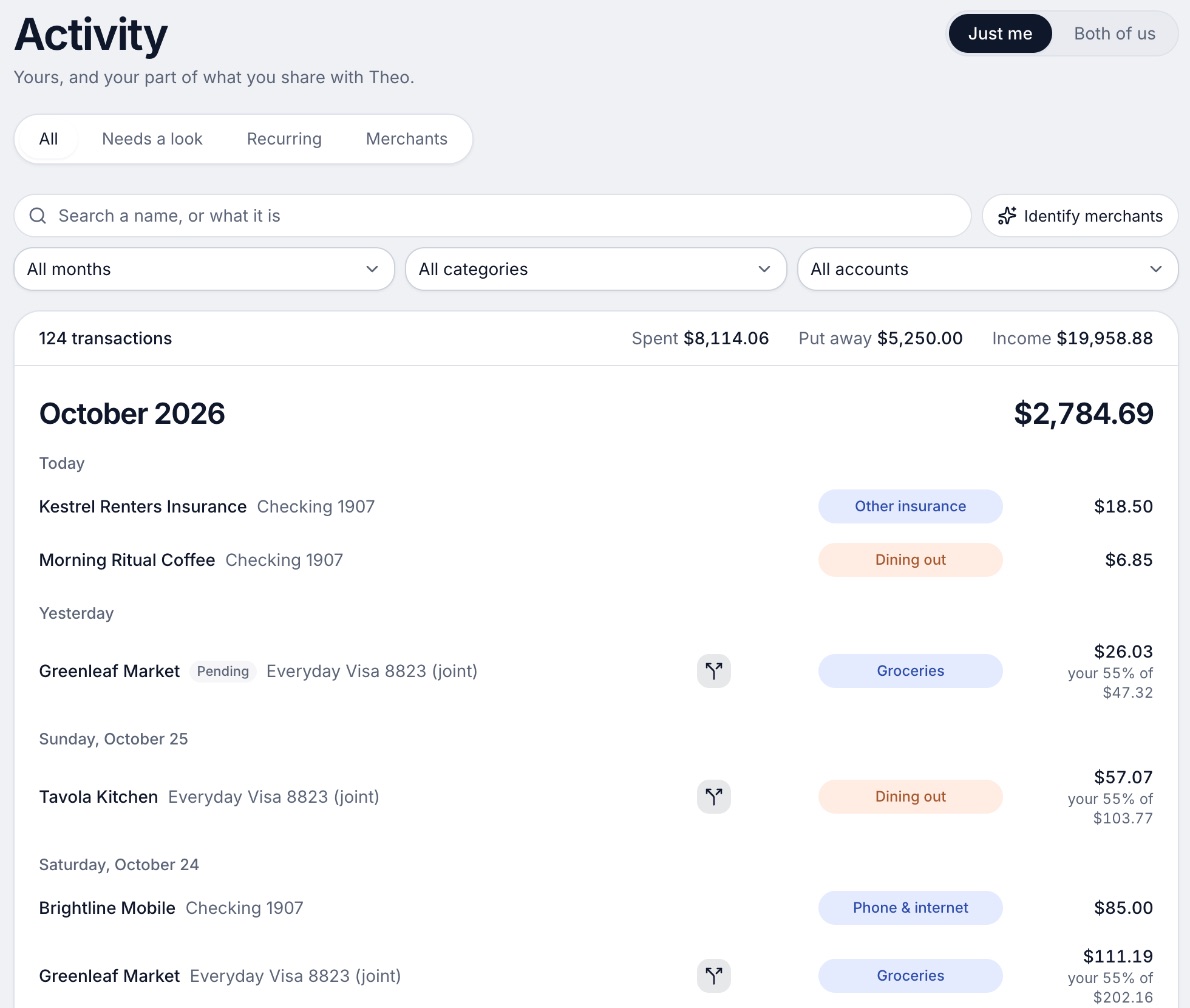
1. Your own banks, shared costs split your way, a running who-owes-whom
Wonderful
$14.99/mo or $99/yr· Web
What it is
A budgeting app for couples who keep their own money, and for one person: each of you connects your own bank, chooses what the other sees, and every paycheck gets a plan.
Why it's on this list
We make Wonderful, so weigh this entry accordingly. For a move, it fits because nothing has to merge. Each of you connects your own bank, and for each account you choose whether the other sees everything, only totals, or nothing.[2] A partner joins with their own login at no extra cost.[1]
Shared costs split evenly, by income or any way you choose, with a running total of who owes whom.[3] If you start separate and want to share later, you can switch on a date you pick, and earlier months stay as they were. It is not free after the first week, and it runs in the browser with no iPhone or Android app yet.
Ideal for: Two people moving in who want one app for the budget and the split, and will pay $99 a year for the household.
What it does
- Every paycheck gets a plan for bills, spending and saving before it lands.[3]
- Banks connect through Plaid and every charge is sorted into a category.[2][3]
- Mine, yours and ours: each charge counts for the person or the pair it belongs to.[3]
- Finds recurring charges and subscriptions, lists what's due before your next paycheck, and flags a bill that comes in higher than usual. It doesn't cancel them for you.[3]
- Texts you by iMessage when a bill is charged twice, a price goes up or a refund lands, and you can text it questions.[3]
- Savings goals show the month you'll reach them.[3]
- Net worth for each of you and for both, from the balances your banks send, with its line over time.[3]
- Life events like getting married come step by step, with the deadlines.[3]
Good
2. A free phone app with a per-account choice of what your partner sees
What it is
A free phone app for couples that shows both people's linked accounts, bills and budgets, with a choice of how much each person shares.
Why it's on this list
Honeydue is built for two. Each partner links their own accounts, and after you connect a bank it asks what your partner can see.[7] The whole app is free.
Its pages list expense splitting and settling up, but say less about how a split works than the dedicated split apps do.[5][9] It has no web version, and many recent App Store reviews report accounts that stopped syncing.
Ideal for: Two people who want a free app, are fine on a phone, and want to choose what the other sees.
What it does
- Shared view of linked bank account balances, loans and investments. The site says it connects "over 20,000 financial institutions across 5 countries."[5][9]
- Choose what your partner sees per account: balances and transactions, balances only, or nothing.[7]
- Monthly household spending limits for each category, with alerts as you and your partner get close.[9]
Good
Pricing
- Free[6]FreeHoneydue's help center says, "Honeydue is 100% free for everybody, and we don't block any features with a paywall."
- Monthly tip (optional)[6][9]Any amount from $1 to $10 a month through the App Store or Google Play. The help center says tips fund new features. The App Store lists $0.99 to $9.99.
- The whole app is free. The only paid thing is the optional tip, which can be changed or cancelled in the App Store or Google Play.[6]
“My husband and I have used this for years and genuinely love using it.”Read it where it was said ↗
3. Nothing connected: a tally of shared costs, with uneven splits
What it is
An app for iPhone, Android and web that tracks shared expenses with a partner, roommates or a group and works out who owes whom.
Why it's on this list
Splitwise connects no bank on its free plan, so it fits a move where nothing has merged. You add shared expenses and it works out who owes whom, with equal splits or unequal ones.[15][16] It is not a budget. The free plan allows 4 expenses a day, and Pro removes the limit; no Splitwise page we read gives Pro's price.
Ideal for: Two people who want nothing connected and only a tally of what you owe each other.
What it does
- Groups and private friendships for any splitting situation, with balances across groups.[14][16]
- Split equally, or unequally by percentages, shares or exact amounts, and add multiple payers on one expense.[14][16]
- Simplifies debts into the easiest repayment plan.[14][16]
Good
Not so good
- The free plan allows up to 4 expenses a day, per Splitwise's help center; Pro removes the limit.[15][19][20]
- Pro's price is not on Splitwise's own pages or help center; the App Store lists several Pro purchases from $2.99 to $39.99.[15][16][19]
- Trustpilot shows 2.0 stars from 72 reviews.[18]
- Card transaction import is a Pro feature and works in the US only.[15]
Pricing
- Free[14][15][19]Free"Free for iPhone, Android, and web." Splitwise's help center says "free users can add up to 4 expenses each day"; Pro removes the limit.
- Splitwise Pro[15][16][19]No price on splitwise.com or its help center. The help center lists Individual and Duo annual plans (Duo is for two people) and a monthly plan for one person. The App Store lists Splitwise Pro purchases at $2.99, $3.99, $4.99, $29.99 and $39.99 without saying which plan is which.
- A free plan exists. Pro adds unlimited expenses each day, card transaction import (US only), currency conversion, charts, receipt scanning, itemization, expense search, default split settings, early access to features and no ads.[15]
“My partner and I just throw our shared expenses in here and then just settle up when the deficit is >$1,000 - works great!”Read it where it was said ↗
4. Uneven weights and several payers, with a cheap yearly upgrade
Settle Up
Free, or $3.99/mo or $19.99/yr· iPhone, Android, Web, Mac· App Store 4.8 (1.8K)[22]
What it is
An app for iPhone, Android and the web that tracks group expenses, works out the fewest payments to settle everyone and offers a Premium plan for individuals or a whole group.
Why it's on this list
Settle Up tracks shared expenses with even splits, unequal weights or several payers on one item, and finds the fewest payments to settle up.[22][23] The free app carries ads, and recurring expenses are a Premium feature, so repeating monthly bills are the part you would pay for. Nothing connects to your bank.
Ideal for: Two people who want a weighted split for the monthly bills and don't mind a few ads.
What it does
- Unequal weights and several payers on one expense.[22]
- A settlement that finds "the fewest possible transfers" to clear every debt.[22]
- Works offline and syncs when you are back online.[22]
Good
Pricing
- Free[22]FreePremium is sold as "Ad-free", so the free app carries ads. The App Store description lists what Premium adds.
- Premium (one person)[22]$3.99 a month · $19.99 a yearThe App Store lists "Monthly Premium" at $3.99 and "Yearly Premium" at $19.99.
- Group Premium[22]$39.99 a yearListed as "Group Premium" for 1 year at $39.99. Shorter passes run from $5.99 for 1 week to $29.99 for 2 months, and Lifetime Group Premium is $149.99.
- A free plan exists. Premium adds an ad-free app, receipt photos, recurring and future expenses, custom categories, export to Excel and statistics.[22]
“We have tried many other expense spitting tools, and this is by far the best for group houses! ... Allows for income splitting”Read it where it was said ↗
5. Free and simple, for splitting what you buy together
Tricount
Free· iPhone, Android· App Store 4.9 (7.6K)[25]
What it is
A free app for iPhone and Android that tracks shared costs in groups, shows who owes whom and sends payment requests.
Why it's on this list
Tricount is free with no ads and no limits on its own pages. You choose who is included in each expense and record who paid.[24][25] Its pages describe no standing monthly split and no way to set a share by income, so a rent split by income means entering it each time. It is an expense splitter, not a budget.
Ideal for: Two people who only want to log what you buy together and see who owes what.
What it does
- Add an expense, choose who is included and record who paid; the app shows who owes what.[24]
- Payment requests, with a view of who has sent their share and who needs a reminder.[24]
- Currency conversion is included, and the App Store lists support for multiple currencies.[24][25]
Good
Not so good
- No budgets, income plan or bank feed on its pages (the bunq Card is the one automatic link). It is an expense splitter.[24][25]
- No web app is listed; the pages say iOS and Android.[24]
- App Store reviewers in 2025 and 2026 ask for recurring expenses and CSV export, and some report totals that do not add up.[26]
Pricing
- Free[24][25]FreeTricount's home page says "Free. No ads. No limits." and its App Store listing says "no limit on tricounts or expenses." No paid plan is listed.
- The whole app is free. The only paid thing on its pages is an optional bunq Card, which carries its own fees and terms.[24]
“Love this app, one request devs please add a reoccurring expense feature! My girlfriend and I love using this for day-to-day stuff but for reoccurring charges like BGE or insurance it would be great”Read it where it was said ↗
How to choose
If you want one app for both the budget and the split, with nothing merged, that is Wonderful or Honeydue. If you already budget somewhere else and only need the split, any of the three trackers works, and the deciding question is whether you split by income:
- Wonderful: Shared costs split evenly, by income, or any way you choose, and it keeps a running total of who owes whom.[3]
- Splitwise: Splits can be equal, or unequal by percentage, share or exact amount, with multiple payers on one expense. On Pro you can set a default split for a group, such as 55%/45%.[15][16]
- Settle Up: "Whether it's an even split, unequal weights, or multiple people paying for one item." Reviewers describe weighted shares and income splitting.[22][23]
Choose Wonderful if you:
- Want a budget and a split in one app
- Will pay $99 a year for both of you
- Are fine in a browser for now
Choose Honeydue if you:
- Want it free and on your phone
- Want to choose what your partner sees
- Can live with some sync problems
Choose Splitwise if you:
- Want nothing connected
- Only need a tally of shared costs
- Can stay within 4 expenses a day
Choose Tricount if you:
- Want a free, simple log
- Split most things evenly
- Don't need recurring bills
What to revisit after three months
By the third month you have real bills, not guesses. Sit down for half an hour and check four things.
- Is the rent rule still fair? If either pay has changed, rework it with how to split rent.
- Did any one-time cost go unpaid back? Settle the deposit and furniture shares now, using paying a partner back.
- Are the transfers a chore? If so, a joint account for the bills may be worth it. See from separate to shared money.
- Do you want to see each other's accounts? Our list of budgeting apps for couples with separate accounts shows what each partner sees.
Wonderful is the wrong pick if you need an iPhone or Android app, want a free plan after the first week, or want investment advice, which it doesn't give. For the questions to ask each other first, see 30 money questions to ask before moving in or getting married.
Questions people ask
What is the best budgeting app for couples moving in together?
Pick on one test: can each of you keep your own bank, split shared costs any way you choose, and see one running total of who owes whom? Wonderful does all three in one app. Honeydue is free and lists expense splitting and settling up. Splitwise, Settle Up and Tricount only track shared costs, so they pair with a budget you keep elsewhere.
How do we split bills when we move in together?
Start with the rent. Split it evenly if you earn about the same, or in proportion to take-home pay if you don't. On $2,400, an even split is $1,200 each, and a 60/40 income split is $1,440 and $960. Then use the same rule for utilities and internet, and keep your own spending out of it.
Who pays the deposit when moving in together?
Whoever has the cash can pay it, as long as you write down that the other person owes their share. Most couples split the deposit the same way as rent, since each of you is owed your share back when you move out. Put it in the one-time costs table above so it isn't forgotten.
Should we open a joint account when we move in together?
You don't have to. Many couples keep their own accounts and split shared costs between them, then add a joint account later if the transfers get tiresome. Our guide to moving from separate to shared money lays out what to set up at each stage.
What should we keep separate when we move in?
Paychecks, personal accounts, debts from before you met, and each person's own savings goals can all stay separate. What you share is the home: rent, utilities, internet, groceries and the things you buy for the place together.
How should we split furniture and household costs?
Split what you both use by your rent rule, and let each person pay for their own things. For a big item like a couch, decide before you buy who owns it if you split up, and record the split in your tracker on the day you pay.
Is there a free app for couples moving in together?
Yes. Honeydue and Tricount are free, and Splitwise has a free plan with a daily limit on expenses. Wonderful is not free: it has a free week or a $1 first month, then $14.99 a month or $99 a year for both of you.
Can we start separate and merge later?
Yes, and an app should let you. Wonderful lets you switch from separate to shared money on a date you pick, and earlier months stay as they were. Our guide to separate to shared money covers when couples tend to make that change.
- Best budgeting apps for couples who keep separate accounts →
- How to split rent →
- From separate to shared money →
- 30 money questions to ask before moving in or getting married →
- Best budgeting apps for couples →
- Yours, mine and ours money: account setups compared →
- Split bills by income →
- Paying a partner back →
Sources
26 sources · read November 7, 2026
Every number on this page comes from wonderful.money, honeydue.com, support.honeydue.com and 9 more. If a source has changed since, the source is right.
- 1Wonderful terms of servicewonderful.money
- 2Wonderful privacy policywonderful.money
- 3Wonderfulwonderful.money
- 4Honeydue home pagehoneydue.com
- 5Honeydue: How it workshoneydue.com
- 6Honeydue help: How does Honeydue earn moneysupport.honeydue.com
- 7Honeydue help: Will my partner see my accountssupport.honeydue.com
- 8Honeydue Joint Cashhoneydue.com
- 9Honeydue on the App Storeapps.apple.com
- 10Honeydue on Google Playplay.google.com
- 11Apple public review feed for Honeydueitunes.apple.com
- 12Honeydue help: Account issues and inviting a partnersupport.honeydue.com
- 13Honeydue help: How do I cancel my accountsupport.honeydue.com
- 14Splitwise home pagesplitwise.com
- 15Splitwise Pro pagesplitwise.com
- 16App Store listing, Splitwiseapps.apple.com
- 17App Store reviews, Splitwiseapps.apple.com
- 18Trustpilot, splitwise.comtrustpilot.com
- 19Splitwise help center: What is Splitwise Pro?kb.splitwise.com
- 20Splitwise help: Why am I seeing an expense limit?feedback.splitwise.com
- 21Settle Up home pagesettleup.io
- 22App Store listing, Settle Up - Group Expensesapps.apple.com
- 23App Store reviews, Settle Upapps.apple.com
- 24Tricount: comparison with other bill-splitting appstricount.com
- 25App Store listing, tricountapps.apple.com
- 26App Store reviews, tricountapps.apple.com
App names are trademarks of their owners; Wonderful isn't connected with them. Wonderful gives general information. It isn't a financial or tax advisor.