The short version
Quicken Classic is $4.49 to $10.99 a month, billed annually, and renews at the then-current price.[5] For a Mac, the closest programs are Banktivity (native, from $59.99 a year) and Moneydance ($65 once).[12][16] Simplifi, Monarch, YNAB and Wonderful run in a browser, and GnuCash and Actual Budget are free.
- 1
Banktivity: Mac users who want a native app, with Quicken for Mac files imported
- 2
Moneydance: A program you buy once, on Mac, Windows or Linux
- 3
Quicken Simplifi: Quicken's own web app, at the lowest first-year price
- 4
Monarch Money: A web app with phone apps and a partner included
- 5
YNAB (You Need A Budget): People who want a method, not just a tracker
- 6
Wonderful: Leaving desktop software for a web app, one price for two
- 7
Tiller: Keeping your data in a spreadsheet you own
- 8
GnuCash: Free desktop software, for people who know bookkeeping
- 9
Actual Budget: A free envelope budget you host yourself
At a glance
| App | Price | On a Mac | Brings in Quicken data |
|---|---|---|---|
| Quicken Classic | $4.49 to $10.99 a month, billed annually[5] | Windows and Mac programs[5] | The original |
| Banktivity | $59.99, $79.99 or $99.99 a year[12] | Native on Mac, iPhone and iPad[12] | Says it imports from Quicken for Mac and Quicken for Windows[3] |
| Moneydance | $65 once; bank syncing is $4 a month or $40 a year extra[16] | Mac, Windows and Linux; free phone apps[15][20] | One reviewer says it "loaded my old Quicken files"; the pages opened do not say which formats[19] |
| Quicken Simplifi | $3.99 a month, billed annually, first year[21] | In a browser, plus phone apps[21][25] | Not stated on the pages opened[21] |
| Monarch Money | $14.99 a month or $99.99 a year[28][29] | In a browser, plus phone apps[29][30] | Not stated on the pages opened[31] |
| YNAB (You Need A Budget) | $14.99 a month or $109 a year[39][42] | In a browser, plus phone apps[42][43] | Not stated on the pages opened[40] |
| Wonderful | $14.99 a month or $99 a year for two[47] | In a browser. No phone app yet[49] | Not stated[49] |
| Tiller | $99 a year[51] | In a browser, in Google Sheets or Excel[50][52] | Not stated on the pages opened[50] |
| GnuCash | Free[54] | Mac builds for Apple silicon and Intel[55] | Imports Quicken QIF files with an assistant[56] |
| Actual Budget | Free; bank data from SimpleFIN is $15 a year[62][63] | Desktop app for Mac, or a browser[60] | Not stated on the pages opened[60] |
Quicken, fairly
A page of alternatives owes Quicken a fair hearing first. Desktop money software for Windows and Mac, with a companion phone app, that downloads bank transactions, budgets and tracks bills and investments.[5][7] It has four tiers: Starter at $4.49 a month, Deluxe at $6.99, Premier at $7.99 and Business & Personal at $10.99, each billed annually.[5][6][7][8] Starter has no investment tracking. Deluxe and Premier add it, plus a debt reduction planner, and Premier adds tax reports and bill pay.[7][8]
The companion phone app holds 4.6 stars on the App Store from about 15K ratings. Quicken.com holds 3.6 on Trustpilot from 84,643 reviews, and that score covers all Quicken products, not Classic alone.[9][10] If it works for you, the alternatives below are for specific reasons, set out next.
Good
Pricing
- Classic Starter[7]$4.49 a monthBilled annually. The 40% off does not apply to Starter. No investment tracking.
- Classic Deluxe[5][6]$6.99 a monthBilled annually, shown with 40% off. Multiple budgets, debt reduction, retirement planning. Windows and Mac.
- Classic Premier[5][8]$7.99 a monthBilled annually, down from $8.99 (40% off). Adds investing tools, tax reports and bill pay for over 10,000 billers.
- Classic Business & Personal[5]$10.99 a monthBilled annually, down from $12.49 (40% off). Business and personal finances in one place.
- No free plan is listed. The App Store lists the companion app as Free.[5][9]
- "Full payment is charged to your card immediately." The membership renews every year at "the then-current price"; you may cancel before the renewal date.[6][7][8]
- The discount is for the first year of new memberships ordered directly from Quicken; the pages' offer ends November 29, 2026 (11:59 PT).[8]
- No money-back guarantee appears on the pricing comparison or Deluxe pages.[5][6]
“...It is easy to keep updated, because spending and income are automatically imported into the account.”Read it where it was said ↗
Why people leave Quicken
These reasons come from Quicken's own pages and from public posts and reviews dated 2023 to 2026. One person's experience is not everyone's, and each problem has users who never had it.
- Price: App Store and Trustpilot reviewers in 2026 complain about yearly price rises and an annual fee they call too high.[10][11]
- Sync: App Store reviewers in 2026 report cloud sync and bank sync failing, and categories changing after syncing to mobile.[11]
- Crashes: App Store reviewers in 2026 report the companion app crashing or not loading on iOS 26.[11]
- Subscription-only: Quicken's pages describe membership terms that renew yearly, with no one-time purchase listed.[6][7][8]
“...annual fee is far too much for the product”Read it where it was said ↗
“They love to add new features for more money and raise prices on the core product as it continues to degrade.”Read it where it was said ↗
The subscription
Quicken Classic is sold only as a membership. Each of its pages says the membership renews every year, that full payment is charged at purchase, and that you can cancel before the renewal date.[6][7][8] Quicken's CEO explained the change in a letter: the "primary motivation for the change to a subscription model is to simplify the experience". Quicken 2017 was supported "until their discontinuation date of 4/30/2020".[1] For someone who liked buying a version and keeping it, that is the end of the choice.
“...I use old-school desktop Quicken and have never really had any trouble with it. The huge down side is they've gone to subscription pricing which is horrible.”Read it where it was said ↗
“...Desktop Quicken 2016/2017 does everything I need, so why should I pay for a subscription?”Read it where it was said ↗
The price
The pages show Deluxe at $6.99 a month and Premier at $7.99, billed annually and shown with 40% off. The offer is "for the first year only", for new memberships ordered directly from Quicken by November 29, 2026, and the pages say the membership renews at the "then-current" rate.[5][6][8] The pages do not state the renewal price, so the number you pay in year two is not on the page you buy from. The CEO's letter about the subscription plan quoted Deluxe at $51.99 a year.[1]
“20% is a massive price increase when many of us are not getting salary increases, and the cost of living has only gone up.”Read it where it was said ↗
Sync and crashes
App Store reviewers in 2026 report cloud sync and bank sync failing, and the companion app crashing or not loading on iOS 26.[11] A November 2025 post on Hacker News says Quicken "has been running into lots of issues syncing some of my accounts lately (mostly duping assets)". [post]
The change to a subscription, in dates
Most of what people say when they leave Quicken goes back to one change. Here is how it went, from the sources we could open.
- October 2017. A report quoted by Michael Tsai says "Quicken 2018 shifts the pricing scheme from paid annual upgrades to a new annual subscription plan." Mac subscriptions were Starter at $34.99 a year, Deluxe at $49.99 and Premier at $74.99. The older Mac versions, Quicken 2015 and 2017, had cost $75 each.[4]
- April 30, 2020. Quicken 2017 was discontinued. The CEO's letter told annual upgraders that Quicken now cost "1/3 less each year ($51.99 for Deluxe vs $77.99)", and said the change was meant to simplify the experience.[1]
- December 2023. A Quicken email announcing a 20% price increase drew complaints on TidBITS Talk, quoted above. Some replies argued the rise tracked inflation. [thread]
- November 2026. Classic Starter is $4.49 a month, Deluxe $6.99 and Premier $7.99, each billed annually, with a 40% first-year offer on all but Starter.[5][6][7][8]
We don't subtract one of these prices from another. The 2017 figures are yearly prices, today's are monthly prices billed annually, and the pages say the final price may differ from the monthly figure times 12.[5]
Quicken on a Mac, and what to use instead
Quicken Classic runs on Mac. The Mac page says it supports the current macOS and the two before it, and that on an older system the application may keep running, but transaction download and Quicken's online backup may stop working at any time.[2] Two of its tools are Windows only: the Lifetime Planner on Deluxe and above, and Morningstar Portfolio X-Ray on Premier.[6][8]
If you are leaving Quicken because you are on a Mac, there are three routes, and they trade different things away.
- A native Mac program. Banktivity is built for Mac, iPhone and iPad, and says it imports Quicken for Mac and Quicken for Windows files. It has no Windows or Android version.[3][12]
- A program that runs on every system. Moneydance runs on macOS, Windows and Linux for a one-time $65, and GnuCash is free on all three.[15][16][54][55]
- A web app. Simplifi, Monarch, YNAB, Tiller and Wonderful run in a browser, so the Mac version question goes away. You give up a local file. See our best budgeting websites.
Quicken's own Deluxe page lists what the Mac version can import: Quicken for Windows 2010 or newer, Quicken for Mac 2007 and 2015 or newer, Quicken Essentials for Mac, and Banktivity.[6]
Where Quicken Classic is ahead
Leaving has costs, and the honest list starts with what you give up. Quicken Classic's higher tiers do things most of the apps below don't.
- Investment analysis. Premier calculates IRR and ROI and analyzes buys and sells. Banktivity, Moneydance and Simplifi track investments, and Monarch's Plus tier adds deeper tracking. Wonderful counts investments only as balances.[8][49]
- Tax reports. Premier has built-in tax reports that export to TurboTax or go to an accountant.[8]
- Bill pay. Premier pays bills inside Quicken for "over 10,000 billers". Deluxe only tracks upcoming bills.[6][8]
- Debt and retirement planning. Deluxe and above have a debt reduction planner, and the Lifetime Planner is Windows only. Simplifi has a retirement planner of its own.[5][6][21]
If you use two of these every month, a switch needs a plan for each. If you mostly download transactions and watch a budget, nothing here is out of reach.
How we compared
Someone leaving Quicken usually cares about one of a few things, so those are what we looked at:
- Price over years. Quicken renews at the then-current price, so the question is who states a price and who charges once.
- A Mac. Whether it runs on one, natively or in a browser.
- Your history. Whether it says it imports Quicken data.
- Where the data lives. On your computer, with a server you run, or with the company.
- Bank download. Whether transactions come in by themselves.
We read each product's pricing and help pages, its app store listings and public posts, on November 2 and 3, 2026. Each fact is numbered to its source at the bottom. Where a page was silent we say so. We haven't used these apps ourselves, so nothing here is a hands-on verdict. For the wider picture, see our best budgeting and personal finance software page.
1. Mac users who want a native app, with Quicken for Mac files imported
Banktivity
$6.99/mo or $59.99/yr· iPhone, Mac· Trustpilot 2.8 (35)[14]
What it is
A money app that runs natively on Mac, iPhone and iPad, with net worth tracking, budgets, goals and investments.
Why it's on this list
Banktivity is the closest to what a Mac user wants from Quicken: a program made for Apple devices, with accounts, budgets, goals, investments and net worth. Its three plans are Bronze at $59.99 a year, Silver at $79.99 and Gold at $99.99, with a 30-day trial for first-time customers, and one subscription covers all your devices.[12] Its own comparison page says data stays on your devices, with optional end-to-end encrypted cloud sync, and it says it imports from Quicken for Mac and Windows.[3] The tradeoffs are that it is Apple only and has no Android app, and its pages show no partner sharing.[12][13]
Ideal for: Mac and iPhone users who want a native app and plans from $59.99 a year.
What it does
- Bank accounts, savings accounts and credit cards sync automatically; investment and retirement accounts contribute their current market value.[13]
- Real estate, vehicles, precious metals and crypto "can be added and updated whenever their value changes."[13]
- A mortgage can be linked to its home, so collapsed you see net home equity and expanded the home value and the loan balance.[13]
- Accounts can be put in custom groups and subgroups, such as one Real Estate group for two homes.[13]
- "Banktivity does not automatically update vehicle values," so a car is revisited by hand.[13]
Good
Pricing
- Bronze[12]$6.99 a month · $59.99 a year$6.99 a month billed monthly, or $59.99 billed annually ($4.99 a month). Bank and card sync, budgets, debt payoff, emergency fund and goals.
- Silver[12]$8.99 a month · $79.99 a year$8.99 a month billed monthly, or $79.99 billed annually ($6.67 a month). Adds downloadable stock prices, goals tools and real estate tracking.
- Gold[12]$10.99 a month · $99.99 a year$10.99 a month billed monthly, or $99.99 billed annually ($8.33 a month). Adds accounts in different currencies and downloadable exchange rates and crypto prices.
2. A program you buy once, on Mac, Windows or Linux
Moneydance
$9/mo or $90/yr· iPhone, Android, Mac· App Store 4.7 (982)[18]
What it is
Desktop money software for macOS, Windows and Linux that you buy once, with free iPhone, iPad and Android companion apps, that tracks accounts, budgets, bills and investments.
Why it's on this list
Moneydance is the answer to the subscription complaint: $65 once per household, with a free upgrade to the next major release and a 90-day money-back guarantee.[16][17] It runs on macOS, Windows and Linux, with free iPhone, iPad and Android apps.[15]
Two cautions. Moneydance+, the optional subscription its purchase page ties to syncing with over 11,000 North American banks, is not in the $65: it is $4 a month or $40 a year. And one 2026 App Store reviewer says they have never been able to get the desktop version to download transactions from their bank, so test your banks in the trial.[16][19]
Ideal for: People who want to stop renewing and don't mind that bank syncing is a separate subscription.
What it does
- Runs on macOS, Windows and Linux, with a download page for other platforms.[20]
- "Moneydance can automatically download transactions and send payments online from hundreds of financial institutions." Its purchase page says the subscription includes syncing with "over eleven thousand North American banks".[15][16]
- Your data is "private, encrypted, and never shared", and a review the page quotes describes "an architecture based on local storage".[15]
- Investment tracking for stocks, bonds, CDs and mutual funds, with cost basis and automatic price downloads.[20]
- Budgets, scheduled reminders for one-off or recurring payments, reports you can export, and multiple currencies.[20]
Good
Not so good
- Moneydance+, which the purchase page ties to syncing with 11,000+ North American banks, is not in the $65.00. It is $4.00 a month or $40.00 a year on top.[16]
- No web app. The phone apps need the desktop program.[15][18]
- The pages name no bank connection method and give no list of supported banks.[15][20]
Pricing
- Moneydance 2024, buy once[16]$65.00 once, per household. Includes a free upgrade to the next major release. Moneydance+ is not included.
- Moneydance+ add-on[16]$4.00 a month or $40.00 a year on top of the one-time purchase. Optional.
- Subscribe instead of buying (software and Moneydance+)[16]$9 a month · $90 a year$9.00 a month or $90.00 a year. "Get Moneydance 2024 and all future updates, as well as unlimited syncing with over eleven thousand North American banks."
- A free trial that is "fully functional but limited to entering up to 100 manually entered transactions." Moneydance+ subscriptions have a 14-day free trial.[15][16]
- No free plan. The iPhone, iPad and Android apps are free, and the iPhone app needs the desktop version of Moneydance to be useful.[18][20]
“...when I upgraded to Windows 11, the quicken program wouldn’t load, and I didn’t wanna have to pay monthly fees, Moneydance loaded my old Quicken files...”Read it where it was said ↗
3. Quicken's own web app, at the lowest first-year price
Quicken Simplifi
$6.99/mo; $3.99/mo the first year· iPhone, Android, Web
What it is
A web and mobile budgeting app from Quicken that links accounts, builds a spending plan, projects cash flow and tracks bills, goals and investments.
Why it's on this list
Simplifi is Quicken's own web and phone app, with the lowest first-year price on this page: $3.99 a month, billed annually. It renews at the then-current rate, which its pages don't state, and it has no free trial, only a 30-day money-back guarantee on purchases made directly from Quicken.[21][24][25] It builds a spending plan, projects cash flow, tracks investments with cost basis and has a retirement planner.[21] Sharing goes to one additional member with full access, and not to specific accounts.[23] It is a web app, so there is no local file. See Monarch vs Simplifi, Simplifi pricing and Simplifi alternatives.
Ideal for: Someone who likes Quicken's budgeting but not desktop software, and will share with one person.
What it does
- A spending plan that shows what you can spend per day.[21]
- Projected cash flow with "what-if" scenarios.[21]
- Tracks upcoming bills and subscriptions and shows all your subscriptions.[21]
- Automatically categorizes transactions and connects to over 14,000 financial institutions.[21]
- Savings goals, reports and insights.[21]
Good
- A partner can use the shared space without paying for a second subscription.[23]
- 30-day money-back guarantee on purchases made directly from Quicken.[24][25]
- Every support channel is included with every subscription.[22]
- Covers budgeting, bills, investments and a retirement planner in one subscription.[21]
Not so good
- No free plan and no free trial.[25]
- Annual billing only, and renewal is at the then-current rate, not the first-year offer.[21][25]
- Only one shared space and one additional member; no way to share only some accounts.[23]
- A person invited to share must accept on the web app; signing in on the mobile app prompts them to subscribe.[23]
Pricing
- Simplifi, first-year offer[21]$3.99 a monthBilled annually. The page says the final price may differ from the monthly price times 12, and the offer is for the first year when ordered directly from Quicken by November 29, 2026.
- Simplifi, price shown beside the offer[21]$6.99 a monthBilled annually. Shown next to $3.99 on the page without a label. The subscription renews at "the then-current rates".
“Really nice budgeting, finance, and tracking tool. The setup takes some time and it isn’t perfect, but works very very well for the cost.”Read it where it was said ↗
4. A web app with phone apps and a partner included
What it is
A paid budgeting and net worth app that pulls every account into one place and lets a partner join under the same subscription.
Why it's on this list
Monarch is a web and phone app that connects accounts through 13,000+ institutions and tracks net worth across them.[31] It is $14.99 a month or $99.99 billed yearly, and a partner joins under the same plan.[28][32] It holds 4.9 stars on the App Store from 116K ratings.[29] Unlike Quicken Classic it has no program to install and no local file. Its couples page says both partners see every account.[32] See Monarch alternatives.
Ideal for: Someone who wants net worth, budgets and investments in one web app, with phone apps and a partner on the same plan.
What it does
- Connects bank accounts, credit cards, loans, investment accounts and real estate, through 13,000+ financial institutions.[31]
- Tracks net worth across all connected accounts.[29][31]
- Sorts transactions automatically and searches across every account in one list.[29][31]
- Two ways to budget: Flex, which splits spending into fixed, flexible and non-monthly buckets and gives one main number to watch, or Category budgeting.[29][34]
- Rollovers: money left in a category carries into the next month, to cover bills that do not come every month.[34]
Good
- A partner joins under the same subscription at no extra cost, with a separate login.[32][33]
- Two people can fund a shared goal even when their money sits in separate accounts.[33]
- Works on iPhone, iPad, Android and the web.[29][30][31]
- Rated 4.9 on the App Store (116K ratings) and 4.8 on Google Play (26.1K reviews).[29][30]
Not so good
- No free plan after the first week.[28][29]
- Paid monthly it is $14.99, which is $179.88 over twelve months, against $99.99 billed yearly.[28]
- Forecasting, several income sources and deeper investment tracking sit in the Plus tier. The App Store shows Plus at $199.99 a year; the pricing page lists no Plus price.[28][29]
- A partner sees all accounts and transactions. The couples page describes no way to keep one account private.[32][33]
Pricing
- Monthly[28][29]$14.99 a monthPricing page and App Store both show $14.99. The pricing page does not say which tier it is.
- Yearly[28][29]$99.99 a yearBilled yearly. The pricing page names two tiers, Core and Plus, but lists only these two prices.
- Yearly Plus[28][29]$199.99 a yearShown only as an in-app purchase on the App Store. The pricing page says Plus adds forecasting tools, tracking several income sources like a small business, and deeper investment tracking.
- The pricing page says "Your first week is on us." The App Store says the app is free to try for 7 days before a monthly or annual membership is billed. Neither says whether a card is needed.[28][29]
- No free plan is listed on the pricing page or the App Store. The only free access is the first week.[28][29]
“I switched to Monarch after Mint was discontinued. I initially wasn’t too interested in a paid service, but Monarch is fantastic for budgeting and doing personal finance at $100 a year. Well worth the price.”Read it where it was said ↗
5. People who want a method, not just a tracker
What it is
A paid budgeting app built on a method: give every dollar a job before you spend it.
Why it's on this list
YNAB is a method first: for every dollar, ask what it is for, and plan before you spend.[41] It is a different idea from Quicken, which records and reports. It costs $14.99 a month or $109 billed annually, with a 34-day trial on its site, and one subscription can be shared with up to 5 more people.[39][45] It works in a browser and on phones, and links accounts to bring transactions in automatically.[40][42]
Ideal for: People who want to give every dollar a job and will learn a method to do it.
What it does
- The method: for every dollar, ask "What's it for?" Plan for now (before the next paycheck), for later (non-monthly bills like car repairs), and for ease (get a month ahead).[41]
- Bank import links accounts and brings in transactions automatically. Apple Card import is also listed.[40]
- Targets: set spending and savings goals per category and track progress at a glance.[40]
- Loan Planner: shows how much interest and time you save for each extra dollar paid toward debt.[40][42]
- Reports on spending, such as average grocery spend, and on net worth over time.[40][42]
Good
- A written method, not just a tracker: the app is built around planning before spending.[41]
- One subscription covers up to six people at no extra cost.[39]
- A 34-day trial with no card when you sign up on the site, and a free 365-day trial for college students.[39]
- Rated 4.8 on the App Store (62K ratings) and 4.6 on Google Play (25.4K).[42][43]
Not so good
- No free plan after the trial.[39]
- Paid monthly it is $14.99, which is $179.88 over twelve months, against $109 billed annually.[39]
- The website says a 34-day trial and the App Store says 30 days.[39][42]
- The method asks you to plan each dollar before you spend it, which the company's method page presents as the whole point of the app.[41]
Pricing
“Budgeting works if you want to change your life. In 10 years of using YNAB we went from being a total of $250,000 in debt to $950,000 in net worth. It takes time and commitment to change.”Read it where it was said ↗
6. Leaving desktop software for a web app, one price for two
Wonderful
$14.99/mo or $99/yr· Web
What it is
A budgeting app for couples who keep their own money, and for one person: each of you connects your own bank, chooses what the other sees, and every paycheck gets a plan.
Why it's on this list
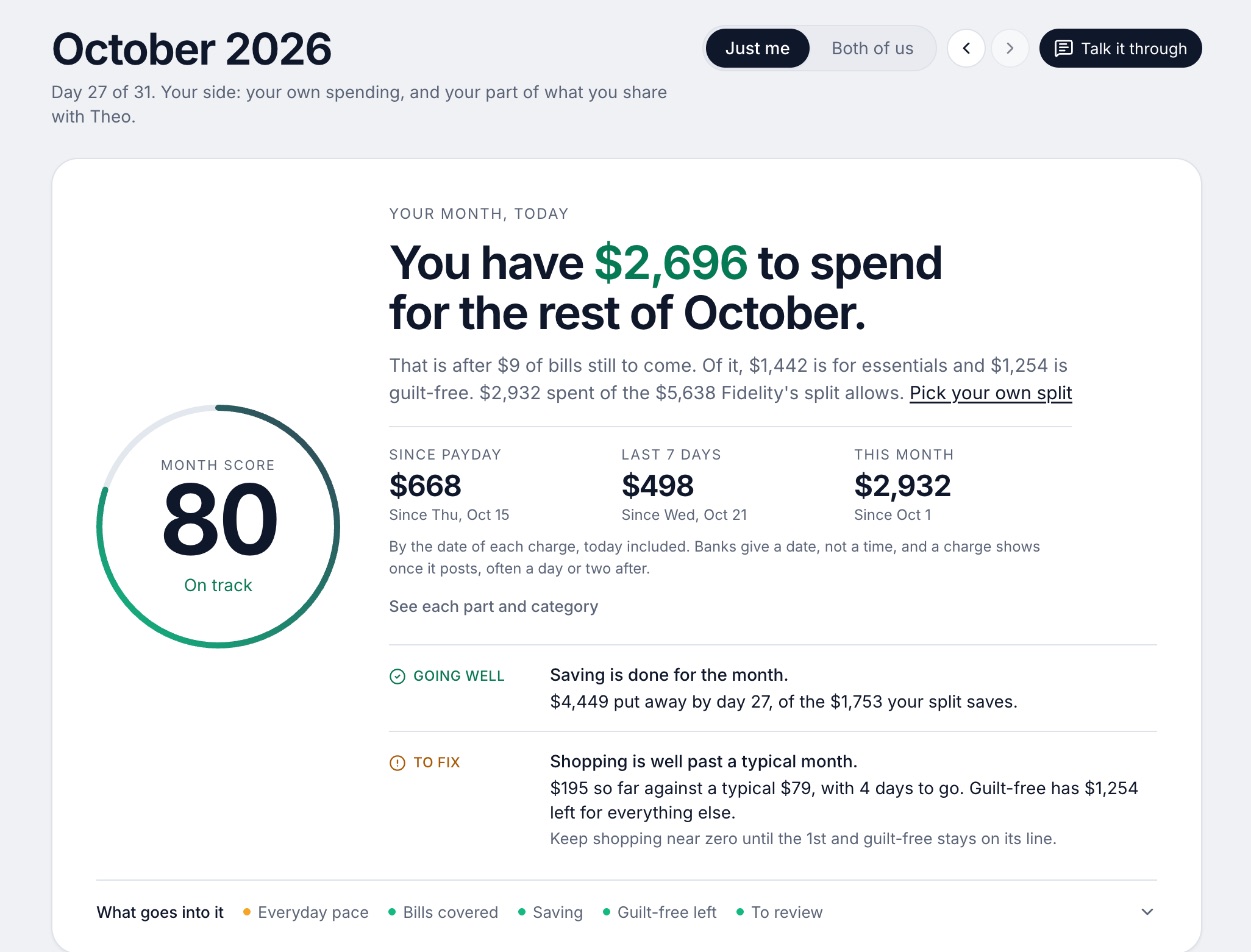
We make Wonderful, so weigh this entry accordingly. It is the only web app on this page built for two people who keep their own money: each of you connects your own bank and chooses, account by account, whether the other sees everything, only totals, or nothing.[48] One subscription, $14.99 a month or $99 a year, covers both partners.[47]
For someone coming from a program on their computer, the difference is that there is nothing to install: it opens in a browser on a Mac or any other computer, and every paycheck gets a plan. The tradeoffs are plain. It has no iPhone or Android app yet, no free plan after the free week, no investment advice or portfolio analysis, and no way described to import Quicken data.[49] Quicken Classic, Premier especially, is ahead on investments.
Ideal for: People leaving Quicken for a web app, who budget with a partner and want one price for both.
What it does
- Every paycheck gets a plan for bills, spending and saving before it lands.[49]
- Banks connect through Plaid and every charge is sorted into a category.[48][49]
- Mine, yours and ours: each charge counts for the person or the pair it belongs to.[49]
- Finds recurring charges and subscriptions, lists what's due before your next paycheck, and flags a bill that comes in higher than usual. It doesn't cancel them for you.[49]
- Texts you by iMessage when a bill is charged twice, a price goes up or a refund lands, and you can text it questions.[49]
- Savings goals show the month you'll reach them.[49]
- Net worth for each of you and for both, from the balances your banks send, with its line over time.[49]
- Life events like getting married come step by step, with the deadlines.[49]
Good
7. Keeping your data in a spreadsheet you own
Tiller
$99/yr· Web
What it is
A service that sends your bank transactions into Google Sheets or Excel spreadsheets you own, with budget templates on top.
Why it's on this list
Tiller sends your bank transactions into spreadsheets you own, with templates on top. It is $99 a year after 30 days free and 30 more with a full refund.[51] It is the web app that keeps the closest thing to Quicken's local file: the data sits in a spreadsheet that is yours. The pages we read name no mobile app and describe no partner login.[50]
Ideal for: People comfortable in Google Sheets or Excel who want the bank feed without giving up their data.
What it does
- Syncs bank accounts into private spreadsheets you own, with daily automation.[50]
- All transactions flow into one Transactions Sheet.[50]
- Works with both Google Sheets and Microsoft Excel.[52]
- AutoCat sorts transactions into categories, and you can set your own category rules.[50][52]
- The Foundation Template is an automated spreadsheet budget; other templates cover expenses, debt, net worth and savings.[50][52]
Good
Pricing
- Tiller[51]$99 a year"After 30 days, Tiller is just $99/year." The only plan listed; no monthly option shown.
“...I use Tiller Money to automate my various bank and credit card transactions directly into Google Sheets”Read it where it was said ↗
8. Free desktop software, for people who know bookkeeping
GnuCash
Free· Mac
What it is
Free, open-source double-entry accounting software for Windows, Mac and Linux that tracks bank accounts, stocks, income and expenses, with no subscription.
Why it's on this list
GnuCash is free and open source, for Windows, Mac and Linux, and it imports Quicken QIF files with an assistant.[54][55][56] The tradeoff is bank download. It imports OFX/QFX, QIF and CSV files you get from your bank, and its online banking is built for European protocols, with OFX Direct Connect called obsolete by its own wiki.[57][58] The pages describe no phone app.
Ideal for: People who know bookkeeping, or want to, and want software that never charges.
What it does
- "Personal and small-business financial-accounting software" that tracks bank accounts, stocks, income and expenses, using double-entry bookkeeping.[54]
- Imports Intuit Quicken QIF files "using a practical assistant". Its guide has sections for importing QIF, OFX/QFX and CSV files.[56][58]
- Matches imported transactions against existing ones so "duplicate transactions are accurately recognized and automatically deleted during file import".[56]
- Online banking runs through AqBanking: FinTS/HBCI and EBICS (German and some European banks) can send orders; OFX Direct Connect, "an obsolete protocol formerly used mainly in the US", can only query.[57]
- Data is stored in XML by default. It can also be stored in a SQL database (SQLite3, MySQL or PostgreSQL), which the features page calls experimental.[56]
Good
Not so good
- Its pages describe no automatic bank download for US banks: OFX Direct Connect is called obsolete, and online banking is built for European protocols.[57]
- The pages describe no phone app and no web app.[54][55][56]
- The SQL storage option is called experimental, with reports of data loss in corner cases.[56]
Pricing
- GnuCash[54]Free"Free Accounting Software", "freely licensed under the GNU GPL". No paid plan, trial or account.
- The whole program is free. The pages list no paid tier and no hosted service.[54]
“I have imported a lot into Gnucash from a downloaded file but its not smooth or complete (narrative needed fixing).”Read it where it was said ↗
9. A free envelope budget you host yourself
Actual Budget
Free· Web, Mac
What it is
A free, open-source, local-first budgeting app you run as a desktop app or on a server you host, with envelope-style budgeting and optional bank sync.
Why it's on this list
Actual Budget is free and open source under the MIT license, a local-first app with a desktop version for Windows, Mac and Linux.[60][63] Bank sync is optional: SimpleFIN Bridge for North American banks costs $15 a year, runs through a server you host, and updates each account once a day.[61][62] It budgets in the envelope style, not the report-heavy way Quicken does, and its pages say nothing about importing Quicken data.
Ideal for: People who want to leave subscriptions behind, like envelope budgeting and can run a small server.
What it does
- "Unabashedly local-first software": the app works on your device and your data is synced in the background so all devices have access.[59]
- Optional end-to-end encryption means your data "remains unreadable, even to the server".[59]
- Desktop app for Windows, Mac and Linux (download from GitHub), a browser version at app.actualbudget.org that keeps data only in the browser and is "not recommended for long-term use", or a server you host with Docker, a command, PikaPods or Fly.io.[60]
- Bank sync: SimpleFIN Bridge for North American banks and Pluggy.ai for Brazilian banks are listed as supported; GoCardless for European banks is "not accepting new accounts"; Akahu and Enable Banking are also listed.[61]
- Bank sync needs actual-server and your own API credentials. Syncing "only happens while Actual is open", and the shortest sync interval you can set is 15 minutes.[61]
Good
Not so good
- No official hosted service is described; the docs point to third-party hosts, which charge fees.[60]
- Bank sync works only through actual-server with your own credentials, and the bank sync tokens "are stored on the server and are not covered by end-to-end encryption".[61]
- The bank-data service SimpleFIN Bridge costs $15 a year, paid to SimpleFIN, and is for North American banks.[62]
- The pages describe no phone app and no app store listing.[59][60]
Pricing
“I've been using Quicken for a long time and might be in the market for a subscription-less alternative that is ideally self-hosted.”Read it where it was said ↗
Each one against Quicken
The table lines Quicken Classic up against each alternative: what is the same, and what changes if you switch.
| App | Same as Quicken Classic | Different from Quicken Classic |
|---|---|---|
| Banktivity | A program on your computer with bank sync, budgets and investments. | Apple devices only. $59.99 to $99.99 a year. Says it imports Quicken for Mac and Windows files.[12][13] |
| Moneydance | Desktop software for Mac and Windows, with phone apps. | $65 once, not a subscription. Bank syncing is Moneydance+, extra. Also runs on Linux.[15][16] |
| Quicken Simplifi | Made by Quicken: budgets, bills, investments. | Web and phone, no local file. $3.99 a month first year. One shared member.[21][23] |
| Monarch Money | Net worth, budgets and investment accounts. | A web app. $14.99 a month or $99.99 a year, partner included.[28][31][32] |
| YNAB (You Need A Budget) | Bank import, reports, a budget. | A method that plans each dollar before spending. $109 a year, 34-day trial.[39][40][41] |
| Wonderful | Bank connection and categories. | A web app for two people. Each partner chooses what the other sees. No phone app, no investment analysis.[48][49] |
| Tiller | Downloads bank transactions every day. | Data in a spreadsheet you own. $99 a year.[50][51] |
| GnuCash | Desktop software for Windows, Mac and Linux, with QIF import. | Free. Accounting first. Bank download by file, not live.[54][56][57] |
| Actual Budget | Keeps your data on your devices. | Free. Envelope budgeting. Bank sync through your own server and SimpleFIN.[59][61][62] |
Is there a free Quicken alternative?
Quicken Classic lists no free plan; the companion app is free to download.[5][9] Two alternatives here are free and ask for nothing, and each takes more work.
- GnuCash is free under the GNU GPL, imports Quicken QIF files and runs on Windows, Mac and Linux.[54][55][56] Bank download is by file for US banks.
- Actual Budget is free and open source. Its optional bank data costs $15 a year at SimpleFIN, and you run the server.[62][63]
Wonderful isn't free after its trial. Our list of free budgeting apps goes further.
Moving your data out of Quicken
Do this before you cancel, because a membership renews every year and Quicken says you may cancel before the renewal date.[6][7][8] Quicken's Data Access Guarantee says "you are assured that you will continue to have full access to and control over your desktop data".[1]
- Try the new app on your own file first. Banktivity has a 30-day trial for first-time customers, and Moneydance a trial limited to 100 manually entered transactions and a 90-day money-back guarantee.[12][15][16]
- Check the import before you pay. Banktivity says it imports Quicken for Mac and Windows files, and GnuCash imports QIF. The other apps here do not say they import Quicken data.[3][56]
- Check your banks download. The thing people report missing most is the bank feed, as one Moneydance reviewer says. Test yours in the trial.
How to choose
Start with the reason you are leaving, because that decides which of these is a real change.
Choose Banktivity if you:
- Use a Mac and want a native program
- Want your Quicken for Mac data imported
- Don't need Windows or Android
Choose Moneydance if you:
- Want to stop paying every year
- Use Linux, or both Mac and Windows
- Will test that your banks download
Choose Quicken Simplifi if you:
- Like Quicken's budgeting but not the desktop software
- Want the lowest first-year price
- Will share with one person
Choose Monarch Money if you:
- Want net worth and investments in a web app
- Want phone apps and a partner on the same plan
Choose Wonderful if you:
- Are leaving desktop software and want nothing to install
- Budget with a partner and keep some money separate
- Are fine without a phone app or investment analysis
Choose GnuCash if you:
- Want free software
- Are happy importing bank files
- Know, or want to learn, double-entry bookkeeping
Where Wonderful fits, and where it doesn't
We make Wonderful, so weigh this section accordingly. It fits someone leaving a program on their computer who would rather not install anything, especially a couple: a web app, a plan for every paycheck, each partner choosing what the other sees, and one price for both. See our best budgeting apps for couples.
It is the wrong move if you rely on Quicken for investment tracking, tax reports or bill pay, because Wonderful gives no investment advice or portfolio analysis. It is also web only, with no iPhone or Android app yet, it has no free plan after the trial, and it doesn't cancel subscriptions for you. If you want your data in a file on your own computer, Banktivity, Moneydance or GnuCash fit better.
Questions people ask
What is the best Quicken alternative for Mac?
Banktivity is the closest native match: it runs on Mac, iPhone and iPad from $59.99 a year and says it imports Quicken for Mac and Windows files. Moneydance runs on Mac, Windows and Linux for $65 once. If you'd rather use a browser, Simplifi, Monarch, YNAB and Wonderful all run on a Mac with nothing to install.
Is there a free alternative to Quicken?
Yes, two. GnuCash is free, runs on Windows, Mac and Linux, and imports Quicken QIF files. Actual Budget is free and open source, with a desktop app or a server you host, and its bank sync uses SimpleFIN at $15 a year. Neither has a phone app listed on its pages. Wonderful and the other web apps are not free.
Is there a Quicken alternative with no subscription?
Moneydance is a one-time $65 per household. Its bank syncing, Moneydance+, is $4 a month or $40 a year extra. GnuCash and Actual Budget are free. Banktivity, Simplifi, Monarch, YNAB, Tiller and Wonderful are subscriptions.
Why did Quicken go to a subscription?
Quicken's CEO said in a letter to its community that the main motivation for the change was to simplify the experience. Quicken 2017 was discontinued on 4/30/2020, and the letter promises a Data Access Guarantee that keeps your desktop data accessible if you don't renew.
Does Quicken work on Mac?
Yes. Quicken Classic's pages list Windows and Mac, and the Mac version runs on the current macOS and the two before it. The Lifetime Planner (Deluxe and Premier) and Morningstar Portfolio X-Ray (Premier) are Windows only.
How much does Quicken cost in 2026?
Classic Starter is $4.49 a month, Deluxe $6.99, Premier $7.99 and Business & Personal $10.99, each billed annually. Deluxe, Premier and Business & Personal are shown with 40% off for the first year for new memberships ordered by November 29, 2026. Renewal is at the then-current price, which the pages don't state.
What is the best Quicken alternative for Windows?
Moneydance ($65 once) and GnuCash (free) both run on Windows. Banktivity does not. For a web app that works on Windows in a browser, Simplifi (Quicken's own, $3.99 a month billed annually for the first year), Monarch ($99.99 a year), YNAB ($109 a year) and Wonderful ($99 a year for two) are the options here.
Is Quicken Simplifi the same as Quicken?
No. Both come from Quicken, but Classic is a Windows and Mac program that keeps your data local, and Simplifi is a web and phone app. Simplifi has no free trial and offers a 30-day money-back guarantee on purchases made directly from Quicken. See Monarch vs Simplifi for a side-by-side.
Can I move my Quicken data to another app?
Banktivity says it imports from Quicken for Mac and Quicken for Windows. GnuCash imports Quicken QIF files with an assistant. One Moneydance reviewer says it loaded their old Quicken files. Test with a trial or the refund window first: Banktivity has a 30-day trial and Moneydance a 90-day money-back guarantee.
What replaced Mint, and is Quicken a Mint replacement?
Simplifi is Quicken's web and phone app, at $3.99 a month billed annually for the first year. Our Mint alternatives page compares 13 apps, including Simplifi, Monarch and Wonderful, and our Simplifi pricing page has the renewal wording.
Sources
63 sources · read November 3, 2026
Every number on this page comes from quicken.com, banktivity.com, mjtsai.com and 19 more. If a source has changed since, the source is right.
- 1Quicken: letter from the CEO about the subscription planquicken.com
- 2Quicken for Mac system requirementsquicken.com
- 3Banktivity: a Quicken alternativebanktivity.com
- 4Michael Tsai: Quicken 2018 switches to subscription (quoting 9to5Mac)mjtsai.com
- 5Quicken plans and pricingquicken.com
- 6Quicken Classic Deluxequicken.com
- 7Quicken Classic Starterquicken.com
- 8Quicken Classic Premierquicken.com
- 9Quicken Classic companion app on the App Storeapps.apple.com
- 10Trustpilot: quicken.comtrustpilot.com
- 11App Store reviews feed for Quicken Classic (most recent)itunes.apple.com
- 12Banktivity plansbanktivity.com
- 13Banktivity, Net Worth Trackingbanktivity.com
- 14Trustpilot, banktivity.comtrustpilot.com
- 15Moneydancemoneydance.com
- 16Purchase Moneydance (The Infinite Kind)infinitekind.com
- 17The Infinite Kind refund policyinfinitekind.com
- 18Moneydance on the App Storeapps.apple.com
- 19Apple public review feed for Moneydanceitunes.apple.com
- 20Moneydance product page (The Infinite Kind)infinitekind.com
- 21Quicken Simplifi product pagequicken.com
- 22Quicken blog: personal finance software with the best customer supportquicken.com
- 23Simplifi help: How to use Spaces sharingsupport.simplifi.quicken.com
- 24Simplifi help: How to cancel and get a refundsupport.simplifi.quicken.com
- 25Simplifi help: Subscription questionssupport.simplifi.quicken.com
- 26App Store listing, Quicken: Budget & Track Moneyapps.apple.com
- 27App Store reviews, Quicken: Budget & Track Moneyapps.apple.com
- 28Monarch pricingmonarch.com
- 29Monarch on the App Storeapps.apple.com
- 30Monarch on Google Playplay.google.com
- 31Monarch home pagemonarch.com
- 32Monarch for couplesmonarch.com
- 33Monarch collaborationmonarch.com
- 34Monarch budgetingmonarch.com
- 35Monarch planningmonarch.com
- 36Apple public review feed for Monarchitunes.apple.com
- 37Monarch help: Monarch for Couples and Householdshelp.monarch.com
- 38Trustpilot, www.monarchmoney.comtrustpilot.com
- 39YNAB pricingynab.com
- 40YNAB featuresynab.com
- 41The YNAB methodynab.com
- 42YNAB on the App Storeapps.apple.com
- 43YNAB on Google Playplay.google.com
- 44Apple public review feed for YNABitunes.apple.com
- 45YNAB: Using YNAB as Partnerssupport.ynab.com
- 46Trustpilot, ynab.comtrustpilot.com
- 47Wonderful terms of servicewonderful.money
- 48Wonderful privacy policywonderful.money
- 49Wonderfulwonderful.money
- 50Tiller hometiller.com
- 51Tiller pricingtiller.com
- 52Tiller featurestiller.com
- 53Hacker News search for Tiller Money commentshn.algolia.com
- 54GnuCashgnucash.org
- 55GnuCash downloadgnucash.org
- 56GnuCash featuresgnucash.org
- 57GnuCash wiki: AqBankingwiki.gnucash.org
- 58GnuCash guide: Importing data into GnuCashcode.gnucash.org
- 59Actual Budgetactualbudget.org
- 60Actual Budget docs: installingactualbudget.org
- 61Actual Budget docs: bank syncactualbudget.org
- 62Actual Budget docs: SimpleFINactualbudget.org
- 63Actual Budget on GitHubgithub.com
App names are trademarks of their owners; Wonderful isn't connected with them. Wonderful gives general information. It isn't a financial or tax advisor.