The short version
Quicken Simplifi works for a couple who are happy to share everything: one partner joins at no extra cost and sees the same accounts. Quicken Classic is built for one user, so a second person gets full read and write access to your file through the web, not their own copy. Neither lets you keep one account private, and neither splits a bill.
- 1
Quicken Simplifi: A couple who will share one space and both see everything, on web and phone
- 2
Quicken Classic: One person who runs the money on a desktop and gives a partner shared web access
- 3
Monarch Money: Couples who want a bigger app and a partner who sees it all
- 4
YNAB (You Need A Budget): Couples who want to plan every dollar together, up to six people on one plan
- 5
Honeydue: Couples who want a free phone app with a choice of what each shares
- 6
Wonderful: Two people who keep their own accounts, share some bills and want each charge to count for the right person
At a glance
| Quicken Simplifi | Quicken Classic | |
|---|---|---|
| Price | $3.99/mo billed annually, first year[4] | $4.49 Starter, $6.99 Deluxe, $7.99 Premier a month, billed annually[11] |
| Partner | Spaces sharing: you can share your data with one additional member. They need their own Quicken ID but not their own subscription, and must accept the invite on the web app.[4][6] | Quicken's subscription FAQ says Quicken "is currently designed for one user". A spouse or partner can be given access through Data Sharing in Quicken on the Web: they sign in with their own Quicken ID, need no subscription of their own, and see only the data file you share. It works only for a data file synced to the cloud, and it does not give them the desktop app.[1][2] |
| What a partner sees | Sharing is full access to the one shared space. Sharing specific accounts or features is not available yet, and the article says it "may be added" in the future. You can remove a member at any time.[6] | Shared access is full read and write: the invited person can "see and make changes to your accounts, transactions, and other details". Read-only sharing is not offered; Quicken points to a Product Idea to vote on.[1] |
| Works on | Web, iPhone, Android | Windows and Mac desktop, with a companion phone app |
How we compared
A couple needs four answers from a money app: how does the second person get in, do they pay, what do they see, and can a shared cost be divided. We took each from Quicken's own help pages: the Simplifi Spaces sharing article, Classic's Data Sharing article and the subscription FAQ. Prices are from Quicken's product and pricing pages. Every fact is numbered to its source at the end.
Simplifi for two
How you share. Spaces sharing: you can share your data with one additional member. They need their own Quicken ID but not their own subscription, and must accept the invite on the web app.[4][6] The article also says Simplifi includes only one shareable space. A bigger plan, Quicken Business & Personal, offers up to three.[6]
What it costs. The same as for one person, since the second person needs no subscription. Quicken shows $3.99 a month billed annually for the first year.[4] Renewal is at the then-current rate, and the page does not say what that is. For the full picture, see Simplifi pricing in 2026.
What your partner sees. Sharing is full access to the one shared space. Sharing specific accounts or features is not available yet, and the article says it "may be added" in the future. You can remove a member at any time.[6] In practice that means both of you see every account in the space. If one of you wants a card or a savings account kept out of sight, the workaround is to leave it out of Simplifi.
The catches. Three things trip couples up. A person invited to share must accept on the web app; signing in on the mobile app prompts them to subscribe.[6] It has no free trial, only a 30-day money-back guarantee on purchases made directly from Quicken.[8] And a bill cannot be split: the sharing article describes a shared space, not a running total of who owes whom.
Quicken Classic for two
Classic is the older desktop product for Windows and Mac. Quicken's subscription FAQ is direct about couples: it says Quicken is "currently designed for one user."[2] A couple has three ways to live with that.
- Shared web access. Turn on cloud sync for your file, then invite your partner by email from Quicken on the Web. They sign in with their own Quicken ID, need no subscription of their own, and see only the file you share. It does not give them the desktop app.[1]
- One Quicken ID on two computers. Quicken says there is no limit on how many computers it is installed on, if each signs in with the same Quicken ID. Sharing the subscription that way means handing over your ID and password, and Quicken warns the person also gets your billing details and any synced mobile data.[2]
- Two separate files. Each of you keeps your own data file on your own computer. Nothing is shared, so it works as two separate budgets, not a household one.
What your partner sees. Shared access is full read and write: the invited person can "see and make changes to your accounts, transactions, and other details". Read-only sharing is not offered; Quicken points to a Product Idea to vote on.[1]
Two people on one file. Quicken says a file can be moved from one computer to another but not opened on both at once, and advises against sharing a file over a network because several people using a single file at once will often lead to data issues.[3] So Classic suits one person who runs the money and a partner who looks in, not two people entering transactions side by side.
Cost. One subscription covers it. Starter is $4.49 a month, Deluxe $6.99 and Premier $7.99, all billed annually, with the 40% off for the first year of new memberships and renewal at the then-current price.[11][12] The phone app is a companion to the desktop program, so the couple question comes back to the desktop file.
Choosing between the two Quicken products rather than as a couple? Read Simplifi vs Quicken Classic, or Quicken alternatives.
Where both fall short for couples
Both are built around one person's view of money, with a second person let in. That shows in four places.
- No private accounts. Sharing is the whole space or the whole file. If you keep your own account, your partner sees it.
- No splitting. Neither page describes dividing a shared bill or tracking who owes whom.
- Bank connections drop. It is a common complaint in the public reviews, so test your own banks early.Bank connections: App Store reviewers in 2026 report main banks disconnecting, accounts that will not sync, and long waits for fixes.[10]
- Price creep. Price: App Store and Trustpilot reviewers in 2026 complain about yearly price rises and an annual fee they call too high.[16][17]
“I’ve been waiting for a fix on my main bank for almost a month. Every time I contact they just say there’s no updates. Going to use something else.”Read it where it was said ↗
“...annual fee is far too much for the product”Read it where it was said ↗
The 2026 App Store and Trustpilot comments quoted here are about bank connections, price and removed features, not about sharing with a partner.
If you want something else
If you need a private account, or a way to split bills, these are the apps people look at. For longer lists see Simplifi alternatives and the best budgeting apps for couples.
At a glance
| App | Price | Partner | What a partner sees |
|---|---|---|---|
| Monarch Money | $14.99/mo or $99.99/yr | A partner joins at no extra cost under the same subscription and gets their own login. The page says, "Partners will each have their own login, but can view each other's data."[22][23] | Both partners see everything. The page says, "both parties will have full visibility into all accounts and transactions associated with it," and tells people to check they are comfortable with that first. The help center adds: "You cannot hide bank accounts or transactions in Monarch."[22][23][27] |
| YNAB (You Need A Budget) | $14.99/mo or $109/yr | YNAB Together shares one subscription with up to six people, "for the price of a single subscription." It is meant for partners and other close groups.[29][30][35] | YNAB's pages don't say what each member sees. Its partner article says members can create and share budgets with each other under one subscription.[35] |
| Honeydue | Free, with an optional tip | Built for two. Each partner links their own accounts and the app asks what the other can see.[37][40] | After you connect a bank, Honeydue asks what your partner can see: balances and transactions, balances only, or nothing.[40] |
| Wonderful | $14.99/mo or $99/yr for both | A partner joins with their own login at no extra cost. One subscription covers the household.[47] | Each person chooses, account by account, whether the other sees everything, only totals, or nothing.[48] |
Monarch is the closest in spirit to Simplifi: a paid app where a partner joins free and sees everything. Both partners see everything. The page says, "both parties will have full visibility into all accounts and transactions associated with it," and tells people to check they are comfortable with that first. The help center adds: "You cannot hide bank accounts or transactions in Monarch."[22][23][27] It comes up in Monarch vs Simplifi.
“My wife loves being able to see every thing in one place. It took us 10 years to find this app. Thank you monarch!”Read it where it was said ↗
YNAB shares one subscription across up to six people, but its pages do not say what each member sees.[35]
Honeydue is the free choice built for two. After you connect a bank, Honeydue asks what your partner can see: balances and transactions, balances only, or nothing.[40]
“My husband and I have used this for years and genuinely love using it.”Read it where it was said ↗
5. Two people who keep their own accounts, share some bills and want each charge to count for the right person
Wonderful
$14.99/mo or $99/yr· Web
What it is
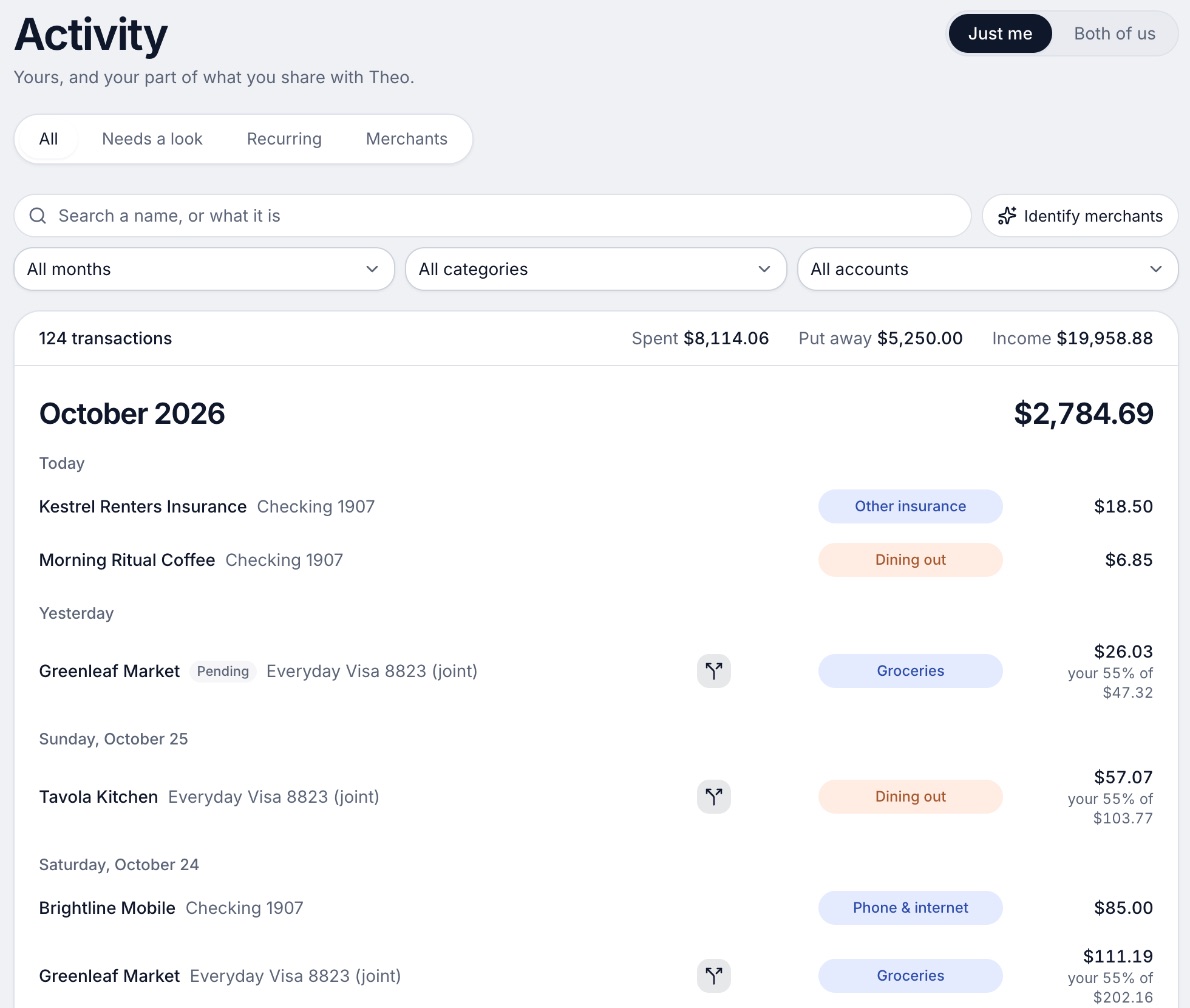
A budgeting app for couples who keep their own money, and for one person: each of you connects your own bank, chooses what the other sees, and every paycheck gets a plan.
Why it's on this list
We make Wonderful, so weigh this as you would any maker's note. It is not free: there is a free week, then $14.99 a month or $99 a year for the household, with no free plan after the trial.
It answers the two gaps above. A partner joins with their own login at no extra cost, each person chooses what the other sees account by account, and shared costs split evenly, by income or any way you choose, with a running total of who owes whom. It has no iPhone or Android app yet and gives no investment advice.
Ideal for: Two people who keep their own accounts, share some bills, and will pay $99 a year for the household after a free week.
What it does
- Every paycheck gets a plan for bills, spending and saving before it lands.[49]
- Banks connect through Plaid and every charge is sorted into a category.[48][49]
- Mine, yours and ours: each charge counts for the person or the pair it belongs to.[49]
- Finds recurring charges and subscriptions, lists what's due before your next paycheck, and flags a bill that comes in higher than usual. It doesn't cancel them for you.[49]
- Texts you by iMessage when a bill is charged twice, a price goes up or a refund lands, and you can text it questions.[49]
- Savings goals show the month you'll reach them.[49]
- Net worth for each of you and for both, from the balances your banks send, with its line over time.[49]
- Life events like getting married come step by step, with the deadlines.[49]
Good
Which to pick
Choose Quicken Simplifi if you:
- Both want everything in one shared space, with nothing kept private
- Want the lowest first-year price and can live with annual billing
- Want the budget on web and phone, not a desktop program
- Will accept the invite on the web app on day one
Choose Quicken Classic if you:
- Are the one who runs the money, and your partner mostly looks in
- Want data kept on your own computer
- Need investments, tax reports or bill pay
- Are comfortable giving your partner full read and write on the file
Choose Wonderful if you:
- Keep your own accounts and share only some
- Want shared bills split and a running total of who owes whom
- Are fine with a web app and no iPhone or Android app yet
- Will pay $99 a year after a free week
Choose Honeydue if you:
- Want a free phone app built for two
- Want to choose what your partner sees after you connect a bank
- Can live with reports of accounts that stop syncing
When Wonderful is the wrong pick: if you want an iPhone or Android app today, investment tracking or a free plan, it is not that. Simplifi, Monarch or Honeydue fit better.
Questions people ask
Is Quicken Simplifi good for couples?
It works if both of you are fine seeing everything. One partner can join your space without paying, but sharing is all or nothing: Quicken's help article says sharing specific accounts is not available yet. There is also only one shareable space and one additional member.
Does my partner need their own Simplifi subscription?
No. Quicken's help article says the member you invite needs their own Quicken ID and password but not their own Simplifi subscription. They have to accept the invitation on the web app, because signing in on the mobile app prompts them to subscribe.
Can two people use Quicken Classic?
Quicken's subscription FAQ says Quicken is currently designed for one user. A second person can be given access through Data Sharing in Quicken on the Web, with their own Quicken ID and no subscription, but only for a data file synced to the cloud, and they get full read and write on it.
Can my spouse use my Quicken subscription on their computer?
Quicken says there is no limit on how many computers it can be installed on, but each one signs in with the same Quicken ID. Sharing the subscription that way means giving your spouse your Quicken ID and password, and Quicken warns it also exposes your billing details. The shared-access feature avoids that.
Can two people edit one Quicken file at the same time?
Not safely, by Quicken's own pages. A file can be moved between computers but not opened on two at once, and Quicken advises against sharing a file over a network because a single file used by several people at once often leads to data issues.
Can my partner see only some of my accounts in Simplifi or Quicken?
Not from what Quicken's pages say. Simplifi's sharing is full access to the one space, and Classic's Data Sharing is full read and write on the whole file. Quicken points to a product idea for read-only access in Classic, which is not a feature yet.
How much do Simplifi and Quicken Classic cost for two?
The same as for one, because a partner joins without a subscription. Simplifi shows $3.99 a month billed annually for the first year. Classic shows $4.49 for Starter, $6.99 for Deluxe and $7.99 for Premier a month, billed annually, with renewal at the then-current price.
Does Simplifi split bills between two people?
Its help article describes a shared space, not a way to divide a bill or track who owes whom. For that, look at apps that list splitting, such as Wonderful, which splits evenly, by income or any way you choose.
What is the best app for a couple who keep separate accounts?
Look for per-account sharing. Honeydue asks after you link a bank what your partner can see: balances and transactions, balances only, or nothing. Wonderful offers the same three choices account by account and also splits shared costs. Simplifi, Classic and Monarch share everything.
Sources
49 sources · read November 3, 2026
Every number on this page comes from quicken.com, support.simplifi.quicken.com, apps.apple.com and 10 more. If a source has changed since, the source is right.
- 1Quicken: How to use Data Sharing in Quicken Classic on the Webquicken.com
- 2Quicken: Subscription Membership FAQsquicken.com
- 3Quicken: Can I install Quicken on multiple computers?quicken.com
- 4Quicken Simplifi product pagequicken.com
- 5Quicken blog: personal finance software with the best customer supportquicken.com
- 6Simplifi help: How to use Spaces sharingsupport.simplifi.quicken.com
- 7Simplifi help: How to cancel and get a refundsupport.simplifi.quicken.com
- 8Simplifi help: Subscription questionssupport.simplifi.quicken.com
- 9App Store listing, Quicken: Budget & Track Moneyapps.apple.com
- 10App Store reviews, Quicken: Budget & Track Moneyapps.apple.com
- 11Quicken plans and pricingquicken.com
- 12Quicken Classic Deluxequicken.com
- 13Quicken Classic Starterquicken.com
- 14Quicken Classic Premierquicken.com
- 15Quicken Classic companion app on the App Storeapps.apple.com
- 16Trustpilot: quicken.comtrustpilot.com
- 17App Store reviews feed for Quicken Classic (most recent)itunes.apple.com
- 18Monarch pricingmonarch.com
- 19Monarch on the App Storeapps.apple.com
- 20Monarch on Google Playplay.google.com
- 21Monarch home pagemonarch.com
- 22Monarch for couplesmonarch.com
- 23Monarch collaborationmonarch.com
- 24Monarch budgetingmonarch.com
- 25Monarch planningmonarch.com
- 26Apple public review feed for Monarchitunes.apple.com
- 27Monarch help: Monarch for Couples and Householdshelp.monarch.com
- 28Trustpilot, www.monarchmoney.comtrustpilot.com
- 29YNAB pricingynab.com
- 30YNAB featuresynab.com
- 31The YNAB methodynab.com
- 32YNAB on the App Storeapps.apple.com
- 33YNAB on Google Playplay.google.com
- 34Apple public review feed for YNABitunes.apple.com
- 35YNAB: Using YNAB as Partnerssupport.ynab.com
- 36Trustpilot, ynab.comtrustpilot.com
- 37Honeydue home pagehoneydue.com
- 38Honeydue: How it workshoneydue.com
- 39Honeydue help: How does Honeydue earn moneysupport.honeydue.com
- 40Honeydue help: Will my partner see my accountssupport.honeydue.com
- 41Honeydue Joint Cashhoneydue.com
- 42Honeydue on the App Storeapps.apple.com
- 43Honeydue on Google Playplay.google.com
- 44Apple public review feed for Honeydueitunes.apple.com
- 45Honeydue help: Account issues and inviting a partnersupport.honeydue.com
- 46Honeydue help: How do I cancel my accountsupport.honeydue.com
- 47Wonderful terms of servicewonderful.money
- 48Wonderful privacy policywonderful.money
- 49Wonderfulwonderful.money
App names are trademarks of their owners; Wonderful isn't connected with them. Wonderful gives general information. It isn't a financial or tax advisor.