The short version
For a free start, Goodbudget's envelopes cost nothing but typing. YNAB plans every dollar of one paycheck and has a 34-day trial. PocketGuard shows what is safe to spend. Wonderful, which we make, plans each paycheck and costs $99 a year after a free week. None of these pages describe single parents specifically, so use the trials.
- 1
Goodbudget: A free plan with envelopes, if you will type in spending
- 2
YNAB (You Need A Budget): Giving every dollar of one paycheck a job
- 3
PocketGuard: One 'safe to spend' number for a single adult
- 4
Wonderful: A plan for every paycheck and goals with a finish month
- 5
Monarch Money: One clear picture of accounts, goals and spending
- 6
Honeydue: A free app, if you share the money with someone
How to budget on one paycheck
Single moms and single dads run the same math: one income, and costs that do not wait for payday. The aim is to see a shortfall weeks ahead, while there is still something to do about it.
- Start from take-home pay. Use what lands in your account after tax and anything taken at work. If your pay varies, budget on your lowest recent month and see budgeting apps for irregular income.
- Put fixed bills and childcare first. Rent or mortgage, utilities, insurance, childcare and transport. Our household expenses list is a checklist, and budget categories shows how to group the rest.
- Match each bill to a paycheck. If you are paid every two weeks, some bills fall in a thin paycheck. The paycheck budget planner shows which paycheck covers which bill, and this page compares apps by pay schedule.
- Plan the costs that come once a year. School fees, car registration, holidays and back-to-school are what break a month. A sinking fund spreads each over the year.
- Build a cushion first, then pay it forward. With one paycheck covering everyone, a car repair or a missed shift is the whole risk. Our emergency fund guide covers how much. If every month is tight, see apps for living paycheck to paycheck.
Tax credits and help to check
Before you pay for any app, check what the government may already owe you or provide for free. This is general information, not tax or legal advice, and the IRS pages below are the authority. The figures are for the 2025 tax year, the latest the IRS pages show.
- Child Tax Credit. The IRS says it is worth up to $2,200 per qualifying child, and up to $1,700 per child can be refunded depending on income, with at least $2,500 of earned income needed. The child must be under 17 at the end of the year, and you and the child need Social Security numbers valid for employment in the US.[1]
- Head of household. Publication 501 lists three tests: you are unmarried or considered unmarried on the last day of the year, you paid more than half the cost of keeping up your home, and a qualifying person lived with you more than half the year. The publication also lists the standard deduction tables for each filing status.[3]
- Child and Dependent Care Credit. Up to 35% of work-related care costs for a child under 13, on up to $3,000 of costs for one child or $6,000 for two or more. The rate drops to 20% as adjusted gross income rises above $43,000. You report each provider's name, address and taxpayer ID on Form 2441.[2]
- Earned Income Tax Credit. The IRS says it is for people with low to moderate income, and the amount changes if you have children. The IRS publishes the figures in its credit tables.[4]
- Free tax help. The IRS's Volunteer Income Tax Assistance (VITA) program prepares returns free. It sets no program-wide income cap, and many sites help people who make about $70,244 or less.[5]
- Child support. You sign up through your state or local child support agency, found through the federal Office of Child Support Services, which does not handle individual cases. The agency may charge an application fee, which can be waived for some people, so ask what yours charges.[6]
If child support or a custody order is part of your budget, treat the amount as income only once it has landed a few months in a row. If you are separating, our budgeting after a divorce page covers the money side.
At a glance
| App | Price | Free trial | For one adult | Works on |
|---|---|---|---|---|
| Goodbudget | Free, or $10/mo or $80/yr | None stated | Free plan, no bank sync | iPhone, Android, Web |
| YNAB (You Need A Budget) | $14.99/mo or $109/yr | The pricing page says a 34-day free trial | Method for one pay; trial of 34 days | iPhone, Android, Web |
| PocketGuard | $6.25/mo or $74.99/yr | A 7-day free trial on each plan | 'Safe to spend' number; built for a single person | iPhone, Android, Web |
| Wonderful | $14.99/mo or $99/yr | A free week | Works for one person; no free plan | Web |
| Monarch Money | $14.99/mo or $99.99/yr | The pricing page says "Your first week is on us | Full picture; first week free | iPhone, Android, Web |
| Honeydue | Free | None stated | Free; made for two people sharing | iPhone, Android |
How we compared
With one paycheck and little slack, five things matter more than features:
- What it costs for a year. Every dollar of a fee is a dollar not in the budget, so we compare the cheapest way to pay.
- Whether there is a free option or a long trial. So you can try it through a full month.
- How it handles a paycheck. By category, by envelope or by what is left to spend.
- Bank connection versus typing. Typing is free and takes time; a connection is quicker but costs money.
- Goals. An emergency fund or a school-year cost needs a number and a date.
Every fact comes from each app's own pricing and help pages, the app stores and the government pages in the sources, read on November 3, 2026. We have not used these apps ourselves. Where a page did not say, we say so. For two adults, see family budget apps; for zero-cost options, free budgeting apps.
1. A free plan with envelopes, if you will type in spending
Goodbudget
Free, or $10/mo or $80/yr· iPhone, Android, Web· App Store 4.6 (13,522)[12]
What it is
An envelope budgeting app for the web, iPhone and Android where you divide income into virtual envelopes and share the budget across devices.
Why it's on this list
Goodbudget's free plan is real: 10 regular envelopes, 10 annual or goal envelopes, 1 account, 2 devices and 1 year of history. Envelopes suit one paycheck: when the groceries envelope is empty, it is empty. The catch is that bank sync is Premium, at $10 a month or $80 a year, so the free plan means typing in transactions.[7][8]
Ideal for: A parent who likes envelopes, wants to start free and will enter spending by hand.
What it does
- Envelope budgeting: you divide income into category envelopes, spend from the matching envelope and stop when it is empty, with no physical cash.[14]
- The free plan has 10 regular envelopes and 10 annual or goal envelopes; Premium removes the cap.[7][8]
- Syncs and shares a budget across iPhone, Android and the web, with data backed up to Goodbudget's website.[10][12]
- Automatic bank sync is a Premium feature and works with US banks only. The free plan is manual entry.[7][8]
Good
Pricing
- Free[7][8]FreeCalled "Free Forever" on the page. 10 regular envelopes, 10 annual or goal envelopes, 1 account, 2 devices, 1 year of history, debt tracking, community support.
- Premium[7][8]$10 a month · $80 a yearAdds automatic bank sync (US banks only), unlimited envelopes and accounts, 5 devices, 7 years of history and email support.
2. Giving every dollar of one paycheck a job
What it is
A paid budgeting app built on a method: give every dollar a job before you spend it.
Why it's on this list
YNAB asks what every dollar is for before you spend it. On one paycheck that means a once-a-year cost gets money set aside each month, so it does not arrive as a surprise.[18] It costs $14.99 a month or $109 a year, after a 34-day trial with no card needed when you sign up on its site.[16][19]
College students get a free 365-day trial with proof of enrollment, which helps a parent who is studying.[16]
Ideal for: A parent who wants every dollar of a paycheck to have a job and will do a weekly check-in.
What it does
- The method: for every dollar, ask "What's it for?" Plan for now (before the next paycheck), for later (non-monthly bills like car repairs), and for ease (get a month ahead).[18]
- Bank import links accounts and brings in transactions automatically. Apple Card import is also listed.[17]
- Targets: set spending and savings goals per category and track progress at a glance.[17]
Good
- A written method, not just a tracker: the app is built around planning before spending.[18]
- One subscription covers up to six people at no extra cost.[16]
- A 34-day trial with no card when you sign up on the site, and a free 365-day trial for college students.[16]
- Rated 4.8 on the App Store (62K ratings) and 4.6 on Google Play (25.4K).[19][20]
Not so good
- No free plan after the trial.[16]
- Paid monthly it is $14.99, which is $179.88 over twelve months, against $109 billed annually.[16]
- The website says a 34-day trial and the App Store says 30 days.[16][19]
- The method asks you to plan each dollar before you spend it, which the company's method page presents as the whole point of the app.[18]
3. One 'safe to spend' number for a single adult
What it is
A paid budgeting app for iPhone, Android and web that links bank accounts and shows how much is safe to spend after bills, goals and essentials.
Why it's on this list
PocketGuard's main number is "Leftover": what you can still spend after bills, goals and essentials. It also predicts how much you will have at month's end. The yearly plan is $74.99 after a 7-day trial; monthly is $12.99, and there is a $149.99 lifetime option. It has no free plan.[24][28][25]
Ideal for: A parent who wants one number for what is safe to spend and is fine paying for it.
What it does
- "Leftover": what you can still spend after bills, goals and essentials.[24][28]
- Budget with zero-based, envelope or category methods, with rollovers for unspent or overspent money.[24][26]
- Pace: predicts how much you will have left at month's end from your spending habits.[24][28]
- Finds recurring charges and subscriptions automatically, and the listing mentions a built-in bill negotiation service.[24][28]
Good
Not so good
- No free plan; the app requires the trial or a paid plan.[25]
- Monthly billing is $12.99, about double the yearly rate per month.[25]
- No partner or shared login is described on the pages opened.[24][25][26][27]
- App Store reviewers in 2025 and 2026 report being charged at the start of the trial, and a trial that does not appear in App Store subscription settings.[29]
4. A plan for every paycheck and goals with a finish month
Wonderful
$14.99/mo or $99/yr· Web
What it is
A budgeting app for couples who keep their own money, and for one person: each of you connects your own bank, chooses what the other sees, and every paycheck gets a plan.
Why it's on this list
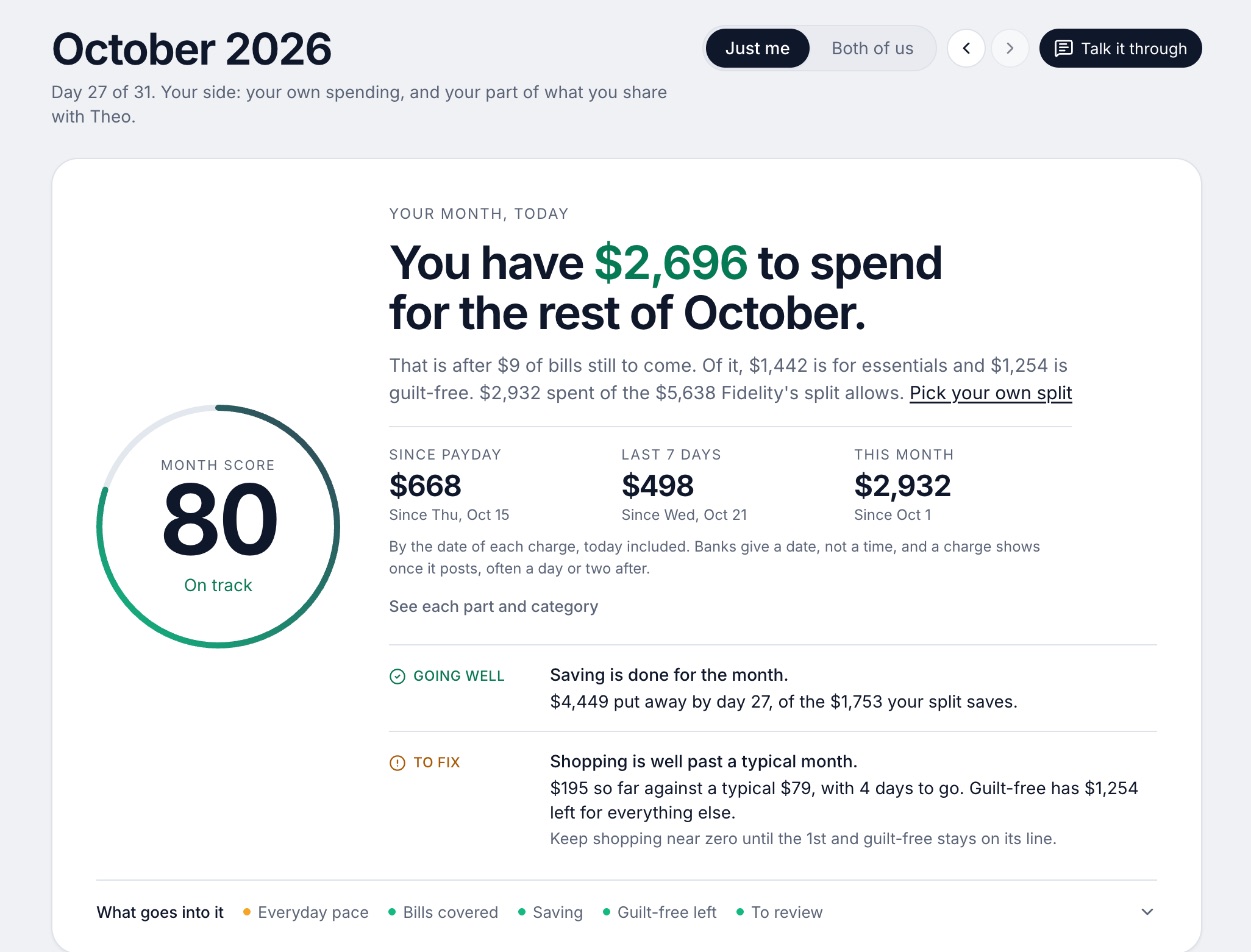
We make Wonderful, so weigh this entry with that in mind. Its pages describe a budgeting app for couples who keep their own money, and for one person. Every paycheck gets a plan for bills, spending and saving before it lands, it lists what is due before your next paycheck, and savings goals show the month you will reach them.
Its pages say nothing about children, child support or co-parents, so we make no claim there. It is not free: $14.99 a month or $99 a year, after a free week. It runs in a browser only, with no iPhone or Android app yet.
Ideal for: One adult who wants every paycheck planned before it lands and is willing to pay $99 a year after a free week.
What it does
- Every paycheck gets a plan for bills, spending and saving before it lands.[33]
- Banks connect through Plaid and every charge is sorted into a category.[32][33]
- Mine, yours and ours: each charge counts for the person or the pair it belongs to.[33]
- Finds recurring charges and subscriptions, lists what's due before your next paycheck, and flags a bill that comes in higher than usual. It doesn't cancel them for you.[33]
- Texts you by iMessage when a bill is charged twice, a price goes up or a refund lands, and you can text it questions.[33]
- Savings goals show the month you'll reach them.[33]
- Net worth for each of you and for both, from the balances your banks send, with its line over time.[33]
- Life events like getting married come step by step, with the deadlines.[33]
Good
5. One clear picture of accounts, goals and spending
What it is
A paid budgeting and net worth app that pulls every account into one place and lets a partner join under the same subscription.
Why it's on this list
Monarch is a paid app with a free first week. It costs $14.99 a month or $99.99 a year. New users can get 30% off Core for one year with code WELCOME, per its pricing page, which says the offer can expire at any time. Its couples tools do not matter for one adult, so judge it on the single-person picture of accounts and goals.[34][35]
Ideal for: A parent who wants all accounts, goals and spending in one place and will pay for it.
What it does
- Connects bank accounts, credit cards, loans, investment accounts and real estate, through 13,000+ financial institutions.[37]
- Tracks net worth across all connected accounts.[35][37]
- Sorts transactions automatically and searches across every account in one list.[35][37]
- Two ways to budget: Flex, which splits spending into fixed, flexible and non-monthly buckets and gives one main number to watch, or Category budgeting.[35][40]
Good
- A partner joins under the same subscription at no extra cost, with a separate login.[38][39]
- Two people can fund a shared goal even when their money sits in separate accounts.[39]
- Works on iPhone, iPad, Android and the web.[35][36][37]
- Rated 4.9 on the App Store (116K ratings) and 4.8 on Google Play (26.1K reviews).[35][36]
Not so good
- No free plan after the first week.[34][35]
- Paid monthly it is $14.99, which is $179.88 over twelve months, against $99.99 billed yearly.[34]
- Forecasting, several income sources and deeper investment tracking sit in the Plus tier. The App Store shows Plus at $199.99 a year; the pricing page lists no Plus price.[34][35]
- A partner sees all accounts and transactions. The couples page describes no way to keep one account private.[38][39]
Pricing
- Monthly[34][35]$14.99 a monthPricing page and App Store both show $14.99. The pricing page does not say which tier it is.
- Yearly[34][35]$99.99 a yearBilled yearly. The pricing page names two tiers, Core and Plus, but lists only these two prices.
- Yearly Plus[34][35]$199.99 a yearShown only as an in-app purchase on the App Store. The pricing page says Plus adds forecasting tools, tracking several income sources like a small business, and deeper investment tracking.
- The pricing page says "Your first week is on us." The App Store says the app is free to try for 7 days before a monthly or annual membership is billed. Neither says whether a card is needed.[34][35]
- No free plan is listed on the pricing page or the App Store. The only free access is the first week.[34][35]
6. A free app, if you share the money with someone
What it is
A free phone app for couples that shows both people's linked accounts, bills and budgets, with a choice of how much each person shares.
Why it's on this list
Honeydue is free, with no feature behind a paywall per its help center, but it is built for two people and asks what your partner can see. If you budget alone, most of that is unused. Many App Store reviews report accounts that stopped syncing and slow support.[48][47]
It is a phone app with no web version listed, and it does not describe co-parent tools, so it is not a way to share expenses with an ex.
Ideal for: A parent who shares money with someone, such as a partner, and wants a free app.
What it does
- Shared view of linked bank account balances, loans and investments. The site says it connects "over 20,000 financial institutions across 5 countries."[46][50]
- Choose what your partner sees per account: balances and transactions, balances only, or nothing.[48]
- Monthly household spending limits for each category, with alerts as you and your partner get close.[50]
- Bill reminders that notify you or your partner when a payment is due.[46][50]
Good
Pricing
- Free[47]FreeHoneydue's help center says, "Honeydue is 100% free for everybody, and we don't block any features with a paywall."
- Monthly tip (optional)[47][50]Any amount from $1 to $10 a month through the App Store or Google Play. The help center says tips fund new features. The App Store lists $0.99 to $9.99.
- The whole app is free. The only paid thing is the optional tip, which can be changed or cancelled in the App Store or Google Play.[47]
What it costs for a year
- PocketGuard$74.99
- Goodbudget$80
- Wonderful$99
- Monarch Money$99.99
- YNAB (You Need A Budget)$109
No paid plan with a listed price: Honeydue.
From each app's own pages. Goodbudget is the Premium plan that adds bank sync; its free plan costs nothing. Honeydue is free. Wonderful's price covers a household, which for a single parent is you.
How to choose
Start with money. If cash is the first constraint, Goodbudget's free plan is the real option, and a spreadsheet is the other. If you will do a short weekly check, YNAB's method is the most worked-out. If you want less upkeep, a bank-connected app saves the typing.
Choose Goodbudget if you:
- Want it free
- Like envelopes
- Will enter spending by hand
Choose YNAB (You Need A Budget) if you:
- Want to plan every dollar of a paycheck
- Will check in weekly
- Can pay $109 a year after a 34-day trial
Choose PocketGuard if you:
- Want one safe-to-spend number
- Want a lifetime option at $149.99
- Are budgeting alone
Choose Wonderful if you:
- Want each paycheck planned before it lands
- Want a goal with a finish month
- Will pay $99 a year after a free week
Choose Monarch Money if you:
- Want all accounts in one view
- Will pay about $99.99 a year
Where Wonderful fits, and where it doesn't
Wonderful fits if your problem is timing: which paycheck pays which bill, and what is due before the next one lands. It plans each paycheck, connects banks through Plaid, finds recurring charges and shows when a goal will be reached. It is the wrong pick if you need a free app, because it has a free week and no free plan, and Goodbudget will serve you better. Its pages say nothing about children, child support or co-parenting, and it runs in a browser only. For the wider field, see the best budgeting apps.
Questions people ask
How do I budget as a single parent?
Start from your take-home pay, not your salary. List the bills that must be paid on a fixed date, set aside money for childcare and school costs, then give what is left to food, transport and savings. Match each bill to the paycheck it will come out of, so a short month is visible before it happens.
What is the best budgeting app for a single mom?
There is no single best one. Goodbudget has a free plan with envelopes but no bank sync. YNAB plans every dollar of a paycheck and has a 34-day trial. PocketGuard shows a safe-to-spend number. Wonderful, which we make, plans each paycheck and has no free plan. Pick by whether you want free, hands-on or automatic.
Is there a free budgeting app for single parents?
Yes. Goodbudget's free plan has 10 regular envelopes, 10 annual or goal envelopes, 1 account, 2 devices and a year of history, with no bank sync. Honeydue is free but built for two people sharing money. A spreadsheet is the other free route. Our free budgeting apps page compares more.
Can I claim head of household as a single parent?
Often, yes. IRS Publication 501 says you must be unmarried or considered unmarried on the last day of the year, have paid more than half the cost of keeping up your home, and have a qualifying person who lived with you more than half the year. This is general information, not tax advice. Check Publication 501 or a free preparer.
How much is the Child Tax Credit?
For the 2025 tax year, the IRS says it is worth up to $2,200 per qualifying child, and up to $1,700 per child can come back as a refund if you have at least $2,500 of earned income. The child must be under 17 at the end of the year and have a valid Social Security number. The IRS page lists 2025 figures only.
Can I get help with the cost of childcare at tax time?
The Child and Dependent Care Credit can cover up to 35% of work-related care costs for a child under 13, on up to $3,000 of costs for one child or $6,000 for two or more. The rate falls as income rises. The IRS says you must report each provider's name, address and taxpayer ID on Form 2441.
How do I get child support set up?
You apply through your state or local child support agency, which you can find from the Office of Child Support Services site. Check the agency's page for its application fee, which can be up to $25 and is waived for some people. The federal office does not handle individual cases.
Can I get my taxes done for free?
Possibly. The IRS runs Volunteer Income Tax Assistance (VITA), which prepares returns free through certified volunteers. Many sites help people who make about $70,244 or less, but each site sets its own limit. People who qualify for the Earned Income Tax Credit are a focus of the program.
How big should a single parent's emergency fund be?
When one paycheck covers everyone, a larger cushion is worth thinking about. Our emergency fund guide lays out the common ranges. Start with one month of essentials, then add to it as you can.
Does Wonderful work for a single parent?
Wonderful's pages say it is for couples and for one person. They do not mention children, child support or co-parents, so we make no claim there. It plans each paycheck, connects your bank and shows when a goal will be reached. It costs $14.99 a month or $99 a year, after a free week.
Sources
54 sources · read November 3, 2026
Every number on this page comes from irs.gov, acf.gov, goodbudget.com and 12 more. If a source has changed since, the source is right.
- 1IRS: Child Tax Creditirs.gov
- 2IRS: Child and Dependent Care Creditirs.gov
- 3IRS: Publication 501, Dependents, Standard Deduction, and Filing Informationirs.gov
- 4IRS: Earned Income Tax Creditirs.gov
- 5IRS: Free tax return preparation for qualifying taxpayers (VITA)irs.gov
- 6Office of Child Support Services: Sign up for, pay, or change your child supportacf.gov
- 7Goodbudget pricing (signup page)goodbudget.com
- 8Goodbudget help: Subscribe to Goodbudgetgoodbudget.com
- 9Goodbudget refunds and cancellationsgoodbudget.com
- 10Goodbudget home pagegoodbudget.com
- 11Goodbudget help indexgoodbudget.com
- 12App Store listing, Goodbudgetapps.apple.com
- 13App Store reviews, Goodbudgetapps.apple.com
- 14Goodbudget envelope budgeting pagegoodbudget.com
- 15Goodbudget changeloggoodbudget.com
- 16YNAB pricingynab.com
- 17YNAB featuresynab.com
- 18The YNAB methodynab.com
- 19YNAB on the App Storeapps.apple.com
- 20YNAB on Google Playplay.google.com
- 21Apple public review feed for YNABitunes.apple.com
- 22YNAB: Using YNAB as Partnerssupport.ynab.com
- 23Trustpilot, ynab.comtrustpilot.com
- 24PocketGuard home pagepocketguard.com
- 25PocketGuard pricingpocketguard.com
- 26PocketGuard help: Plus overviewpocketguard.com
- 27PocketGuard help: all featurespocketguard.com
- 28App Store listing, PocketGuardapps.apple.com
- 29App Store reviews, PocketGuardapps.apple.com
- 30Trustpilot, pocketguard.comtrustpilot.com
- 31Wonderful terms of servicewonderful.money
- 32Wonderful privacy policywonderful.money
- 33Wonderfulwonderful.money
- 34Monarch pricingmonarch.com
- 35Monarch on the App Storeapps.apple.com
- 36Monarch on Google Playplay.google.com
- 37Monarch home pagemonarch.com
- 38Monarch for couplesmonarch.com
- 39Monarch collaborationmonarch.com
- 40Monarch budgetingmonarch.com
- 41Monarch planningmonarch.com
- 42Apple public review feed for Monarchitunes.apple.com
- 43Monarch help: Monarch for Couples and Householdshelp.monarch.com
- 44Trustpilot, www.monarchmoney.comtrustpilot.com
- 45Honeydue home pagehoneydue.com
- 46Honeydue: How it workshoneydue.com
- 47Honeydue help: How does Honeydue earn moneysupport.honeydue.com
- 48Honeydue help: Will my partner see my accountssupport.honeydue.com
- 49Honeydue Joint Cashhoneydue.com
- 50Honeydue on the App Storeapps.apple.com
- 51Honeydue on Google Playplay.google.com
- 52Apple public review feed for Honeydueitunes.apple.com
- 53Honeydue help: Account issues and inviting a partnersupport.honeydue.com
- 54Honeydue help: How do I cancel my accountsupport.honeydue.com
App names are trademarks of their owners; Wonderful isn't connected with them. Wonderful gives general information. It isn't a financial or tax advisor.